The store system comparison - Selection criteria & checklist

Not all store systems are the same – as a glance at the variety of solutions and providers on the market shows. Choosing the right system for your own online store is a challenging task for many retailers, especially if they are entering eCommerce for the first time. Numerous providers vie for attention, lists of functions are long, price models are difficult to compare – the choice can quickly become overwhelming.

This is exactly where this store system comparison comes in. The page bundles:

  • Central selection criteria that play a role in the system decision
  • Practical questions that can be used to concretize requirements
  • A structured checklist as a common thread in the decision-making process

If you can clarify and answer the majority of these requirements and questions for yourself, you are very well prepared to find your way through the “jungle” of store systems and make an informed decision.
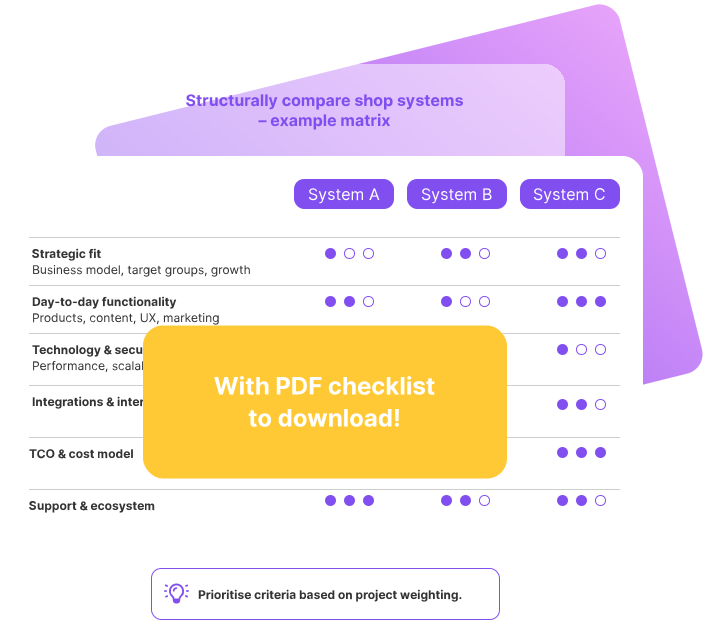
Graphic shows a shop system comparison matrix for evaluating relevant selection criteria in the background, with a notice in the foreground about a downloadable PDF checklist.
A structured comparison of store systems based on relevant criteria is the foundation for making the right choice. Our free downloadable checklist will help you make the right decision.

Before you go into detail, it’s worth taking a look at the fundamental question: What are the benefits of having your own online store – and what role does it play in your business model? Our guide to successful eCommerce shows you the most important arguments:

How to proceed when selecting a store system

Before going into the details, it helps to take a clear look at the process: How do you approach the decision for a store system in a structured way and without getting bogged down?

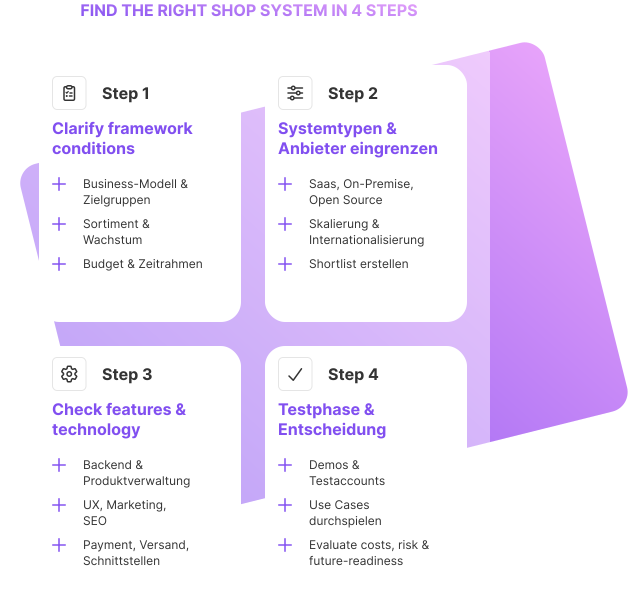
Selection process in 4 steps

A tried and tested procedure can be roughly divided into four steps:

1. clarify framework conditions

  • Business model, target groups, markets

  • Product range and growth prospects

  • Budget, internal resources, time frame

2. limit system types & providers

  • Fundamental decisions: SaaS, on-premise, open source

  • Rough requirements for scalability, internationalization, integrations

  • Create an initial shortlist of potentially suitable systems

3. check functional & technical requirements

  • Back end usability, product management, content functions

  • UX, store design, marketing & SEO

  • Payment, shipping, interfaces, security, performance

4. test phase & well-founded decision

  • Use test accounts or demos

  • Run through specific use cases (e.g. product creation, ordering process, changing templates)

  • Weigh up costs, risk (vendor lock-in, migration) and future viability

Graphic shows a four-step process for selecting a shop system, from requirements and system types to feature evaluation and testing.
With a clear 4-step process, you can avoid ad-hoc decisions and maintain an overview when selecting a store system.

Avoid typical mistakes when choosing a store system

In addition to the criteria, it is helpful to know which typical mistakes should be avoided:
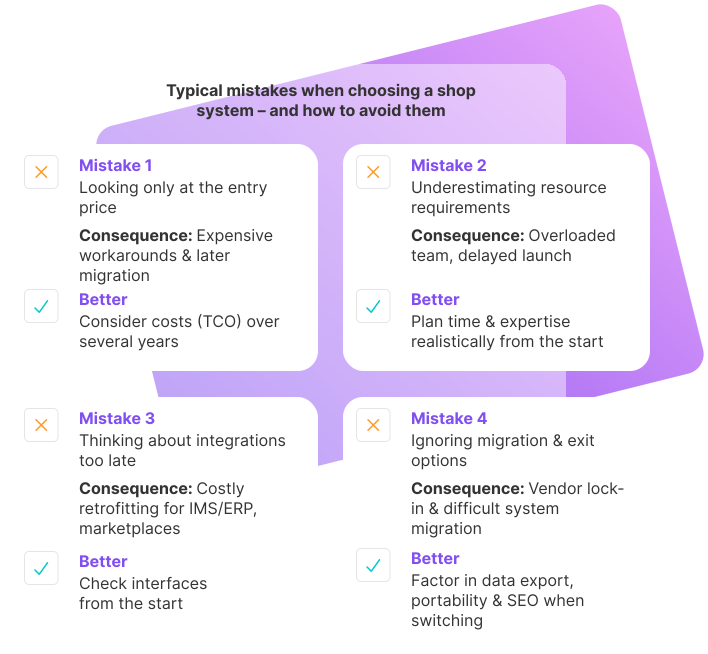
Overview graphic shows four common mistakes when choosing a shop system and how to avoid them.
If you keep an eye on price, resources, interfaces and migration, you can avoid the biggest stumbling blocks when deciding on a system.

Just look at the price

Getting started at a low price can be tempting. However, if important functions are missing or the system does not grow with you, there will be considerable additional costs for workarounds, migration or individual developments later on.

Underestimating resource requirements

Even the best store system does not do all the work for retailers. Setup, maintenance, content creation and optimization require time and expertise – internally or via service providers.

Considering integrations and interfaces too late

If you know from the outset that ERP, CRM, marketplaces or logistics systems are to be integrated, you should consider these requirements at an early stage – especially if existing systems are in place.

Ignoring migration and the exit scenario

Store systems are usually used for several years. Nevertheless, it makes sense to consider early on how portable data is and what a subsequent system change might look like.

A clear, realistic assessment of your own situation helps to avoid these stumbling blocks.

Strategic Framework conditions & objectives

Before comparing individual store systems, your own starting position should be clearly outlined. If you know where you want your store to go, you can make a much more targeted selection.

Business model, target groups & growth

The central preliminary questions include:

Which business model is being pursued?

B2C, B2B or a hybrid form? Are you aiming for one-off orders or subscription models? Should services, digital products or physical goods be sold?

What does the product range look like – today and in the future?

  • How large is the product portfolio at the beginning?

  • How wide or deep will categories become in perspective?

  • Will variants (e.g. sizes, colors, sets) play a major role?

Which markets are to be served?

  • Launch exclusively in one country or directly internationally?

  • Requirements for multilingualism, multiple currencies and country-specific legal requirements?

The clearer these points are, the more specifically systems can be selected that match the product range, target groups and growth targets.
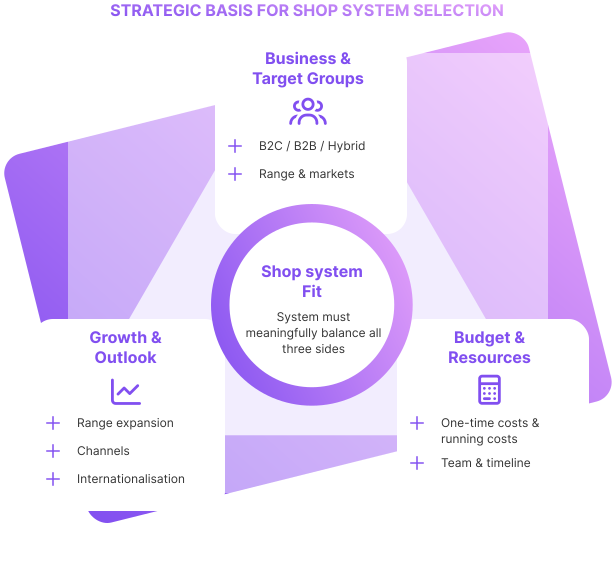
Triangle graphic shows business and target groups, growth perspective, as well as budget and resources as the strategic basis for choosing a shop system.
The right store system is created in the area of conflict between the business model, growth targets and available resources.

Budget, resources & project schedule

In addition to content-related goals, economic and organizational framework conditions are decisive:

Budget for acquisition and furnishing

  • What funds are available for license costs, implementation, design, data migration and initial adjustments?

  • How high can one-off start-up investments be?

Budget for ongoing operations

  • What regular costs are affordable (licenses, hosting, extensions, support, agency services)?

  • Are there limits for transaction fees or royalties?

Availability of know-how and time

  • Can the setup be carried out mainly in-house or is external support (agency, freelancer) required?

  • How much time can be planned for conception, construction, testing and launch?

By answering these questions in advance, you can avoid surprises later on and evaluate listings more realistically.

System types & architecture of the store system

Store systems differ not only in their range of functions, but also in their technical architecture and operating model. These fundamental decisions have an impact on costs, flexibility and dependencies.

SaaS, on-premise & open source in comparison

Important system types are:

SaaS (Software-as-a-Service)

  • Operation and updates are the responsibility of the provider

  • Often ready to go quickly, with clearly defined pricing models

  • Individualization is usually possible within a given framework

  • Less technical administration effort, but stronger connection to the provider’s platform and features

On-Premise / Self-Hosted

  • Store is operated on own or rented servers

  • High level of control over infrastructure and code base

  • Suitable for companies with their own IT resources or complex requirements

  • High responsibility for operation, updates, security and scaling

Open source systems

  • Costs are incurred primarily for hosting, development, maintenance and support

  • requires technical know-how or an experienced implementation partner

  • High level of customizability, large communities and expansion options

  • Source code is open, license costs are eliminated or are low

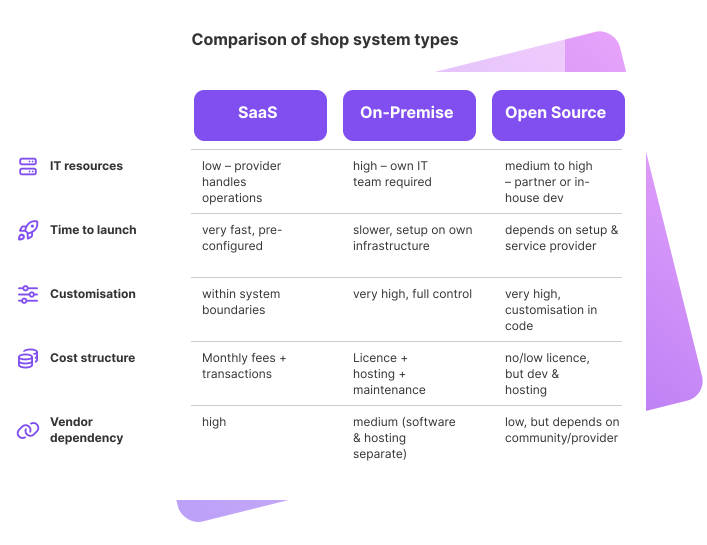
Comparison table contrasts SaaS, on-premise, and open-source shop systems based on IT resources, time to launch, customization, cost structure, and dependency.
The choice of system type has a fundamental impact on start-up speed, flexibility, costs and dependence on one provider.

It should be noted for the purposes of comparison:

  • How important is in-depth customization?

  • What level of independence from a provider is desired?

  • Which operating form suits your own resources and security requirements?

Hosting, scalability & internationalization

Further structural questions about the system architecture:

Where is the store hosted and where are the servers located?

  • Relevance for performance, data protection and latency, among other things.

Good scaling of the system?

  • Can it reliably process growing order volumes, higher visitor counter numbers and larger amounts of data?

  • Does the provider bidder offer modular packages or resource upgrades?

Is the system fit for internationalization?

  • Multilingualism, multiple currencies, different tax rates

  • Support for country-specific legal texts, payment methods and shipping options

  • Country-specific domains or subshops, if applicable

These criteria help to weed out systems that do not fit in with long-term growth plans.

Functional requirements for a store system

Once the framework conditions and system type have been determined, it is worth taking a closer look at the specific functions in day-to-day operations: How well does the store system support operations?
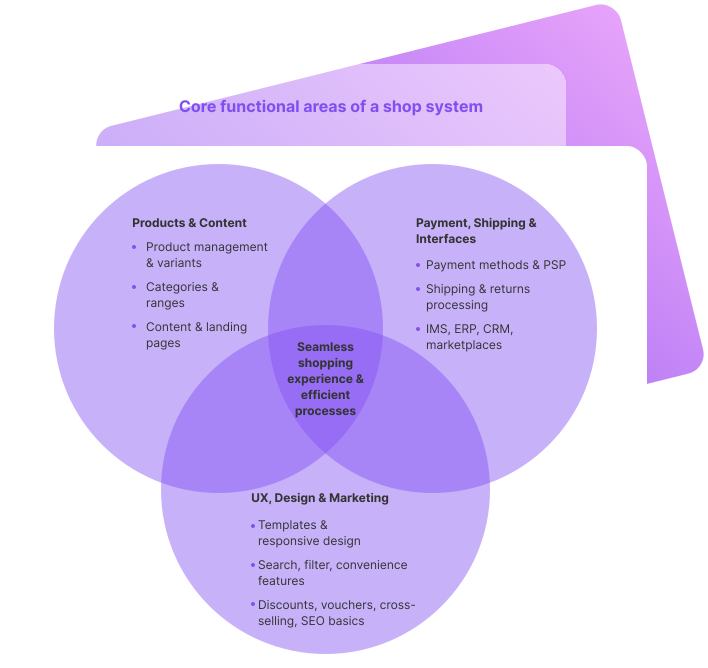
Three circles show the core functional areas of a shop system: product and content management, UX and marketing, as well as payment methods, shipping, and integrations.
A good store system combines product and content management, user experience and marketing with payment, shipping and integrations to form a coherent whole.

Product, product range & content management

Central questions about the back end and product management:

Usability of the back end

  • How intuitive is the interface for administrators and editors?

  • Are there ways to configure dashboards or views?

Product and catalog management

  • Can different product types (simple products, variants, bundles, services) be mapped?

  • How detailed can attributes and characteristics be maintained?

  • Are there any restrictions on the down payment of categories, subcategories or products?

Content management

  • How is content management organized?

  • Is it easy to create and maintain landing pages, guides, FAQs or magazine sections?

  • Can powerful extensions (e.g. a connected CMS) be implemented if required?

UX, store design, marketing & SEO functions

A store system should offer solid foundations for user experience, store design and marketing:

Templates and design

  • Does the system bidder responsive templates that are convincing on all devices?

  • How large is the selection of templates – and to what extent can they be customized?

  • Are there additional professional templates from third-party providers and what is their pricing structure?

Product presentation

  • How are products presented visually?

  • Are there zoom functions, image galleries, possibility to integrate videos?

  • Can additional content (e.g. size charts, download material) be displayed?

User experience & convenience functions

  • What functions does the search offer? What does the standard search look like – and are there advanced search solutions if required?

  • Can features and filters be set up to clearly display large product ranges?

  • Are there wish lists or “wish lists”?

  • Can customer accounts with billing and delivery addresses and order history be created?

  • Are there integrated evaluation functions for products?

  • Can interactive elements such as store finders or maps be integrated?

Marketing & SEO

  • Are SEO-relevant functions (URL maintenance, meta data, redirect management, schema markups, etc.) easily accessible?

  • What opportunities are there to promote sales (discount campaigns, vouchers, special offers, cross-selling, upselling)?

  • Are there personalization functions or the possibility of segmenting customer groups?

  • Can blog or magazine pages be connected to display theme worlds and advice content?

These functions have a direct impact on visibility, conversion and customer loyalty.

Navigation, layout and customer journey should not be secondary factors when choosing a system: they influence conversion, brand perception and customer satisfaction. We explain in detail which UX aspects you should consider when setting up and designing your store on our guide page:

The SEO capabilities and GAIO suitability of your store system will determine how Good your store will be visible in search results and AI overviews. We have compiled a list of the SEO features a system should offer and what you need to look out for in detail on our GAIO & SEO guide page:”

Payment methods, shipping & interfaces

Payment and shipping are crucial for customer satisfaction and conversion. Important checkpoints:

Available payment options

  • Which payment methods and payment service providers can be integrated (e.g. credit card, PayPal, instant bank transfer, invoice, local methods)?

  • Are country-specific payment methods and currencies supported for international trade?

  • What about security and PCI DSS compliance when handling payment data?

Shipping and logistics

  • Which shipping service providers and forwarding agents can be integrated?

  • Are there flexible shipping options (e.g. standard, express, collection) and automatic rate calculation?

  • Can shipment tracking and status information be issued to customers?

  • How are returns organized and mapped in the system?

Interfaces and integrations

  • Are there open, stable interfaces to ERP, ERP, accounting, CRM and marketplaces?

  • Can other services (e.g. newsletter tools, analysis tools) be integrated without any problems?

A store system should offer sufficient flexibility to cover current and future requirements.

If you plan to use multiple sales channels or automate warehousing and shipping, the combination of store system and ERP should be considered from the outset. We explain in detail what this interaction looks like in practice on our guide page:

In addition to the functional level, technical quality, safety and legal framework conditions play a central role.

Performance, stability & expandability

Important questions about the technical basis:

  • How does the store system behave with growing visitor counters and order volumes?

  • What are the experiences of other retailers in terms of stability and downtimes?

  • What options are there for optimizing performance (caching, content delivery network, database optimization)?

  • Is the code cleanly structured and up-to-date to enable good loading times and a secure basis for extensions?

A system that quickly reaches its limits under load can slow down growth considerably.

Data protection, compliance & data security

Legal and safety aspects should be included in the customer review at an early stage:

Tax and legal requirements

  • Can mandatory information (legal notice, general terms and conditions, revocation, data protection) be integrated in a legally compliant manner?

  • Does the system support VAT rates, OSS regulations and country-specific requirements?

Safety & protective measures

  • How are access rights and authentication regulated in the system?

  • What measures are in place to protect against fraud and hacker attacks?

  • Is SSL encryption a matter of course?

Data protection & compliance

  • Where is personal data stored and how is protection ensured?

  • Are the requirements of other regulations (e.g. PCI-DSS, possibly CCPA for international scenarios) supported?

  • Is the store system GDPR-compliant?

Migration, updates & roadmap of the provider

A store system is not a snapshot in time, but is operated for years. That’s why it’ s worth looking ahead:

Update policy and release cycle

  • How regularly are updates provided?

  • How time-consuming is it to install updates – manually, automatically, as part of a SaaS listing?

Further development & roadmap

  • Does the provider have a recognizable product roadmap?

  • Are current trends (e.g. new payment methods, GAIO features, marketplace integrations) taken up promptly?

Migration capability & exit scenario

  • How easy is it to export product data, customer data and order histories?

  • Is there support for migrating from an existing system?

  • How can SEO-relevant aspects (URLs, redirects) be taken into account in the event of a subsequent system change?

Asking questions at an early stage prevents later dependencies that are difficult to resolve.

Operation, support & Total costs

In addition to functionality and technology, operation, support and overall cost-effectiveness also determine whether a store system is a good fit in the long term.
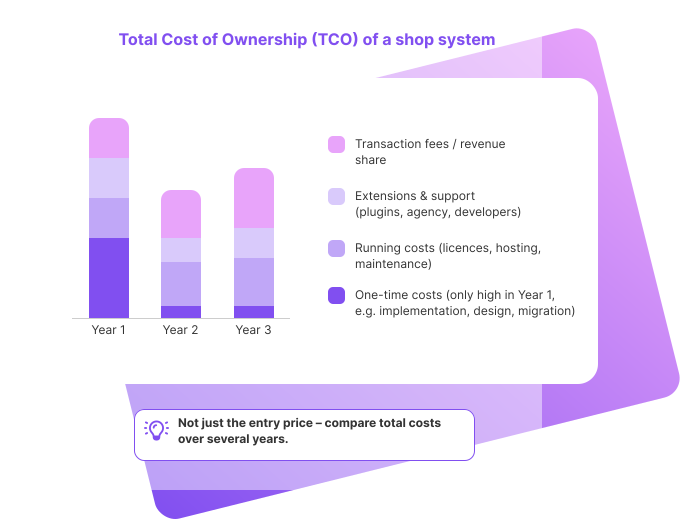
Bar chart shows the total cost of ownership of a shop system over several years, including one-time costs, ongoing costs, extensions, and transaction fees.
When comparing store systems, the total costs over several years should always be taken into account - not just the seemingly low entry price.

License models, running costs & TCO

The Total Cost of Ownership (TCO) includes:

Ongoing costs

  • License or subscription fees

  • Hosting costs

  • Transaction fees or royalties

  • Costs for external service providers (agencies, developers)

  • Fees for extensions, plugins or additional modules

One-off costs

  • Licenses or set-up fees

  • Implementation, design, data migration

  • Training at the start if necessary

It is worth looking not only at the initial price, but also at the costs over several years. This allows you to compare systems that may seem cheap at first glance, but may become more expensive in the long term – or vice versa.

Support, training & community

Good store systems also depend on a strong environment:

Support from the provider

  • Which support services are included (e.g. email, telephone, ticket system)?

  • What do response times and service level agreements look like?

  • What are the costs for extended support?

Training & knowledge transfer

  • Does the provider offer training for new sellers and advanced users?

  • Are there manuals, video tutorials, best practices?

  • Are webinars, events or trade fairs organized to facilitate exchange?

Community & ecosystem

  • Is there an active community for questions, exchange and support?

  • Is there a wide listing of agencies, developers and template/plugin providers?

A strong environment reduces dependency on individual service providers and facilitates the long-term development of the store.

Download the store system checklist

Our printable or interactively fillable store system checklist is a great way to make use of all the points mentioned in the decision-making process. It will help you keep an overview.

On several clearly structured pages you can:

  • strategic framework conditions and objectives,

  • Classify system types and architecture,

  • Evaluate functional, technical and legal requirements

  • and compare the costs, support and further development of different providers.

Use the checklist to evaluate 2-3 store systems based on standardized criteria, add notes on strengths and weaknesses and make an informed decision at the end.
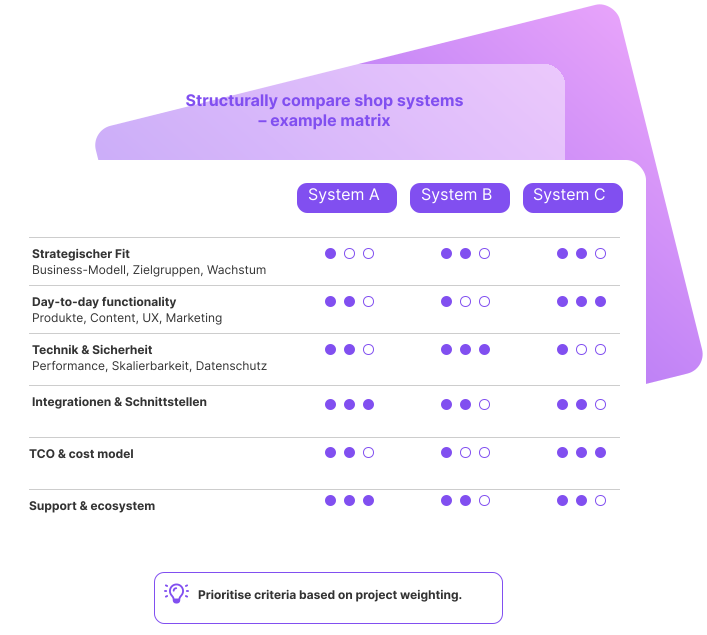
Example comparison matrix shows three shop systems evaluated based on criteria such as strategic fit, functionality, technology, integrations, costs, and support.
With an evaluation matrix, store systems can be compared objectively and strengths and weaknesses can be made transparent.

Conclusion - how to find the right store system

Choosing the right store system is a crucial step for the success of an online store. It influences:

  • how efficiently daily processes can be organized

  • how to react flexibly to growth and new requirements

  • How well the store is set up in terms of UX, SEO and GAIO

  • and how economical the business remains in the long term

The checklist presented here bundles the most important criteria and questions so that the decision for a store system can be made in a balanced and reliable manner.

For a more in-depth look at individual aspects, it is worth taking a look at the other pages of the guidebook world on the subject of store systems – for example on:

  • the advantages of having your own online store

  • the efficient combination of store system and ERP

  • UX design and user-friendliness in the store

  • SEO and GAIO functions of modern store systems

This creates a step-by-step decision-making basis that retailers can use to choose a store system that is not only a good fit for their business model today, but also for the years to come.


“Once you have recorded your requirements in a structured way using the checklist, it’s worth looking back at the big picture: system types, setups and the role of the online store in the overall concept. Our guide summarizes these basics in a compact format – click here for an overview: