UX & Design in the online store - Shopping made easy!
Excellent usability often goes unrecognized because everything “just works”. Poor usability, on the other hand, immediately catches the eye: users become insecure, can’t find their way around, Cancel – and, in case of doubt, don’t come back. This applies both to the administration of a store system and to the front end with which customers interact.
A confusing category structure, a lack of responsive design, which makes the online store barely usable, or a complicated checkout process quickly lead to
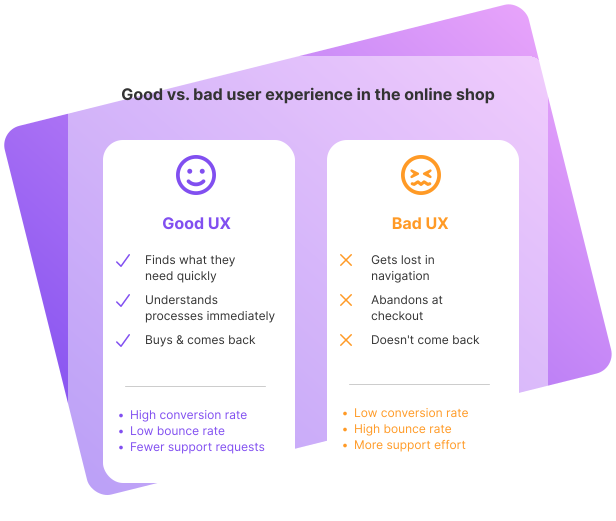
It is therefore crucial for retailers to ensure that the user experience is positive – and that customers are happy to return, ideally even making recommendations. At the end of the day, it’s not just about making a purchase, but about the feeling that remains after visiting an online store.
Retailers set the course for an optimal shopping experience by choosing a suitable store system that offers enough scope to implement a first-class user experience. On this page, we explain why UX design is so important in online stores and which technical and design factors retailers should pay attention to in order to provide their customers with a pleasant user experience.
Why is UX design important for online stores?
User experience (UX for short) basically describes a user’s experience when applying a product, system or service. In the context of an online store, this refers to all points of contact that arise between visitors and the digital store front – from the first page view to parcel delivery and beyond.
The Experience includes, among other things:
Among UX experts, the guiding principle has become established: “The less the user has to think, the better.” In essence, it’s about intuitive, clear and smooth processes without unnecessary hurdles. The fewer clicks that lead to the goal and the fewer points of friction, the more convenient the shopping experience.
Why should UX be at the top of the online store’s list of priorities?
An online store that works well across all devices increases customer satisfaction. Visitors become customers – and ideally regular customers.
A well thought-out UX design makes purchasing decisions easier. Short paths, clear categorization, a transparent checkout – all this lowers the hurdle to purchase.
Good UX has a direct impact on sales and margins: Those who feel comfortable are more likely to buy more than planned and come back more often.
At the same time, support costs are reduced because many questions are answered before they are asked thanks to clear information, help pages or FAQs.
Another important aspect is mobile use. The majority of users already make their online purchases primarily via smartphone – and the trend is rising. Nevertheless, many stores are still not consistently “mobile first”. Pages are overloaded with decorative but unhelpful content or are difficult to use on small screens. Users like to scroll, but only if the content is relevant.
Conclusion: Design, layout, content and technology must go hand in hand to turn prospective customers into paying customers. UX is not a “nice-to-have”, but a key success factor in eCommerce.
Technical basics for a good user experience in the online store
The technical basis of a store system has a significant influence on the user experience. Stability, speed and clean structures ensure that the user experience is not clouded by frustration factors. When selecting a store system, the following aspects should therefore be checked in particular.
Navigation & information architecture
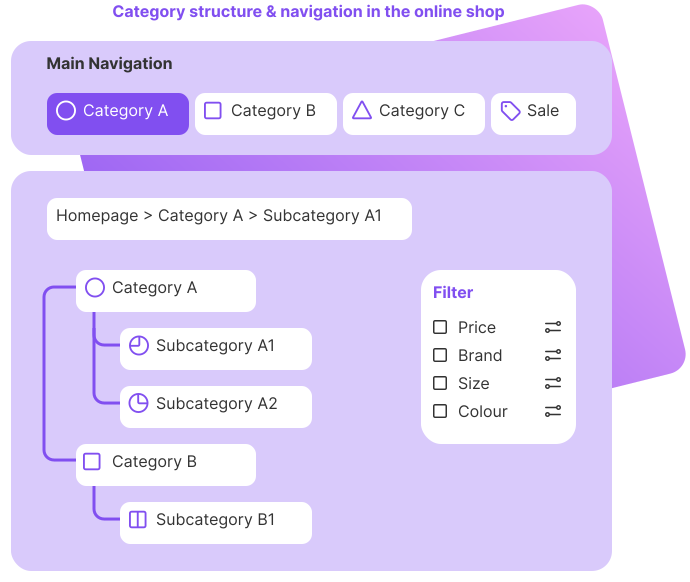
Navigation is a core element of user guidance. It determines whether visitors quickly grasp the information: What is available here? Where can I find what I’m looking for?
Important points:
When choosing a store system, it is worth taking a close look at the options for navigation and information architecture. Good systems allow flexible menu structures, multiple navigation levels and, if necessary, different navigation concepts for desktop and mobile.
Intelligent search & filter
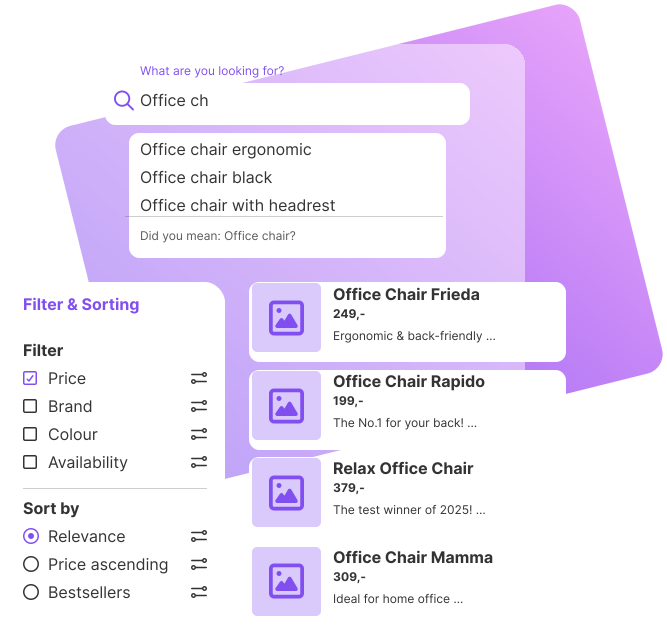
For many users, the search function is the fastest way to find a product. It becomes a decisive UX factor, especially for larger product ranges. Modern search and filter systems should:
For retailers with an extensive product range, the quality of the search should be a key criterion when selecting a store system. Powerful search solutions or integrated search modules with AI support are particularly worthwhile here.
Error pages & error tolerance
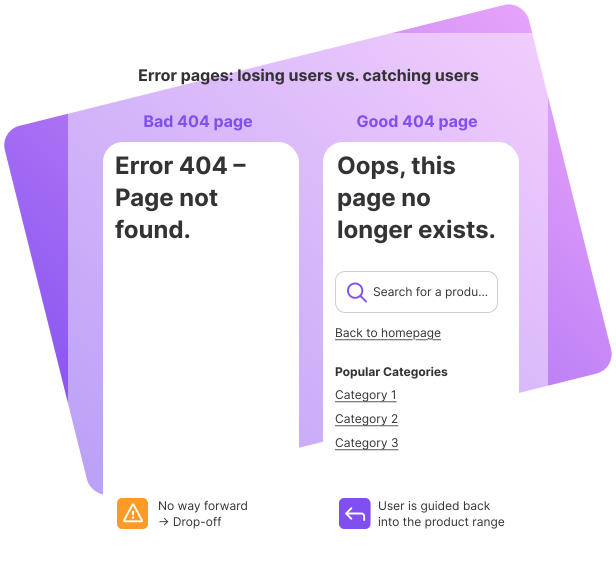
Orphaned links and 404 error pages are poison for the user experience. Anyone who lands on an error message feels frustrated and often cancels. This makes it all the more important that:
Good store systems offer functions or extensions to efficiently manage redirects and create individual error pages. Ideally, they also support the detection of dead links. All of this contributes to a stable, trustworthy user experience.
Loading times & performance
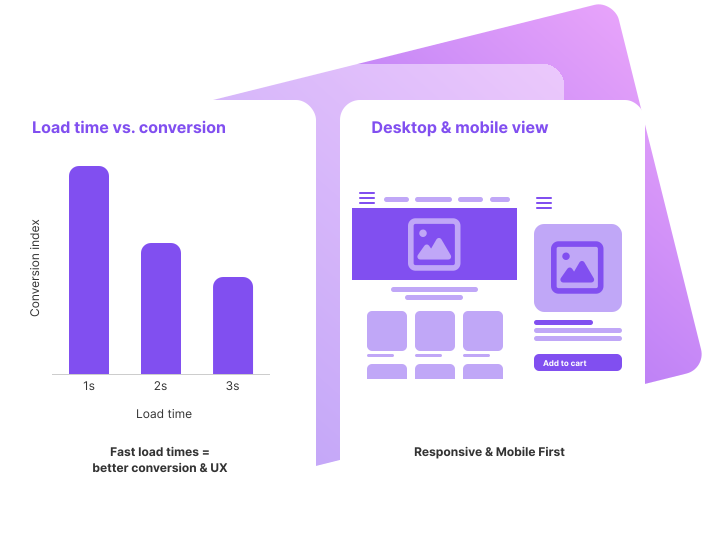
Loading times are a critical UX and conversion factor. A delay of just a few seconds can significantly increase the bounce rate. Guideline: Pages should load noticeably within 1-2 seconds.
Relevant points when selecting a store system:
The preparation of the content also plays a major role:
Good performance not only ensures satisfied users, but also has a positive effect on visibility in search engines.
Interfaces for service & after-sales
The user experience does not end with the click on “Order”. Delivery speed, transparency in shipping, uncomplicated returns and accessible support have a major influence on how customers review the store overall.
A store system should therefore offer interfaces to:
These interfaces can be used to:
This not only makes internal work easier, but also significantly improves the post-purchase experience for customers – a key component of a holistic user experience.
Design & store design in the online store
In addition to the technology, the visual and content design plays a decisive role. A well thought-out online store impresses with clear structures, consistent design and comprehensible communication.
Clear structures & visual hierarchy
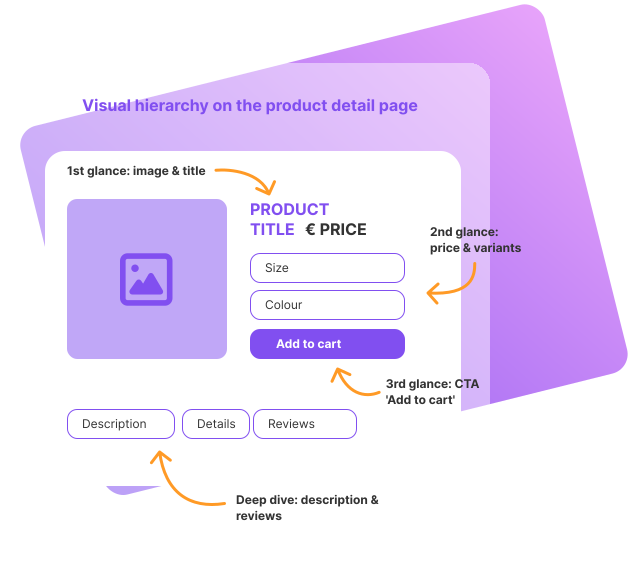
The same applies to online retail: first impressions count. Visitors should recognize at first glance:
This is important:
The “standard equipment” of a store system should ideally include:
The aim is a design that reflects the brand, but always keeps the focus on the products and the next steps – not on purely decorative elements.
Forms & checkout without hurdles
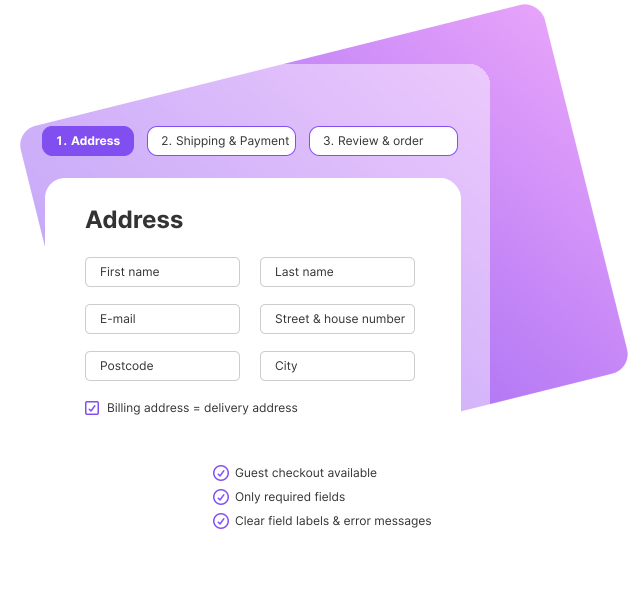
Forms are a frequent stumbling block in the user experience. The checkout in particular determines whether the purchase is completed or canceled. Typical problems:
Best Practices:
Good store systems support these requirements:
Forms are thus transformed from an obstacle into an inconspicuous, functional component of a smooth purchasing process.
Responsive, mobile layout
Responsive design ensures that the online store can be used optimally on all devices – from desktop to tablet to smartphone. Elements automatically adapt to the available space without content becoming illegible or control elements becoming too small.
A responsive store system should:
Especially with regard to “Mobile First”, it is important that the store system supports mobile templates and components without the need for individual programming for each customization. This is the only way retailers can ensure that the shopping experience is also convincing on small displays.
Customer Journey & Conversion Optimization in the online store
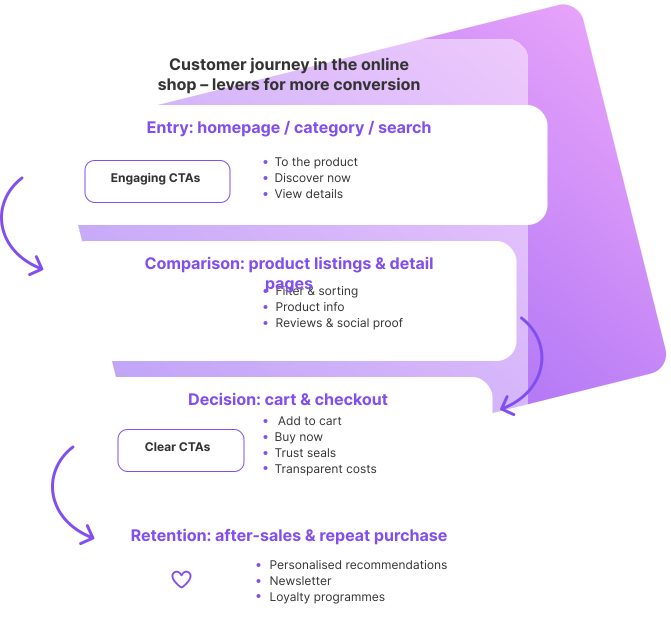
In the purchasing decision process, customers go through several phases in which online stores can provide proactive support with tailored assistance and signals. From the above-mentioned error-tolerant search and the initial information about a product, to details for more detailed interest, to confidence-building signals that make a decision easier: There are numerous opportunities for retailers to place information and incentives in such a way that customers are encouraged in their decision to buy a product and trigger an order. The following points should be standard in a good store system.
Call-to-actions in the online store
Call-to-actions (CTAs) are requests for action: They tell the user what to do next. Typical CTAs include:
Good user experience requires CTAs:
A store system should offer enough flexibility to place CTAs in the relevant places in the layout and adapt their design to the brand design.
Product list and results pages
If a user has set suitable filters via search or categories, the results list decides whether the next click – the product detail page – is made.
Important elements for good results pages:
When selecting a store system, retailers should therefore also check how Good product lists and search results can be configured: What information can be displayed? How flexible are the layout and filter logic? How well do these pages work on mobile devices?
Personalization in the online store
Personalization can significantly improve the user experience if it is used sensibly. The aim is to give users the feeling that the store “understands” what they are interested in.
Typical examples:
Many store systems or connected tools already offer functions or extensions for this. The important thing is that personalization:
Social proof for more trust
People like to base their purchasing decisions on others. This principle – social proof – can be used specifically in eCommerce to build trust.
Possible forms of social proof and trust signals:
Modern store systems usually offer:
Positioning is crucial: customer reviews and trust signals should be visible where they support the purchase decision – for example on product detail pages, in the checkout or near CTAs.
Conclusion: UX design as a success factor in eCommerce
Good user experience is a key success factor for online stores. It decides whether visitors:
The store system forms the technical and design stage: it should not only provide the desired functions, but also be intuitive, flexible and future-proof.
UX is an important building block, but not the only one: topics such as store system selection, merchandise management connection, SEO, content and performance also play a major role in sustainable success in eCommerce. You can find more advice pages with practical tips and checklists in our store systems section.





