Efficient processes thanks to store system and ERP
The larger the order volume, the more work awaits retailers in the background. Every order triggers a chain of tasks: Checking stocks, creating sales orders, creating documents, organizing shipping, posting payments, processing returns and much more. Without a suitable system landscape, this workload can quickly get out of hand.
That is why we are devoting this page to an often underestimated power duo that forms the basis for maximum efficiency, scalability and expandability – and thus ensures sustainable, transparent business processing: the interaction between the store system and the merchandise management system (ERP).
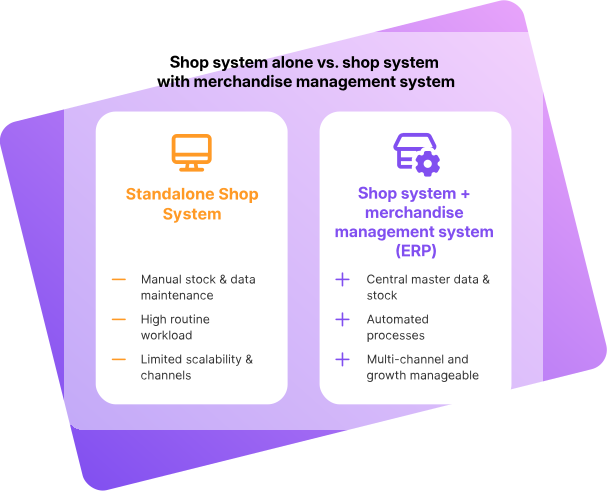
In the early days of eCommerce, merchandise management systems were not yet considered very important. Many retailers managed their orders and inventories with spreadsheets or simple stand-alone solutions, because online business was more of a sideshow. Today, things are very different: For many companies, digital distribution has gone from being a “decorative accessory” to the market with the highest turnover. As a result, the requirements are increasing:
Of course, a store system can also be operated independently as a stand-alone application by small retailers who only sell a few handmade items, for example. However, the larger the range, demand and variety of channels, the more difficult it is to bundle the growing tasks in a structured manner and process them efficiently.
The advantages of combining an ERP system with a store system are immense: process optimization and automation relieve the burden on day-to-day business, multichannel sales become manageable and predictable growth becomes possible. This page provides an overview,
Limitations of a store system without ERP
In principle, a store system can also be operated without a connected ERP system. This is referred to as a stand-alone store system. Such setups are widespread and perform well up to a certain level of expansion – especially for small order quantities and manageable product ranges.
Typical scenarios in which a stand-alone store is sufficient:
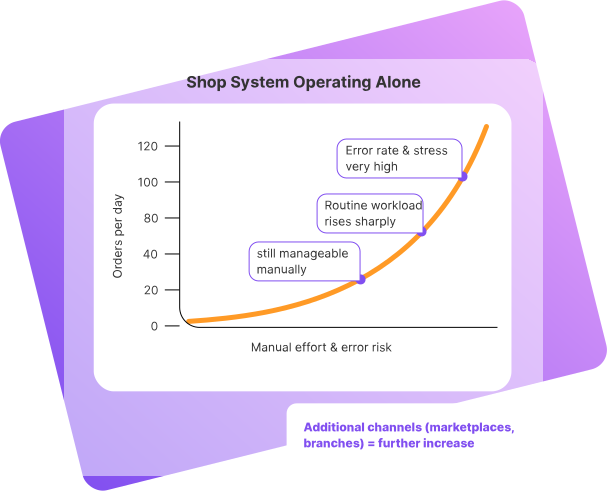
However, limits quickly become apparent as success grows. Working with a store system without ERP limits flexibility, process quality and growth potential.
Examples:
If marketplaces such as Amazon, eBay or Otto are to be served inaddition to the online store, the effort involved multiplies:
This work is not only nerve-wracking and time-consuming, but also highly error-prone. Incorrect stock, incorrect prices or delays in processing are quickly reflected in customer dissatisfaction, poor customer reviews and additional support costs.
There is no general answer as to the order volume up to which a store system without a merchandise management system is practicable. In practice, ranges of between around 40 and 100 orders per day are often quoted – depending on the degree of automation, product range, returns rate and staffing levels. One thing is clear: anyone planning to expand their business from the outset or to use several channels in the medium term should think about a merchandise management system very early on.
Advantages of a store system with ERP
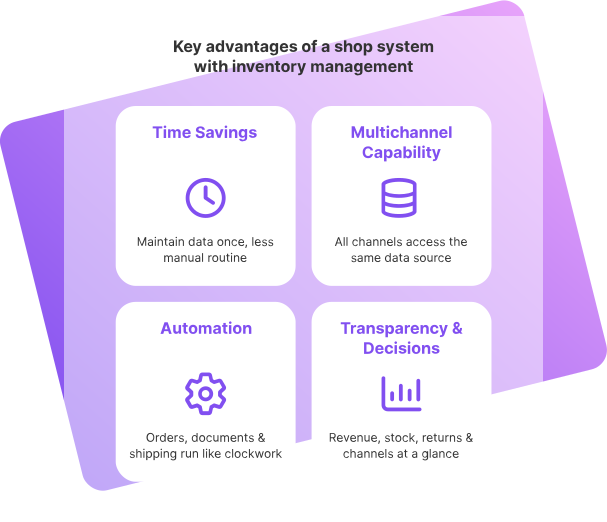
The interaction between the ERP and store system brings a number of advantages that make day-to-day work in eCommerce much easier. It turns the online store into a professional, scalable sales center instead of just providing an interface for orders.
Time savings and lower error rate
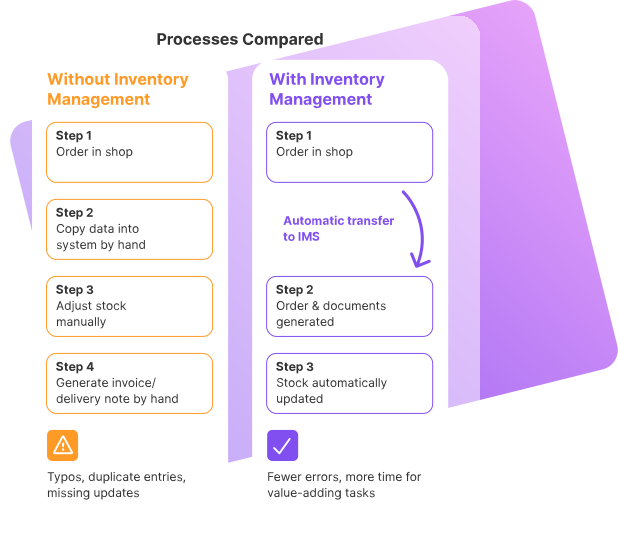
Through the integration of an ERP system with the store system, all relevant information – such as item master data, orders and stock levels – is automatically exchanged between the systems. This means
This not only saves time, but also drastically reduces the error rate caused by manual intervention. Typing errors, forgotten updates, duplicate entries – all of these are much rarer.
The more items and channels are added, the stronger this effect becomes. Where previously it took hours of manual reconciliation, processes now run “on the side” in the background, freeing up the team for value-adding tasks.
Fit for multichannel retail
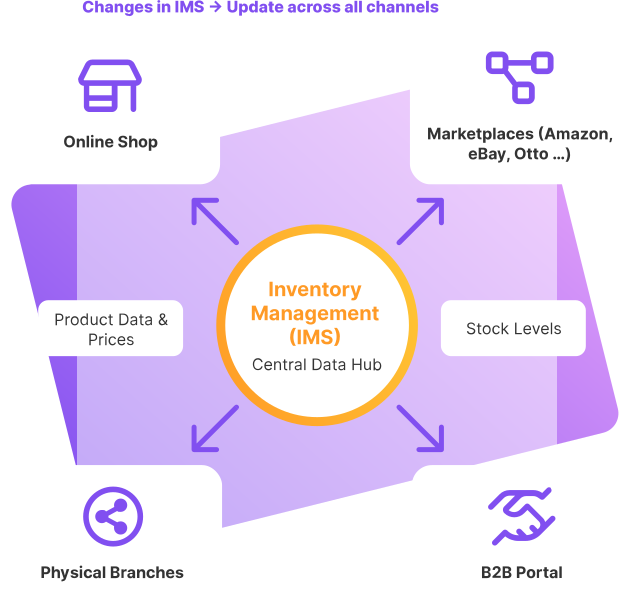
ERP is the heart of all processes that access product information and stock levels. This is where everything comes together:
All channels are supplied from a central database. Product data, prices and stocks no longer have to be maintained individually for each channel. Instead, changes are made in the ERP system and transferred to the connected systems via interfaces.
This has several advantages:
This is how multichannel retail is turning from a risk lever into a growth lever.
Automation of central business processes
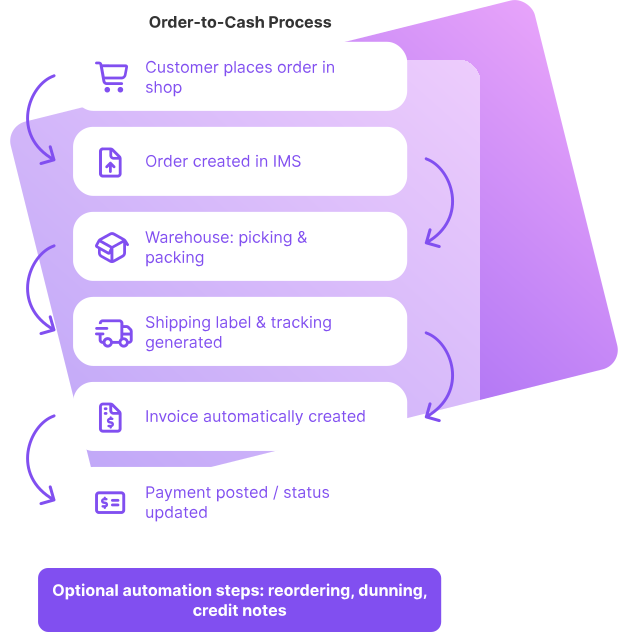
A store system with a connected ERP system enables the automation of numerous business processes, for example:
The degree of automation depends on the solutions used and the individual setup. One thing is clear: every automated step relieves the team, reduces errors and speeds up processing. What used to require many individual work steps becomes a continuous, plannable process.
Better transparency & well-founded decisions
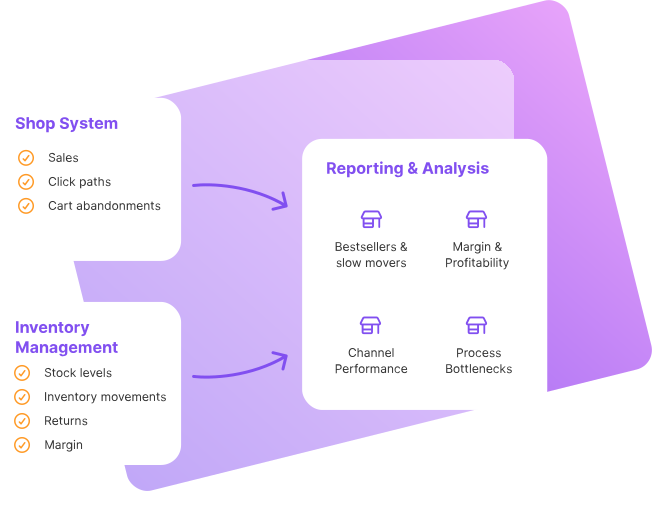
The linking of the ERP and store system creates a database that goes far beyond a simple order list. Through the joint evaluation of:
comprehensive analyses and reports. These help, among other things,
On this basis, strategic decisions can be made in a more informed manner – for example on stock build-up, product range width, channel expansion or internationalization. Instead of acting on instinct, retailers can rely on valid key figures.
Interaction of store system and ERP in practice
How exactly do the store system and the ERP system interact? The specific design depends on the selected products and the technical architecture. However, there are typical functions and processes that are similar in many setups.
Basic mode of operation
The combination of ERP and store system should ensure a smooth sales process for both buyers and retailers. Basically, three central phases can be distinguished: Product provision, order processing and follow-up.
1. product provision
2. order processing
3. follow-up & service
Customer data is also transferred from the store system to the ERP and used there for service requests, B2B pricing logic or evaluations, for example. This creates a continuous data flow that supports both operational processes and analyses.
Data synchronization in real time across all channels
An important success factor is data synchronization in real time or near real time. Depending on the system and setup, this can mean
Real-time synchronization
Changes (e.g. order, stock correction) are transmitted immediately to all connected systems.
Interval synchronization
Data is synchronized at fixed intervals (e.g. every 5, 10 or 30 minutes).
When an order is received via the online store, a sales order is automatically created and a delivery bill and shipping label are generated (if supported by connected systems). At the same time, stocks are corrected and any price or product changes are passed on to marketplaces.
If retailers also serve other sales channels such as Amazon, eBay, Otto & Co. in addition to the online store, the same mechanism applies: all channels are connected to the ERP system via interfaces. This ensures that:
The interaction between the store system and the ERP system also enables detailed evaluations and reports. Sales trends, channel performance or stock turnover can be analyzed at the touch of a button.
The specific implementation always depends on the software selected and the company’s requirements. However, the functions described above form the typical framework that a combination of online store and ERP can cover.
Selecting the right ERP for the store system
Choosing a suitable merchandise management system is a strategic step. A thorough analysis of your own requirements and well-founded research in advance are crucial in order to avoid bottlenecks or costly system changes later on.
A helpful first step is a requirements specification. This should not only define the requirements for the store system, but also explicitly for the ERP and the interaction between the two systems. Important questions are, for example
These key figures help to realistically assess the scope of the tasks to be managed and to evaluate which ERP solution suits your own business model.
Important selection criteria for an ERP include:

Support & Community
Good accessibility of support, understandable documentation and an active community make it easier to use the system in everyday life.
Compliance & data protection
With cloud-based solutions, it is particularly important that the provider fulfills requirements such as GDPR and any industry-specific regulations.
Scalability
The ERP system should be able to grow with the company – in terms of sales order volume, user numbers, additional channels and international requirements.
Usability
No matter how powerful a system is, if it is difficult to use on a day-to-day basis, acceptance will suffer. Test access and pilot phases help to realistically assess usability and functionality.
Data preparation
Especially for retailers who already sell on marketplaces, it is important that existing product data can be transferred to the ERP system in a structured way. The field logic and data models must fit together.
Budget
In addition to license or usage fees, there are often costs for consulting, adaptations, training and ongoing operation. These should be calculated realistically and compared with the added value.
Interfaces
Open, well-documented interfaces (APIs) are crucial for integrating store systems, accounting, shipping service providers, payment providers or fulfillment partners.
Multichannel capability
The ERP system should be able to serve several channels in parallel – from your own online store to marketplaces and stationary retail.
Market maturity
Systems that have been tried and tested by many users are often more stable and better documented. Young solutions can offer innovative features, but are sometimes not yet fully developed.
Industry specialization
Requirements in the food trade differ significantly from those in the fashion industry or in technical wholesale. An ERP system with an industry focus can already provide relevant functions.
Organizational aspects & change management
The integration of the merchandise management system and store system is not only a technical project, but also an organizational one. Clear responsibilities, processes and training are just as important for a successful start as the interface configuration.
Important points:
Define leading system
As a rule, the ERP system is the leading system for product and inventory data, while the store concentrates on presentation and sales. Duplicate data maintenance should be avoided at all costs.
Define data flows
It must be clear which data flows in which direction: Where are prices maintained? Where are new items created? How are returns processed?
Determine synchronization logic
Should data be synchronized in real time or at fixed intervals? Which processes are time-critical (e.g. inventories) and which are less so?
Plan a test phase
Before the go-live, an extensive test phase should take place in which typical scenarios (orders, cancellations, returns, price changes, channel changes) are run through.
Train employees
Everyone who works with the online store or ERP system should be involved and trained at an early stage – from the warehouse and service to purchasing and marketing.
Monitoring after launch
In the first few weeks after going live, processes should be closely monitored in order to quickly identify and rectify sources of error.
Taking these organizational aspects seriously significantly reduces the risk of teething troubles and lays the foundation for stable, efficient processes.
Conclusion: store system and ERP as an efficient duo
In order to select a suitable merchandise management system for your own store system, thorough preliminary work is crucial. The clearer the individual needs, processes and growth plans are defined, the easier it is to find a solution that really fits the business model.
For many companies, the combination of store system and ERP is the key to:
Investing in a coherent combination of store system and ERP today creates a stable foundation for future growth in eCommerce – and ensures that increasing order numbers do not become an organizational problem, but the desired signal of success.
Our “Shop system” guide offers valuable tips and advice – from selecting the right system and technical setup to UX design and SEO measures for online stores.