
In the second part of our blog post on Google Shopping, we would like to familiarize you with the possibilities of efficient campaign management. After you learned about the basics of using Google Shopping in the previous article Successful with Google Shopping (Part 1), we will now give you specific recommendations for practical use. These include measures for KPI-driven management using modern bidder technologies. All JTL-Shop customers have access to these technical options, which we will discuss in more detail at the end of the article.
Once again, we would like to thank Christian Hampp and his former team at easymarketing.de (now: emarketing). As in the first part, they also provided the relevant content for this article. easymarketing is a Google SME Premium Partner for Search Engine Advertising and the ideal contact for all marketing tools based on Google services. As a JTL service partner, easymarketing is very familiar with our software solutions and we have been working together very successfully for years.
Basic recommendations for successful campaigns
By observing a few basic rules for efficient shopping campaigns, you create good conditions for sustainable success. You should therefore heed the following recommendations throughout:
1. always keep the shopping data feeds up to date
The shopping data feed should always be supplied with up-to-date and correct product data. Google places high demands on the quality of the submitted data feeds in order to make the shopping experience as positive as possible for the customer. If incorrect or outdated data is submitted, not only will ads not be displayed, but the Merchant Center may also be completely blocked. Once a block has been imposed, it usually takes a long time to lift it, resulting in unnecessary costs and lost sales.
Diagnosis
On the “Diagnostics” page, you can view all current and previous problems with your Shopping product data.
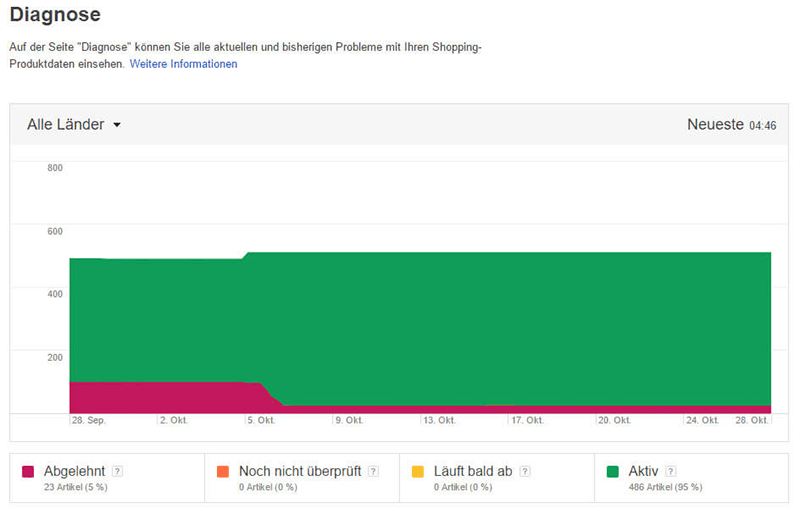
Care should therefore always be taken to ensure that at least all prescribed attributes are included in the data feed. In addition, as many optional attributes as possible should be provided in order to maximize the quality of the data feed and thus the ads to be placed. An example of an optional attribute that should always be transferred is the Google Shopping category. Items can also be advertised without this categorization using Google’s taxonomy, but this has been proven to lead to poorer results. It is also extremely important to always keep prices and shipping costs up to date in the data feed. If there are discrepancies between the information in the web store and that in the data feed, this will inevitably lead to the Merchant Center being blocked.
2. concentration on specific areas of the product range
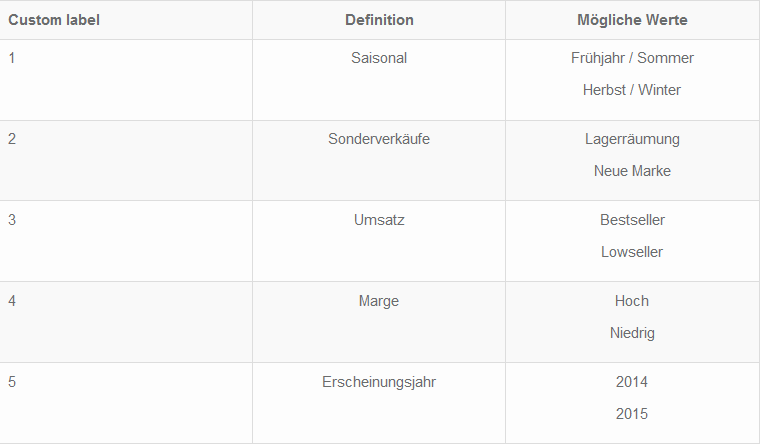
By concentrating on items with a high margin and those that are in particularly high demand, the budget to be spent can be optimally selected and effectively used for the most profitable items. These items should be particularly carefully equipped with meaningful texts and images. The advertising bids can also be set higher here than for items that do not perform as well or have lower margins. Items can be grouped according to criteria, such as bestsellers, using existing webshop categories. Alternatively, so-called “custom labels” can be assigned to group products together, for which special CPCs (cost-per-click) are then set.
3. promotion of seasonal goods through special campaigns
Setting up your own seasonal campaigns, e.g. for Halloween, the summer holiday season or in the winter sports sector, which only contain the relevant products, makes it possible to advertise seasonal items at the right time. Such campaigns can then be launched within a very short time at the beginning of the respective season and automatically terminated at the end of the respective period. This procedure facilitates seasonal budget planning and saves time in order to place campaigns in a targeted manner for the recurring period. In addition, the CPC can be increased separately within the seasonal campaign if required to take account of the competitive situation and ensure prominent placement of the ads.
4. activation of several campaigns with different priorities
If several campaigns are set up, it is possible to react quickly to changing demand situations (e.g. caused by major events such as sporting events, etc.) without having to make extensive adjustments to the main campaign each time. For example, all items from a main campaign that are to be advertised as part of a special sale with specially adapted texts could be grouped together in a special campaign set up specifically for this purpose. This campaign is given the highest priority for the duration of the promotion, so that the largest part of the budget planned for Shopping is available to it and the item is displayed with the ad texts from the special sale campaign. In addition, higher CPCs can be set for the items within the special sales campaign than in the main campaign.
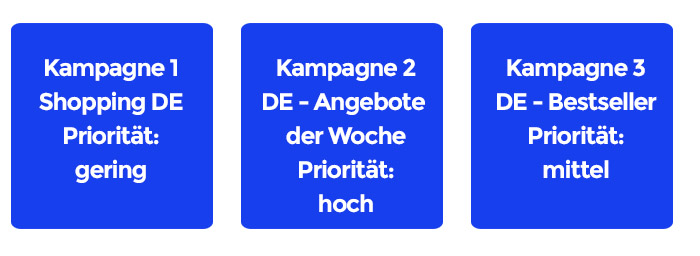
The easymarketing system automatically creates several campaigns and sorts the products according to “success”. This ensures that products that are known to convert are always allocated sufficient budget to avoid the risk of non-converting products “absorbing” budget. The advantage is that you can already assume that some products convert. From the fourth conversion at the latest, the data situation is sufficient for the statistical data to be considered significant.
5. regular data research for quality control of your own campaign
Furthermore, the benchmark values in AdWords can be used to view the performance of your own campaign in comparison with the competition. By comparing your own CTR and maximum CPC with the average values of the competition, you can see whether, for example, the quality of the data feed and therefore the ads placed need to be improved.
Professional bid control: "CPC Bidding"
The height of a successful Shopping campaign lies in continuous monitoring, adjusting and optimizing products and campaigns and determining the ideal CPC for each item at all times! We will now show you which data you need to use for this and which strategies you can or should choose.
Important orientation: The "Bidding Landscape"
For Google Shopping campaigns, a bid simulator is available in AdWords that accesses landscape data from the last week and provides a rough estimate of the expected impressions for product groups or individual items in relation to the maximum ad bid. Compared to the options available for AdWords campaigns, this bid simulator is quite rudimentary.
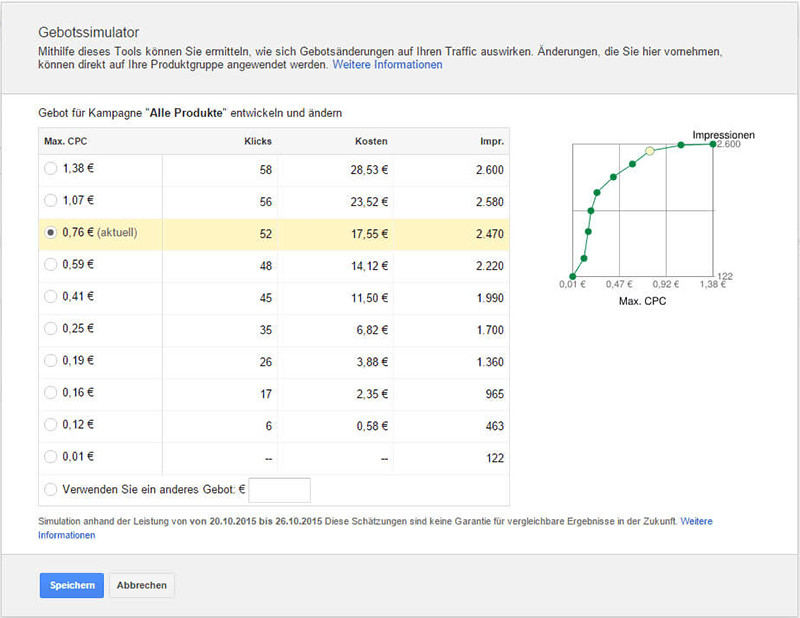
For example, the following core data, which is essential for optimizing a shopping campaign, is missing:
It is only through the use of special technologies that these values can be recorded and used to create meaningful “landscapes”. Only with the help of this data can shopping campaigns be efficiently optimized. With the help of such product-related landscapes, it is possible to estimate how many clicks and impressions can be expected with which CPC bid.
Objectives of different bidding strategies
KPI-driven campaign management can have many purposes, but advertisers mainly focus on the following objectives:
Maximum number of visitors to the webshop
The aim of the advertising campaign is to generate the maximum number of visitors. To achieve this goal, the only thing that needs to be determined during optimization is the CPC at which the maximum number of clicks is reached.
Minimum CPO (cost-per-order) for a given number of conversions
The aim of campaign management is to maintain the number of conversions for an existing campaign, but to reduce the advertising budget spent and thus lower the CPO (CPO = “cost per order”). One can also speak of CPA, i.e. “cost per acquisition”).
Maximum number of conversions for a given budget
The aim of campaign management is to maximize the number of conversions, with the retailer specifying a fixed maximum advertising amount.
Economic yield
Optimization is based on the absolute maximization of yield. The easymarketing algorithm maximizes the profit resulting from the multiplication of conversions with the respective margin for a given CPC. In contrast to the first three approaches mentioned above, only this objective makes economic sense.
The premier class: profit maximization as a goal and how a BOT can help ...
In order to maximize the profit of an advertising campaign, the profit per conversion is determined and then multiplied by the number of conversions. To determine the profit per conversion, it is advisable to work with the margin, i.e. the profit margin of the respective product.
The plugin from our JTL service partner Webstollen, which was developed in collaboration with easymarketing, is able to transfer the respective margin to the easymarketing system so that the correct margin is always used automatically. Otherwise, it would be necessary to set a blanket margin of x % of the product price, for example.
The profit per conversion is calculated by subtracting the CPO (cost-per-order, i.e. the Google costs per conversion) from the margin. These profits per conversion are then added up across all conversions.
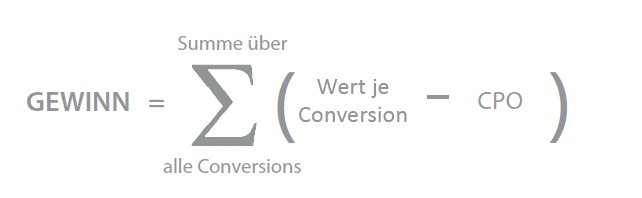
Mathematically, the formula is trivial, but the challenge lies in dealing with inconsistent measured values and recognizing when which values are sufficiently significant. You can’t plan reliably if a product has only had three clicks and no conversions yet. The conversion rate you have to work with is not really meaningful here.
In addition, user behavior is constantly changing. Normally, for example, 50 clicks are enough for a conversion, but then again, for no apparent reason, no conversion is achieved even after 100 clicks.
To simplify the formula with the sum sign, you can also directly assume the average CPO and replace the sum sign by multiplying the average profit by the number of conversions. The number of conversions is calculated by multiplying the conversion rate by the number of clicks.
The formula can therefore also be represented as follows:
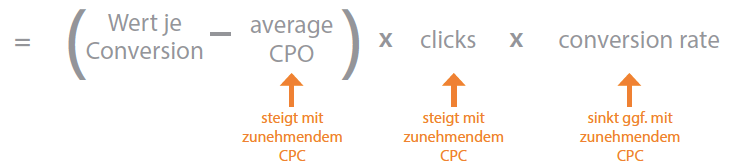
This shows how a higher CPC influences the profit. There are two effects here that work against each other.
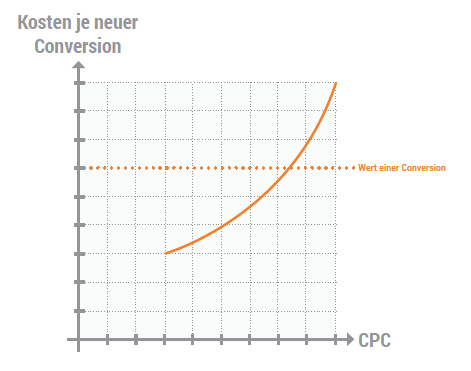
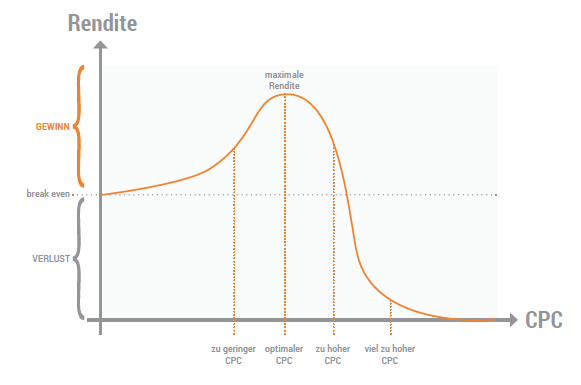
The easymarketing technology, i.e. the BOT, determines this chart in order to find the CPC at which the optimum profit is achieved. As the parameters are constantly changing due to numerous external factors (e.g. weather, customer behavior, competition), the CPC must be continuously tested and varied accordingly.
Problem: Products compete for the budget
As a rule, a retailer has a very large number of products on listing compared to the daily budget used. On average, a retailer spends €23 per day on Google Shopping. At the same time, the average retailer has 1,754 products in their range. This creates the problem for almost every retailer that there is too little budget available per product. For this reason, a product can never be advertised in isolation in order to determine the optimal CPC.
After all, you also want to advertise all the products that may never have been clicked on, as you cannot rule out the possibility that these products also have marketing potential. In this respect, bidding must ideally be found that takes the data situation into account, intelligently estimates missing values and tries to generate as many clicks as possible as cheaply as possible. Top products must be recognized in order to advertise them more strongly, poorly performing products must be identified and given low priority.
How intelligent bidding works
But the BOT can do even more. Depending on the level of knowledge of the various data that can be used, the respective products are assigned to the appropriate sub-algorithm. The easymarketing algorithm assigns the webshop operator’s products to hierarchical campaigns, depending on the algorithm used.
This allocation favors products that have already converted and can be advertised under more reliable assumptions over products for which the assumptions are not yet reliable. In addition, these products are advertised in a profit-optimized manner and their share of the advertising budget is secured. This means that products whose marketing parameters are still unknown do not consume any budget. Calculable conversions for products that are already converting are therefore no longer lost.
Experience has shown that this distribution of campaigns and the corresponding budgets alone leads to an average increase in efficiency of over 15%.
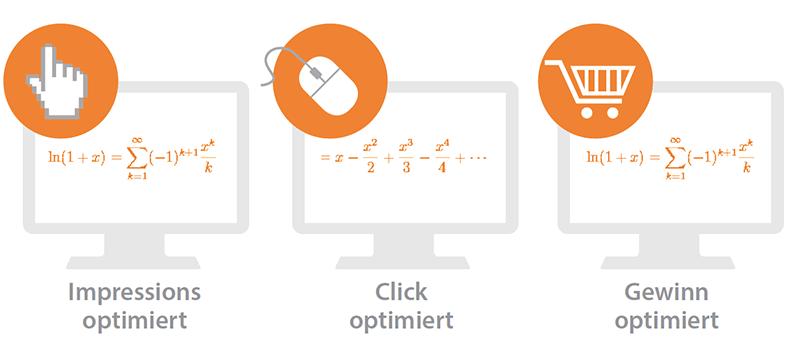
Bidding for products without available data
This algorithm is applied if no data or reliable estimates are available for a product with regard to average CPC, minimum bid for the first display of the product ads, first page bid, potential conversion rate, click-through rate (CTR) etc.
This impression-optimized algorithm approaches the most favourable impressions in a defined step size starting from the minimum conceivable CPC and tests for each product at which CPC level the first impressions are displayed. On the one hand, this procedure guarantees the absolutely most favorable CPC and, on the other hand, prevents too many clicks from suddenly occurring.
Bidding for products with initial data but which have never converted
If initial data is already available, it makes sense to create a bidding landscape and then consider how much you would like to bid in order to receive a certain number of clicks. As soon as you have collected the initial data, you can draw meaningful conclusions.
When making this consideration or calculation and if a technology such as easymarketing’s is applied, it must also be taken into account that other products should also receive clicks so that the budget is not spent too one-sidedly. If similar products exist, the conversion rate can be estimated to some extent and the bidding can be set similarly to that for converting products with a longer history. Nevertheless, the bidding will be somewhat more defensive, as the conversion rate has ultimately only been estimated.
However, it is important to remove products that generate clicks but do not convert from the campaign or to advertise them much more defensively so as not to burn money unnecessarily.
Caution: A stumbling block when bidding for Google Shopping!
In contrast to AdWords, Shopping does NOT bid on search terms, but on products. This sounds trivial at first, but it makes a huge difference. Only Google knows the list of search terms that lead to the display of product ads. As an advertiser, you cannot set which search terms should generate the ad impressions (and cost-driving clicks). However, you can preemptively define “excluding keywords”.
If you use the interface to Google for data analysis, you can at least see which keywords have been searched for and whether these have led to clicks. If you use Google manually, you can view these terms at product group level.
It is interesting to note that overly conservative bidding can lead to Google no longer displaying products under “good” and “expensive” keywords at all, but only those of the competition! This situation is dangerous, as suddenly not only the clicks decrease with decreasing CPC (which is consciously accepted), but also the CR (conversion rate) if the keywords become worse as a result!
In this respect, it is important to check which keywords were searched for when bidding. This is also extremely advisable in order to investigate whether you should add any keywords that are excluded in order to explicitly avoid products being displayed for keywords that convert less well or not at all.
Campaign optimization by time
Campaigns usually perform particularly well or particularly poorly at certain times of day or on certain days of the week. However, the best or worst times cannot be predicted across the board.
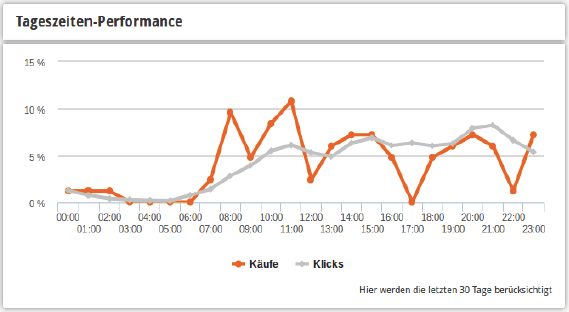
The responsible parameters do not apply equally to all products, so strictly speaking the best and worst time of day must be determined for each product. Since the amount of data is generally not sufficient for significant statements, the best/worst times of day and days of the week are first determined for all products together. As soon as a sufficient amount of data has been collected for an individual product, this product is optimized separately by time of day and day of the week.
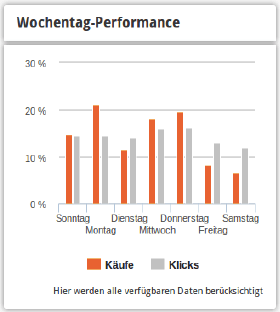
Agencies usually (incorrectly) carry out optimization in such a way that the CPC is only increased across the board at the best time of day or on the best day of the week and reduced in line with the worst time of day or the worst day of the week. However, this can lead to the CPO only increasing on Good days, which would only be justified if the number of conversions also increased. On the other hand, a reduction in CPC on bad days can lead to a decrease in conversions, even though they were previously profitable.
Rather, a landscape must be correctly determined for the various times in order to calculate whether an increase in CPC, which appears tempting on a “good” day, really leads to more clicks and thus conversions. Furthermore, and more seriously, on a “good” day when the campaigns or products are converting well, an increased CPC may result in LESS clicks being recorded if the budget has been fully utilized. A higher CPC only means that you pay more and can afford fewer clicks. So the right thing to do would be to reduce the budget on bad days and increase it on good days! Otherwise, a CPC adjustment is absolutely fatal!
Campaign optimization by region
Similar to the optimization according to times and days of the week, the optimization for the respective regions behaves similarly. Here, too, it can be observed that products convert differently when advertised in different regions!
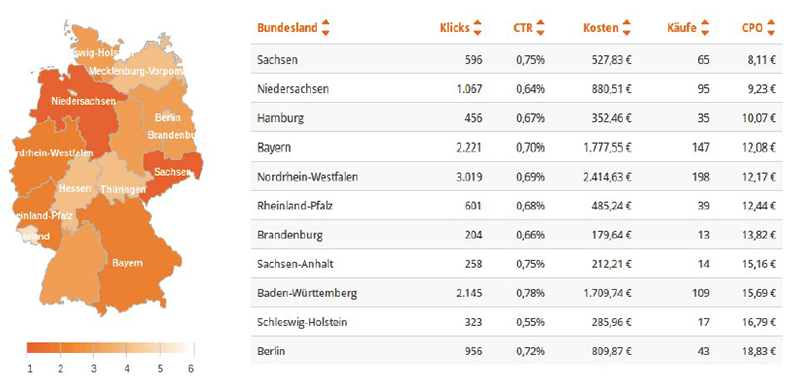
Higher ad bids for search queries from customers who are in the region of your own store can achieve a better conversion rate – many customers demonstrably prefer stores from their region when shopping. Of course, this is particularly interesting if you not only sell online via the web store, but also operate a retail store.
Do your shopping campaigns also reach mobile users?
More and more customers are using mobile devices such as smartphones or tablets to search for and purchase products. As less information can be displayed on smaller screens and mobile users generally spend less time shopping, optimizing your own online store accordingly is essential for the success of a shopping campaign.
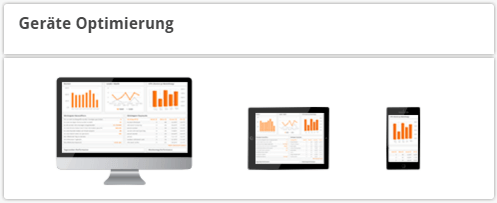
It is therefore essential to check how the CR (conversion rate) behaves on mobile devices. As a rule, the results are completely different here and there is a high probability that you are burning money because campaigns have not been adapted to the circumstances.
Simplifying the shopping process with clearly designed product pages that are optimized for display on mobile devices and a checkout process that is limited to the essentials has been proven to improve the conversion rate. In addition, Google gives webshops with content specially optimized for mobile devices a better customer review than webshops that are not optimized.
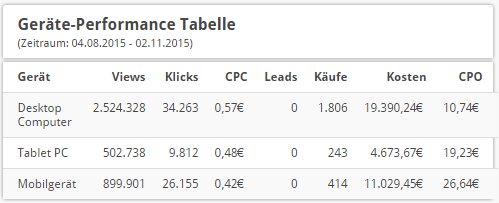
As a result, not only are their ads preferred, optimized webshops also appear at the top of the organic Google search rankings.
Webshop operators should also ensure that visitors with mobile devices are tracked correctly. Research is often carried out on the move using a smartphone, with the actual purchase then being made on a PC or tablet at home. It is therefore important to correctly record these visitors and their purchases in order to correctly assess the role that mobile devices play in sales in your own webshop. When allocating budgets and selecting the optimal CPC, the insights gained can be used to correctly prioritize the delivery of ads on mobile devices.
Summary and conclusion
There are numerous measures and approaches with which you can increase the efficiency of future Shopping campaigns. The effects of the various measures reinforce each other to some extent, so it is not easy to say which measure leads to which increase in efficiency. It should also be noted that the increase in efficiency can have two effects: more customers or conversions with the same budget or lower costs per conversion.
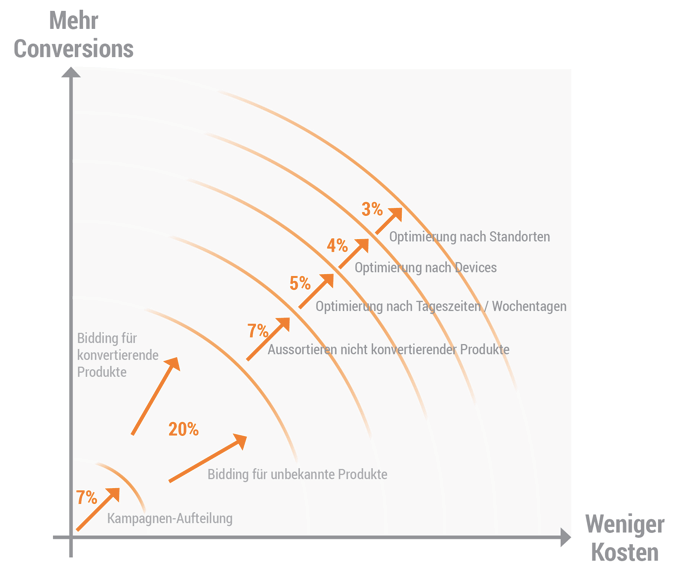
There are measures that only reduce the costs per conversion, but which in turn mean that the budget saved is available elsewhere, where it can be used to generate new customers. The chart above illustrates the expected effects as an indication, whereby cost savings and new customer growth are treated equally. The data may change over time due to further developments to the algorithm.
It should also be noted that the effects depend on the products and the optimization status of a campaign before it was taken over by easymarketing AG’s BOT. The chart above is based on an account that had already been properly set up by an agency; all products that did not convert but generated many clicks have already been sorted out. Otherwise, the effect here would not be 7%, but rather 30%.
Google Shopping campaigns are an integral and indispensable part of a webshop’s marketing activities, and their importance will continue to grow. With a lot of analysis, careful tracking and constant optimization, it is possible to see how the down payment of purchases is constantly increasing, the CPO is decreasing and the generated shopping cart value is being maximized. The management and administration of campaigns is complex and time-consuming. There are few indicators and key data for the manual management of campaigns. Campaigns that are not managed in an optimized way lead to unnecessarily high costs and usually even to the point that the purpose of the entire campaign has to be questioned due to campaign losses. Increasing competition also exacerbates the need for optimization.
The easymarketing BOT not only helps webshop operators to realize considerable cost-saving potential in advertising expenditure and save time in campaign management, but also gives them a competitive advantage and more new customers for a given advertising budget. The BOT determines the best possible click prices, optimizes the budgets and finds out which advertising budget is most effective for the retailer. Thanks to the technology, the BOT provides these services without manual intervention, despite the height of the optimization, and is therefore systematically superior to any agency or in-house solution.
This technology, which is available for every JTL-Shop customer, is therefore an almost indispensable tool for the successful operation of a webshop. Our JTL service partner Webstollen offers a sophisticated module or free plugin that can be used to manage the data feeds and set the tracking pixels correctly. Existing campaigns can also be “remote-controlled” by linking the existing AdWords/Merchant Center account with the easymarketing technology.
If you want to run your Google Shopping campaigns more efficiently in the future and would like to find out more about the individual possibilities of the easymarketing system, please get in touch. At https://easymarket ing.de/signup you can test a corresponding trial package for 2 months free of charge!
We wish you every success!