
Google Shopping is rapidly becoming as important a marketing channel for online sellers as eBay and Amazon already are in this country. Google is making considerable efforts to continuously increase the attractiveness of the platform for both participating online store operators and consumers. As a result, Google Shopping advertising is becoming increasingly important in eCommerce.
In the future, Google is expected to integrate a convenient one-click purchase option into Shopping Ads, which will further increase the reach and sales of campaigns and significantly improve the shopping experience for shoppers. Similar to the shopping experience on Amazon, Google Shopping will also offer a marketplace including an item catalog in the future, which will present customers with a uniform shopping experience. This will make the tedious re-entry of customer and payment data for each individual online store obsolete.
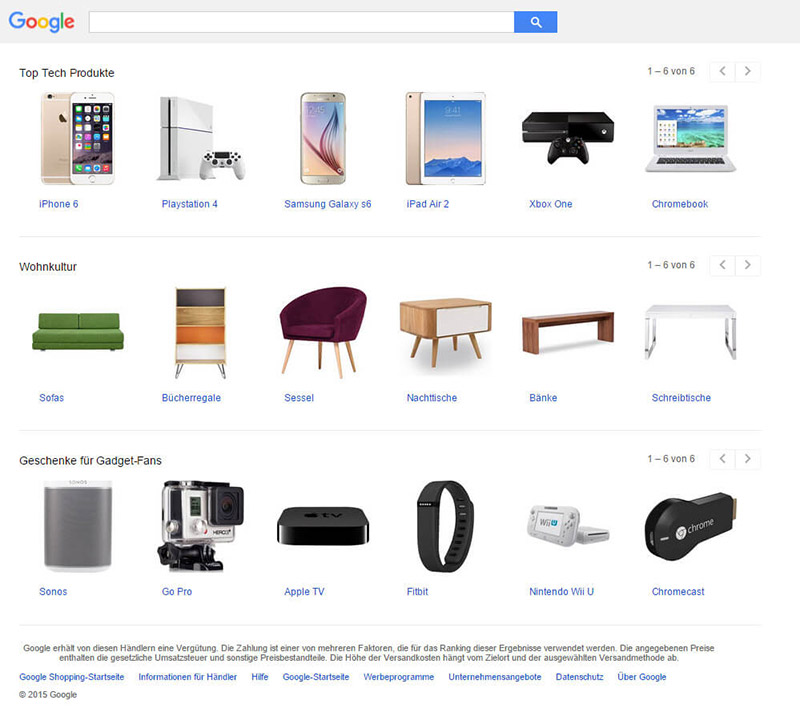
The close integration with other Google services for advertisers, such as Google AdWords and Google Remarketing, can significantly improve the performance of Shopping campaigns. The mix of several online marketing tools increases reach, helps to address different target groups and represents a clear competitive advantage compared to other price and product portals.
Experts on the scene predict a rapid increase in consumers over the next few years, who will search for, find and buy more and more products via Google Shopping. Google is also continuously expanding its services for participating retailers in order to give them a competitive edge. In the medium term, a same-day delivery service is expected, which will collect goods ordered via Shopping from retailers and deliver them to customers on the same day.
Discover Google Shopping with our blog two-parter!
We would like to introduce you to the topic of Google Shopping with two staggered blog posts. Today’s first part is all about the basics of Shopping, definitions and requirements for using this form of advertising. Even this first part will give you lots of helpful suggestions that you can use to set up your first Shopping campaign or optimize an existing campaign.
The second post on this blog topic, which we will publish in three weeks, on 30.10.2015 (UPDATE: 03.11.2015), will then focus entirely on the possibilities of targeted and efficient campaign management for Google Shopping.
We would like to take this opportunity to thank Christian Hampp and his team at easymarketing.de for providing the key content for this article. easymarketing is a Google SME Premium Partner for Search Engine Advertising and the ideal contact for all marketing tools based on Google’s services. As a JTL service partner, easymarketing is very familiar with our software solutions and we have been working together very successfully for years.
What is Google Shopping, where can I find the ads?
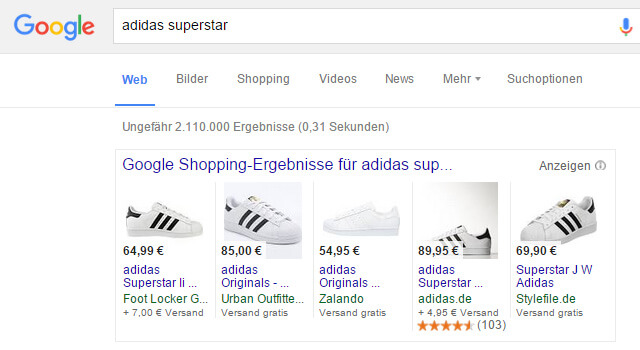
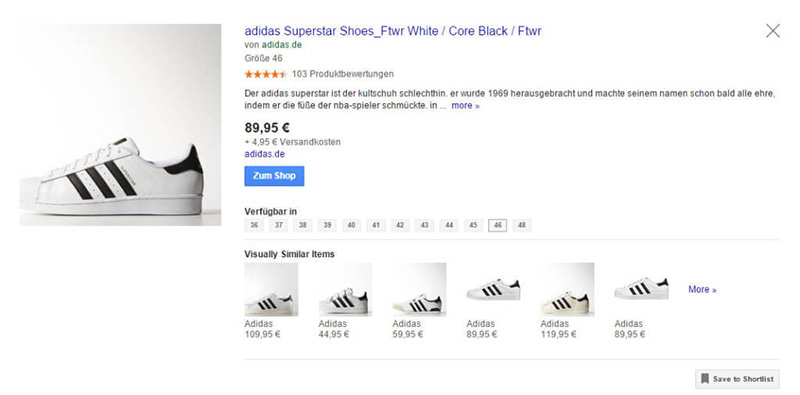
Google Shopping results are the illustrated product ads that are displayed either centrally above or to the right of the organic search results on Google’s search results page. In addition, the searcher can switch from the organic search to the “Shopping” tab – only Google Shopping results for the search query are then displayed. In addition to the product image and the name of the store operator, the price and shipping costs for the item are also displayed directly in the visible ads. This visually appealing form of presentation has been proven to lead to very good click and conversion rates.
Google Shopping is fee-based and emerged from the formerly free PLA (Product Listing Ads), probably better known to many in Germany under the former name “Google Base”. As no basic fee is charged for participation, but is instead billed on the basis of the clicks achieved on product ads, the costs result from the actual service provided.
This is how it works: Create campaigns for Google Shopping
If you want to use Google Shopping, an AdWords account is mandatory. In addition, a so-called “Merchant Center” must be created and set up, via which the items to be advertised and the associated data feeds will later be managed.
To prevent the website from being misused by third parties for advertising purposes, the ownership of the URL to be advertised must also be confirmed with Google (Google Site Verification). There are various methods for this:
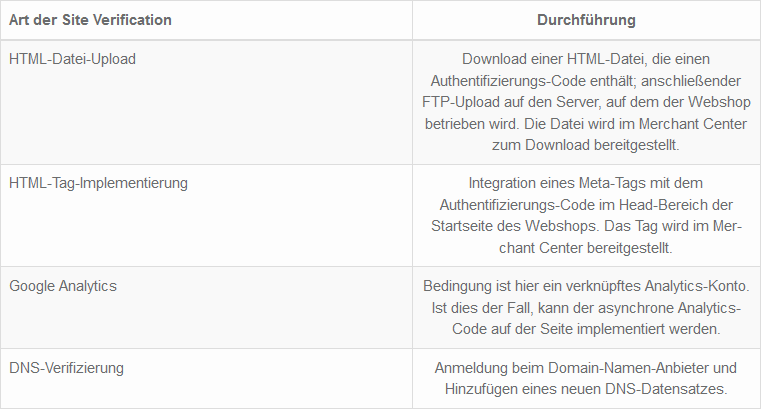
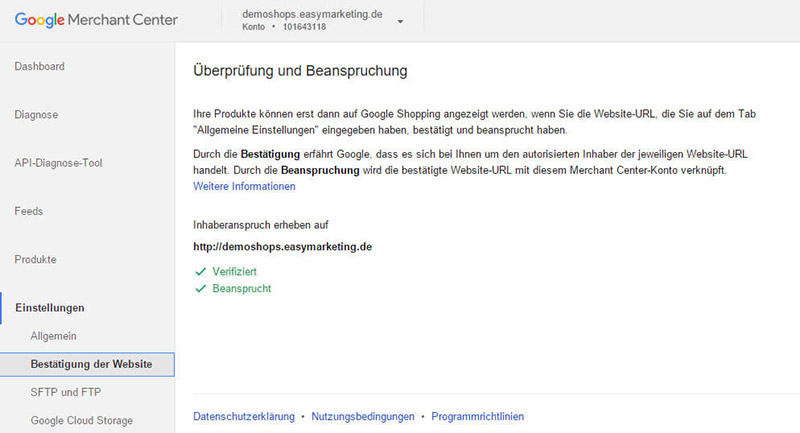
Even for newcomers who are not so familiar with the terminology, it is quite easy to confirm ownership of your own website. Alternatively, our partner WebStollen offers a free and easy-to-use plugin for the back end of the JTL-Shop(emarketing for JTL-Shop 5), which can be used to activate site verification at the click of a mouse.
In order for the Shopping data feed to be transferred to the AdWords account, the Merchant Center and your AdWords account must be linked. This is as easy as linking AdWords with Google Analytics. By entering the AdWords account number in the appropriate place in the Merchant Center, a link request is sent to the AdWords account, which then only needs to be confirmed in AdWords.
The products uploaded to the Merchant Center are then transferred to AdWords, where the campaigns are actually managed. The online retailer must specify a daily budget for the campaigns as a parameter that he is prepared to spend. Furthermore, the individual maximum click prices are specified for each product. For the sake of simplicity, a flat-rate maximum value is usually specified for all products (e.g. €1/click), even by agencies. Google will not charge the maximum CPC (cost per click), but rather the CPC that results from the competitive situation. Google then also shows the “average CPC”, i.e. the average click price, in the reports.
Basis for success: your article data and the data feed
As a rule, an XML feed is used for the Google Shopping API. Here, merchants must use the English names of the data fields. If the data field names consist of individual words, these must be connected with an underscore (e.g. “image_link” and not “image link”).
In order for Google to display the products accurately and categorize them correctly, the online retailer must transfer numerous attribute fields in the data feed to the Merchant Center. Some of the data fields are mandatory in order to be able to list items on Google Shopping (mandatory fields). Other fields are optional, but it is advisable to provide as much data as possible with correct and high-quality content. The quality of the optional data to be transmitted can have a significant influence on the findability of the items in a product search and the positioning within the search results list.
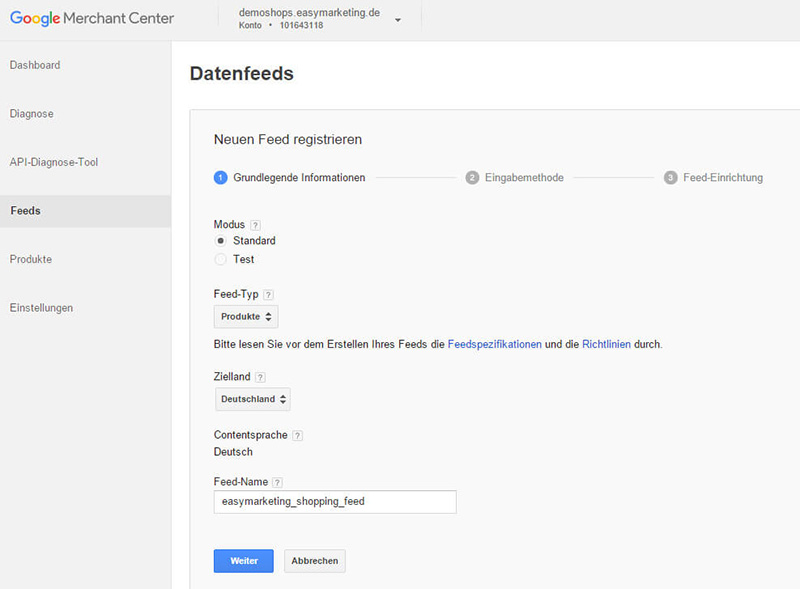
Some data fields are mandatory for all product categories, while others are only required for certain categories: For example, for clothing items that are listed in variations, information on the available sizes and colors must be provided; when selling food, a basic price is required (i.e. €1.50/l, for example).
| Data field | Description field | Mandatory field |
|---|---|---|
| ID | The identification numbers of the individual products must be unique in the Merchant Center and may not be used in other feeds. If a product is listed, the unique ID must not be changed when updating the data feeds | Yes |
| Title | Google recommends adding properties to the product title that help potential buyers differentiate the product at a glance (color, size, brand, etc.). Advertising texts such as “Free Shipping” or the consistent use of capital letters are not permitted. | Yes |
| Description | Detailed and relevant description of the item: e.g. suitable age group, intended use etc.. It is advisable to describe the visual aspects of the item, for example shape, pattern or texture design.
Product descriptions may contain up to 5000 characters (including punctuation), but Google recommends only 500 to 1000 characters. |
Yes |
| Google category | Categorization of the product using the Google product taxonomy. If the product fits into several categories, the most suitable category is selected. Categories must be submitted according to the Google specification, e.g: “Clothing & Accessories > Clothing > Pants > Jeans”. | Required for “Clothing & Accessories”, “Media” and “Software”; otherwise optional |
| Product type | Product category according to your own classification (from the webshop). Several values can be entered here. The field is not mandatory, but is recommended by Google | optional |
| Link | Specification of the URL of the item in the webshop, tracking URLs can be used to identify Google Shopping users. | Yes |
| Mobile link | URL of the item in the webshop for optimized display on mobile devices. Optional, but recommended field. | Yes |
| Image Link | URL of the main product image in the webshop. This image is presented in the search results list and as the first image on the product page. Images with a minimum size of 800 x 800 pixels are recommended. | Yes |
| Condition | Indication of the product status, valid values are:
|
Yes |
| Availability | Availability status of the item. This should be updated regularly so that potential buyers know whether an order has been placed and when the product can be delivered. Valid values:
|
Yes |
| Price | This field indicates the gross price with the corresponding currency designation (e.g. EUR, not €). Should be updated immediately in the event of price adjustments in the store. | Yes |
| Brand | Defines the brand/manufacturer of the item. The own store name may only be used if it is a private label. | optional |
| GTIN | Stands for “Global Trade Identification Number”, the following values are permitted here:
|
yes (if an electronic SKU exists for the item) |
| MPN | Stands for “Manufacturer Part Number” and indicates the manufacturer part number (MPN) assigned by the manufacturer. The MPN can be used in combination with the manufacturer’s specification as a replacement for a GTIN. | optional, but strongly recommended |
| Product identification Drawing |
If neither “GTIN” nor a combination of “Manufacturer” and “MPN” is available for items (e.g. for custom-made products), this can be indicated via this field with the value “FALSE”; such items are then still listed. If no value is transmitted in this field, it is assumed that another product identification exists. | optional |
Note: There are other attribute data fields, the complete list with further information can be viewed here:
https://support.google.com/merchants/answer/188494?hl=de
Overall, the creation and maintenance of a high-quality data feed represents the greatest effort for successful participation in Google Shopping. All transmitted data is subject to constant monitoring by Google in order to make the shopping experience as positive as possible for the customer and to ensure maximum transparency.
For example, the item prices and shipping costs transmitted in the data feed are continuously compared with the information in the web store. In the event of discrepancies, the shopping campaign is blocked until the existing errors have been corrected. To avoid downtime caused by incorrect data feeds, the greatest possible care should be taken here.
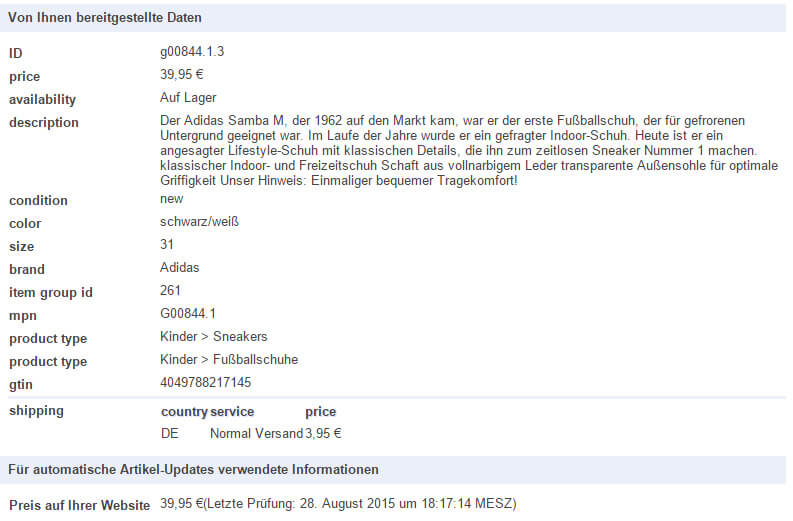
The easymarketing plugin mentioned above and installed in the webshop can provide effective help here. It automatically reads the item data from the webshop database on a daily basis, checks it for plausibility and only transmits flawless item data to the Google Merchant Center. If incorrect data is found for individual items, this does not lead to the entire data feed being blocked – the incorrect items are displayed in a product list and can be corrected by the merchant at their leisure. As soon as the correction has been made, these items will be transferred to Google after the next automatic readout of the items.
Impending losses due to inefficient shopping campaigns
Unlike Amazon and eBay, Google Shopping’s pricing model is not tied to a percentage of the shopping cart value. The actual clicks on the Shopping ads result in fixed costs, regardless of whether a purchase is made or not.
Webshop operators are threatened with unnecessary costs and direct losses due to insufficiently optimized and not continuously monitored campaigns. It is not uncommon for the fee-based clicks for a product to be disproportionate to the subsequent actual sales in the store. Significant improvements can be made here and competitive advantages created by means of KPI-controlled and thoroughly optimized campaign management.
Product diversity ensures high manual maintenance effort
On average, an online retailer has around 1,750 products in its store assortment [value corresponds to the specially determined average of easymarketing AG’s customers].
This makes it clear that the manual management and optimization of extensive Shopping campaigns becomes almost impossible when you consider that, ideally, two changes and/or recalculations should be made per day and product in order to achieve efficient campaign management. This includes, for example, that certain times of day (morning, noon, evening), days of the week or regions perform better or worse than others.
As a result, the advertiser should advertise in a differentiated manner at different times and for different regions, and constantly monitor and adjust the campaigns to ensure optimal use of the advertising budget.
In addition, valuable data is collected with every click, regardless of whether it leads to a purchase. If a product does not convert even after numerous clicks, it should either no longer be advertised at all or restrictive measures should be applied. In such cases, the maximum ad bid prices could be reduced, for example, or the priority for ad placement could be lowered. Conversely, it makes sense to allocate more advertising budget to products that convert well.
As a result, even a smaller retailer would have to invest considerable effort in optimizing the management of their campaign. Efficient campaign management can often only be guaranteed by specially employed experts or an appropriate agency. This is another area where easymarketing’s expertise can help: using specially developed algorithms, easymarketing can automate the above tasks and optimize the product data feed at item level on an ongoing basis and several times a day. All the data collected from the current campaign is included and presented to the advertiser in a clear overview, making it very easy to select target regions and favorable advertising times. You can find out more about this special topic in the 2nd blog post on Googel Shopping.
Lack of collateral before the start of a campaign
In contrast to AdWords, Google does not offer a “Keyword Planner” or a “Bidding Landscape” for Shopping, with the help of which the retailer could get a meaningful picture of relevant key figures and expected cost factors in advance.
Unfortunately, the store operator has to do without the following information at the start of a campaign:
The search terms that lead to the products being displayed cannot be specified either. Google determines these itself using the attributes transmitted in the product data feed, for example from the item description, the item name and the transmitted product category. If electronic SKUs (EAN, ISBN, UPC etc.) are provided, the items are also classified by comparing them with external product databases. The item attributes mentioned must therefore be created and maintained with the utmost care; for example, meaningful item descriptions and titles should always be available. In this context, professionally created product images are also of great importance for successful shopping campaigns.
Online retailers therefore effectively have no choice but to “feel their way forward” and gradually adjust the click prices in order to increase the efficiency of a campaign. Alternatively, the services of external service providers and their experience can be used to achieve Good results as quickly as possible and avoid unnecessary expenditure.
Outlook: Successful with Google Shopping | Part 2
In the second part of our short blog series on Google Shopping, you can find out which methods and helpful tools you can use and how efficient campaign management can be implemented. Based on numerous examples, you can find out which different approaches can be chosen when selecting a suitable shopping strategy.“Successful with Google Shopping (Part 2)” will be published on the JTL blog on 30.10.2015 (UPDATE: 03.11.2015).
easymarketing at the JTL-Connect 2015
If you would like to find out more in advance, you should visit our first JTL in-house exhibition on October 20 in Düsseldorf. “Efficient and successful online advertising with Google Shopping” is the title of the presentation by easymarketing / Christian Hampp, which will take place in lecture room 3 at 1.30 pm!
Here you can find all information about the program at JTL-Connect.
Until then, we wish you good sales!
UPDATE: The 2nd part of the blog post will not be published on 30.10.2015 as initially announced, but on 03.11.2015! Thank you for your understanding.