Update-Hinweis (Stand: 12.2022)
Die technische Unterstützung für JTL-Shop 4 wurde im November 2022 eingestellt. Wir empfehlen allen Shop-Usern dringend das kostenfreie Upgrade auf JTL-Shop 5.
Just before the festive season, we offer you another preview of the upcoming release of JTL-Shop 4.06. The shop version, which will soon be available as a stable release, offers more convenience for buyers. After our first feature preview on the improved item listings, this time we are addressing the conclusion of every sale – the shortened checkout.
The checkout in comparison
Until now, the checkout in JTL-Shop comprised 6 steps:
However, a shorter process was one of the top requests from our customers – reason enough to take a closer look at the process. After all, we want to offer retailers a solution that ensures as few abandoned purchases as possible. After all, nothing is more annoying than a customer who is ready to buy but loses interest during the actual checkout.
The new, shortened checkout therefore combines three of the points mentioned above with others and will in future be limited to the following steps:
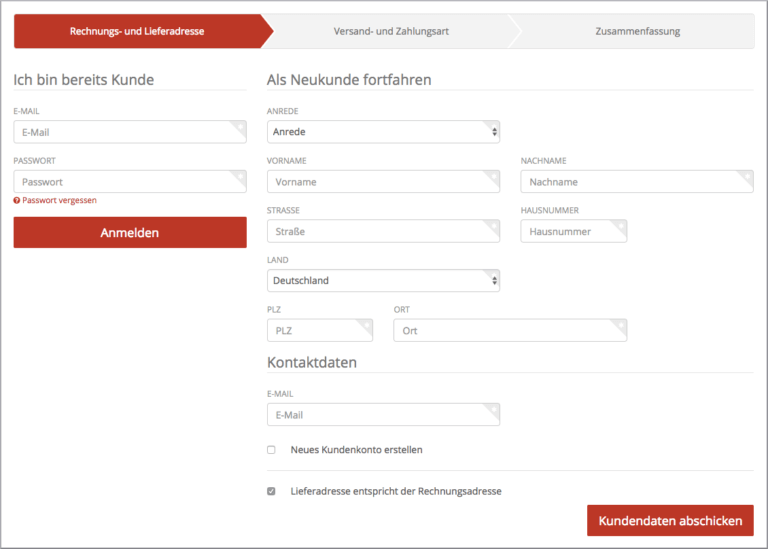
1. login / registration / guest as well as billing and delivery address
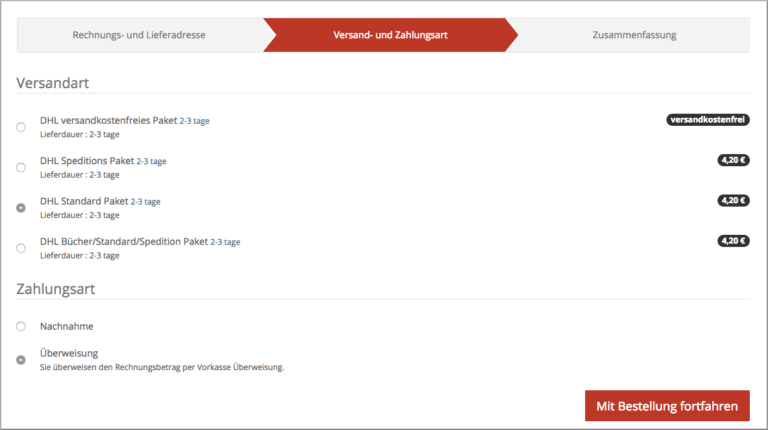
2. shipping and payment method
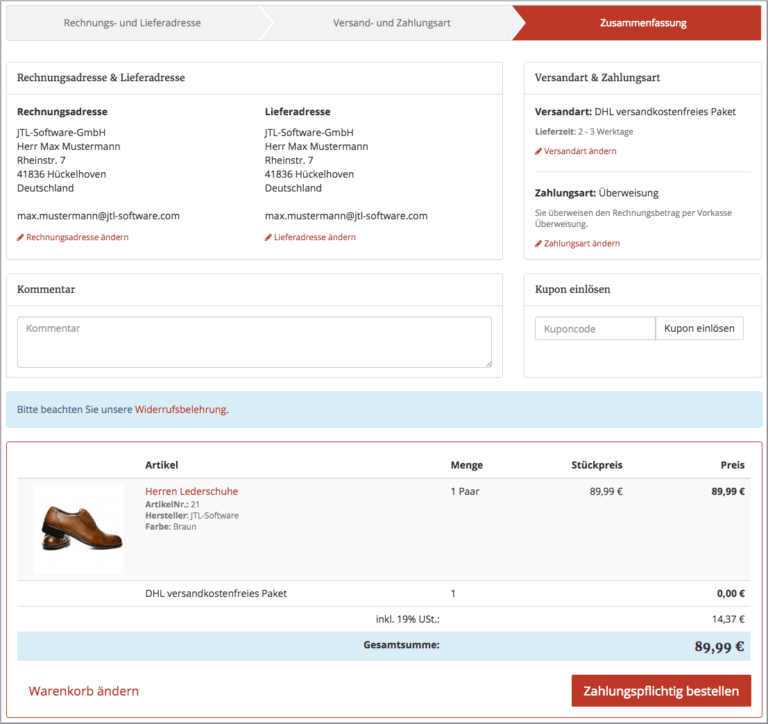
3. order overview and conclusion
The steps in detail
If a buyer clicks on the “Continue to order” button in the shopping cart after selecting an item, they are taken to the first point. Here they can register, log in using their e-mail address and password or simply enter their billing and delivery address. If desired, the buyer can also enter a password in the latter case and thus automatically set up a user account.
The next step is to select a shipping method and payment method. Both are displayed in combination. Once both options and any additional packaging have been selected, click on “Continue with order”.
In the last step, buyers receive an overview of the information provided and can complete the purchase by clicking on “Order with obligation to pay”.
The shortened checkout is automatically available with version 4.06 of JTL-Shop. As long as your template supports the short process, you can use it. Templates of version 4.05 and lower are currently not compatible. Our integrated EVO template is of course already adapted to this when it is released.
A little tip from us: With version 4.05, the almost inconspicuous function “Upload vCard” has already found its way into the JTL-Shop. You can find it on the right-hand side next to “Create new customer account”. It is now also available in the checkout when entering the billing address. Once you have taken the trouble to save your address data as a vCard, you can transfer it to any JTL-Shop with just a few clicks.
Conclusion
The stable version of JTL-Shop 4.06 offers a lot of convenience for buyers, from the already discussed item listings to the shortened checkout. If you use the new release, you will improve the user experience of your store and therefore also your sales. Find out more about the new JTL-Shop version in early 2018!