
In this guest article, we shine our spotlight on Seller Math, a long-time companion of JTL. Korbinian Sigel (KS) and his team created an exciting innovation last year with KostenWalter. The software offers the option of displaying your own current profits or losses within JTL-Wawi, a valuable addition to JTL’s product portfolio. So it’s time to take a closer look at it in an interview with Seller Math.
JTL: Hello Korbinian. You’ve been working with our ERP system for a good seven years now. During this time, you have become aware of a problem that affects many of our customers, correct?
KS: Hello, yes, exactly. In the past, we have repeatedly found that many online retailers have no concrete insight into their own profits, costs and losses. Amazing, isn’t it? In fact, even many veteran e-commerce merchants rely primarily on their own tax advisor. This is because they show turnover, cost of sales, costs and taxable profit. However, the decisive individual orders remain hidden. In our experience, retailers are giving away at least ten percent of their potential profit. There is a lot of room for optimization.
JTL: Ten percent is quite a lot. But explain what exactly is the problem?
KS: Even a concrete evaluation at order level provides online retailers with an approach as to whether and where they are actually generating or burning money. So far, JTL-Wawi has only provided these figures in the statistics to a limited extent. And many of them would have to be compiled manually by retailers. In fact, many do – often using their own Excel list.
But that’s where the problem begins: it’s time-consuming to compile the information. Not everyone knows which figures they actually need. And why should you look for them if the tax consultant is going to do the work afterwards anyway? What’s more, the Excel list is of little use for controlling if errors occur when the figures are transferred manually. A mistake here, a forgotten entry there – and the whole thing is worthless.
The need for optimization does not always lie in the obvious points, but in the details. On closer inspection, one or two bestsellers have turned out to be flops. Sometimes it’s because the picking and packing processes are too time-consuming, sometimes it’s due to unintentional loss purchases or the shipping costs eat into the small profit from an order. Most businesses have at least a dozen places where they incur more costs than are actually necessary. Many of these are not even difficult to solve – if you know where to start.
JTL: And that’s where your product comes in? How exactly?
KS: Exactly! KostenWalter evaluates the costs and profits of the orders placed. Specifically, the user first feeds our tool with all monthly costs incurred after the brief setup and integration with JTL-Wawi. This includes rent, personnel costs, accounting, consulting, insurance and so on. In addition, he can upload the accounting reports of the marketplaces and co. via XML if required. All of this is very easy – we have embedded videos throughout the software that explain how these steps are carried out. On request, we can also support the customer via Teamviewer.
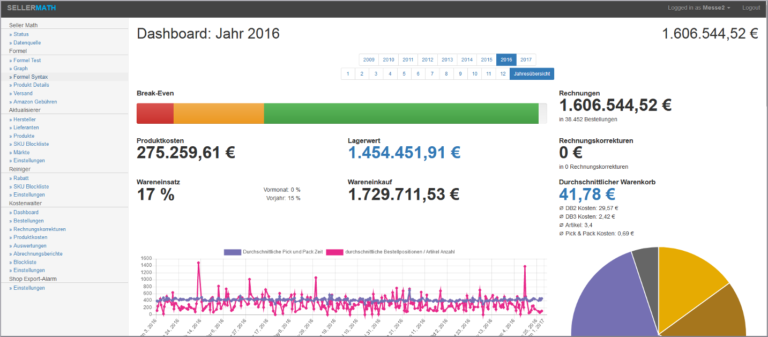
Once the KostenWalter has been fed with all the information, it starts the evaluation. The dashboard provides users with an overview of the break-even point, i.e. whether they are already in the black for the month. It shows the current sales total, invoice corrections, product costs, cost of goods sold and purchased and much more for the selected month.
JTL: The overview already sounds good, but how does it help in detail?
KS: Okay, let’s take a typical order that has been received via Amazon. You can view the order in detail in our software. The costs are divided into three contribution margins (DB). DB 1 gives you a breakdown of the product costs, payment fees, platform fees, pick and pack costs and shipping costs.
DB 2 shows the revenue less the fixed costs related to the business unit, such as personnel, packaging materials, software licenses, accounting and so on. DB 3 adds the global fixed costs of rent, consulting and insurance.
Our product then displays the final amount and shows whether you have made a profit or a loss on the order. And based on the items listed above, you can clearly see what may have cost you too much with this order. Perhaps the picking and packing was too slow. Or the platform fees are eating up too much of the profit. This already provides you with many optimization approaches.
JTL: This tells me how individual orders are calculated. What else can I display?
KS: An evaluation by product is just as possible as an evaluation by supplier or manufacturer. After all, controlling should not be limited to order level. Overall, we offer the option of exporting CSV files from the various parts of the program in order to create individual overviews.
The costs per platform are also exciting, as not every item is profitable on every marketplace. In addition to the purely sales-oriented figures, stock levels are also extremely interesting. Not every retailer knows where their slow-moving items are hidden. If the retailer has created product groups in the ERP, they can find out with just a few clicks which ones have seen little change in stock in recent months. This means that there is most likely a lot of dead stock. We also automatically inform customers of the changes in stock for the month-end closing on the reporting date. Any tax advisor will be delighted.
Some people may now say that they can put it all together without the software. But who has the time to put it all together? It would make much more sense to invest this time in optimization, because that’s where the profit lies. Retailers should be salespeople and not data collectors, decision-makers in their business instead of Excel spreadsheet administrators.
JTL: The charts, tables and dashboard provide retailers with all the overview they need. But how does the implementation work? The actual evaluation must still be carried out proactively by the retailer, but then in KostenWalter.
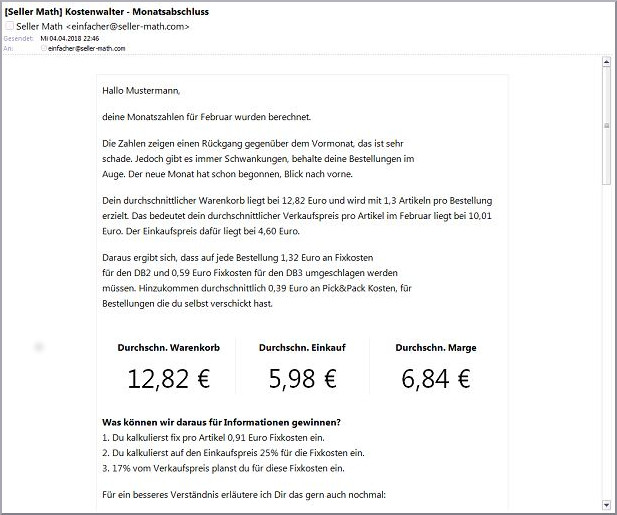
KS: Our customers can do that there, yes. Our service also includes sending emails about orders that have actually been sold in the red to draw the retailer’s attention to the situation. And every morning, we provide a handy summary of the previous day’s figures and an outline of how the month may develop. So our customers are always up to date. We deliver without the customer even having to ask. Our experience from over seven years of online business helps us to support retailers with controlling instead of just providing them with figures.
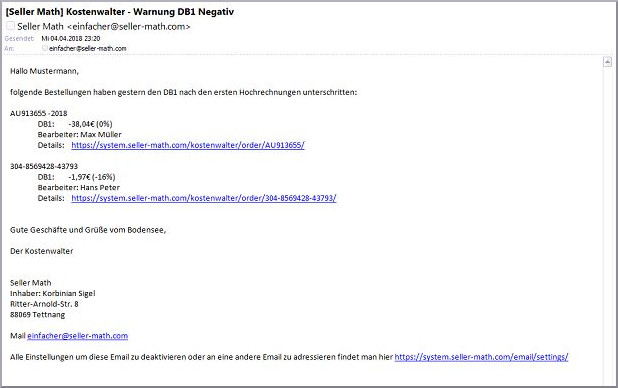
But before panic breaks out over the flood of emails and the question of where to start first, we offer tips, hints and warnings about the problems in the product and advise step-by-step correction. If certain information and emails are not desired, they can also be disabled by the customer.
JTL: Do you have more planned for the KostenWalter?
KS: Sure, a lot – but we are a small team. That’s why we’re taking everything step by step. Among other things, we would like to create integration with the APIs of cost producers such as Amazon, PayPal, AdWords and others so that users no longer have to upload anything. But we also have a few other elements in the works, such as intelligent costing.
JTL: Thank you for the interview, Korbinian.