Email marketing is a perfect form of advertising for online stores. With little effort and low financial risk, you can effectively increase your store’s sales and deepen customer relationships. This is why email marketing continues to enjoy great popularity. Email marketing is also highly valued by customers: In the USA, more than 70% of over-21s currently prefer email when it comes to communicating with companies. This makes email more popular than all other communication channels, such as social media or telecommunications, for significant target groups.
Functional interfaces for sending newsletters
For eCommerce retailers in particular, email marketing software offers promising opportunities to save time and effort. With the help of easily created interfaces, data from the eCommerce system can be used directly for sending newsletters. Among other things, this eliminates the need to manually export customer data from the store system and upload it separately to a recipient database.

The contacts are automatically synchronized via a corresponding interface and compared daily so that the data in both systems is always up-to-date and complete. Other useful data from the store system can also be used for sending newsletters. For example, with the help of a special newsletter module, entire products can be included in the newsletter simply by entering the product ID – with image, price, description and many other fields. This shortens the creation of customer-related and content-rich newsletters to just a few minutes.
Deepen and strengthen customer relationships fully automatically
Further advantages lie in the ability to automate customer contacts. Many emails only need to be set up once and can then be sent automatically to the customer when a certain event occurs, e.g. voucher codes for birthdays or reactivation emails in the event of prolonged inactivity. With the help of targeted personalization, even such automated emails can be tailored in great detail to individual recipients. Intelligently set up seamless contact channels can have a strong positive influence on customer loyalty.
Newsletter dispatch: Powerful plugin for JTL-Shop
The newsletter plugin from our certified technology partner Newsletter2Go makes it particularly easy to get started with email marketing. The interface can be set up in just a few minutes and can be used immediately free of charge for up to 1000 newsletters per month. The newsletter editor has a very intuitive design and is therefore easy for anyone to use without having to get used to it. All of the aforementioned performance features of professional email marketing software are fulfilled by the Newsletter2Go plugin.
Try it out! Please note, however, that the plugin currently only works with JTL-Shop3. We are working hard on the plugin for JTL-Shop 4, so that you will soon be able to realize new sellers of successful email marketing. You only need to follow a few steps to set it up:
1. set up the interface
To use the interface to JTL, all you need is an account with Newsletter2Go. Registration is completely free of charge and absolutely non-binding: Create an account with Newsletter2Go. As soon as you have created your account, download the newsletter plugin for JTL here. Follow the installation instructions andlink your JTL-Shop with Newsletter2Go.
2. synchronize your recipient data
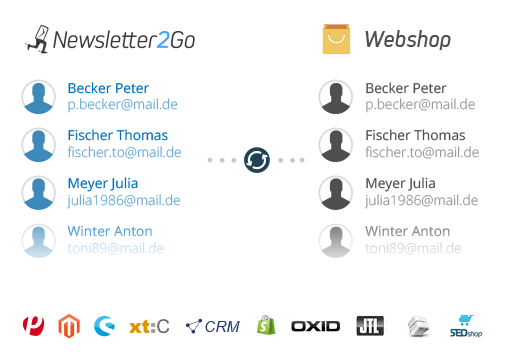
Once you have set up the interface, your recipients are automatically synchronized with the contacts from JTL-Shop. This means you don’t need to export your contacts or import them manually. The plugin performs a bidirectional recipient synchronization every 24 hours so that your data is always up-to-date in both systems. When a new newsletter subscriber logs in, they are automatically entered in your JTL-Shop database and vice versa. Newsletter unsubscriptions are also synchronized, whereby the relevant contacts are not deleted, but marked and no longer contacted.
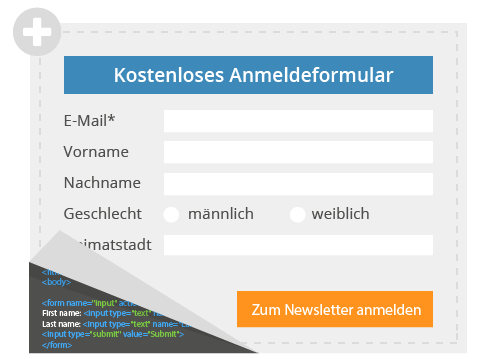
To log in new recipients, you can simply generate a registration form and insert it into your JTL-Shop. The recipients who register there are also synchronized and automatically transferred to the database.
3. create newsletters and insert products
If you want to send a sales newsletter to promote your products, you can do this very quickly and easily with Newsletter2Go. First select one of over 50 free responsive newsletter templates. If you need an individual template in your store design, you can simply have Newsletter2Go program it according to your wishes. You can then customize all templates according to your needs and fill them with your desired content.
To transfer your content to the newsletter particularly quickly, Newsletter2Go offers you the practical 1-click product transfer. To do this, you need a special module that can be integrated into an individual template.
Thanks to this module, newsletter creation is done in no time at all, because you no longer have to copy and paste product information manually. Instead, you simply enter the product ID from JTL-Shop and the module automatically pulls all available information from the database: product name, description, product images, price, discounts etc. This feature allows you to advertise products according to requirements with incomparable speed and flexibility.
With the extremely convenient transfer of desired product data into your newsletter, you can considerably increase the effectiveness of your newsletter campaigns!
4. send the newsletter
Once you have finished designing your newsletter, the next step is to select the recipients. With Newsletter2Go, you can easily segment your recipients based on the characteristics from JTL (e.g. gender, language, place of residence, date of last order) and divide them into groups. Generally speaking, the more precise the segmentation, the better you can tailor the products in the newsletter to the recipients and the more you will ultimately sell.
Everything should then be ready for dispatch. To make sure that your newsletter is exactly what you want, you can use the test send function to send yourself a draft of the newsletter. You can also test the links and the spam score beforehand, which indicates the probability of a newsletter being caught by spam filters.
If everything works, you can send your mailing. You can either send the newsletter immediately or pre-date it for a time of your choice. This can be worthwhile, as the best time to send it is often at the weekend, early in the morning or late in the evening, especially for B2C customers. You can also select a time zone of your choice for sending, which can be very practical for international target groups. Everything fits? Then click on “Order mailing” and send your newsletter!
Newsletter2Go ensures that your emails arrive in the recipients’ inboxes at all times. This works because the sending servers are whitelisted (marked as trustworthy) with the email providers. And you don’t need to worry about the security of your customer data either, because Newsletter2Go’s data protection is even TÜV-certified.
5. after dispatch: evaluate and optimize
After sending, you will want to know how well your mailing was received by the recipients. The key figures you can use to evaluate success are primarily the open rate and click rate. Newsletter2Go provides you with these values and much more data for each mailing in real time. A blog post we recently published on statistical values in email marketing 2015 can give you an idea of how your mailings compare to the average.
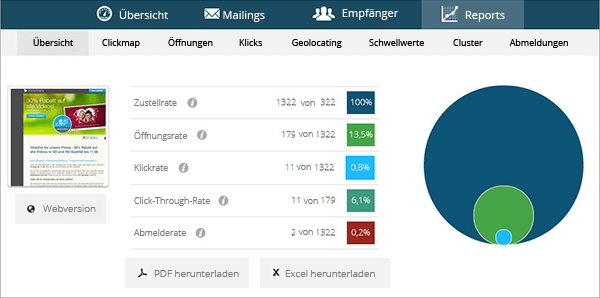
Feel free to try out different variants (e.g. sending times, content, order of content, wording of the subject line, sender name) and adapt future newsletters accordingly. Over time, you can find the most successful variants and continue to improve your newsletter. Log in to Newsletter2Go now for free and get started with email marketing for your JTL-Shop.
We wish you every success!