Content is king. Many store operators are aware of the importance of high-quality and unique content for their website. However, they are often faced with the problem that it is very difficult to place the relevant content in the desired places in the store. Particularly in the case of content that needs to be updated regularly and at short notice or is only to be used temporarily, the effort is spared. This often leads to recommended text updates being made too late or not at all. Potential conversions are wasted.
We at Kreativkonzentrat, a young web agency from Dresden and JTL service partner for over 4 years, have therefore set ourselves the task of developing a plugin for the JTL-Shop that enables fast and user-friendly content maintenance, regardless of the template used. The result is Dropper, with which our customers and JTL-Shop operators can offer their visitors targeted information and purchase incentives in the shop in a simple and elegant way. Regardless of whether it is JTL-Shop3 or the new JTL-Shop 4.
Update-Hinweis (Stand: 12.2022)
Die technische Unterstützung für JTL-Shop 4 wurde im November 2022 eingestellt. Wir empfehlen allen Shop-Usern dringend das kostenfreie Upgrade auf JTL-Shop 5.
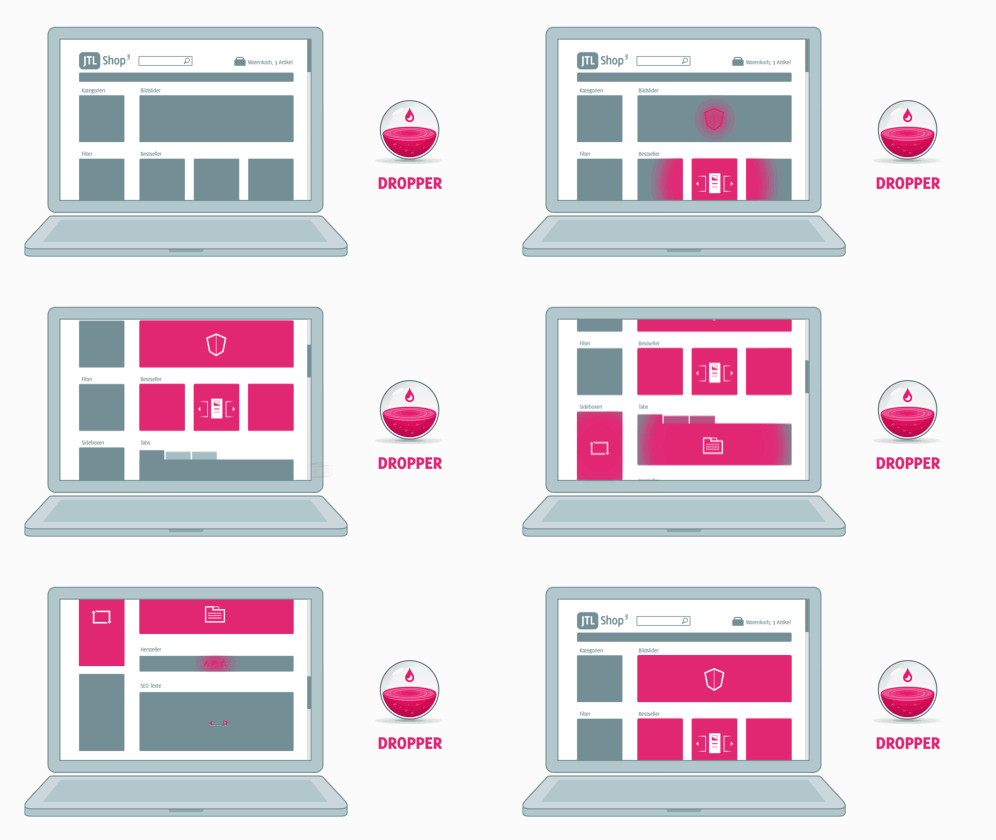
Dropper is one of the most comprehensive plugins ever developed for JTL-Shop. We are very pleased to be able to introduce you to the functions, advantages and diverse application possibilities of Dropper in detail in a three-part blog series.
In the first part of our series of articles, we will explain the basic structure of Dropper and familiarize you with the most important features. Practical application examples will help you to understand the benefits of Dropper for your project or store.
In the second and third parts, we will take an in-depth look at creating landing pages and developing your own drops. After reading this first part, you will already be able to guess what this means and what advantages it will give you. Let’s go!
Dropper - the control center for your drops
Dropper is the platform for managing drops. Drops are the actual content and functions that are used or displayed in your JTL-Shop. When developing Dropper and its user interface, we placed great emphasis on intuitive operation and Good documentation. You are therefore welcome to navigate to our Dropper wiki, for example, to obtain information on installation or other questions that we will not address here.
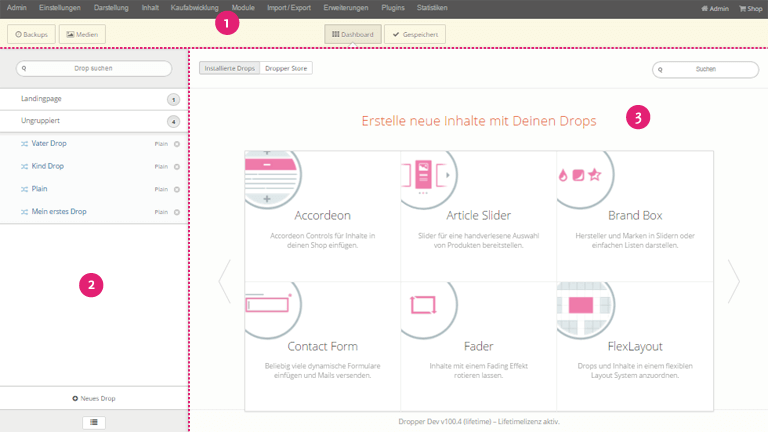
The clear and concise division of the basic areas in the dashboard makes it possible to get started immediately with the creation of a first drop. We can call up the drop detail view via the sidebar, in which we can then create the so-called instance of our drop. The associated dialogue box always has the same structure; for our example, we select the free plain drop to create the first content for our JTL-Shop.
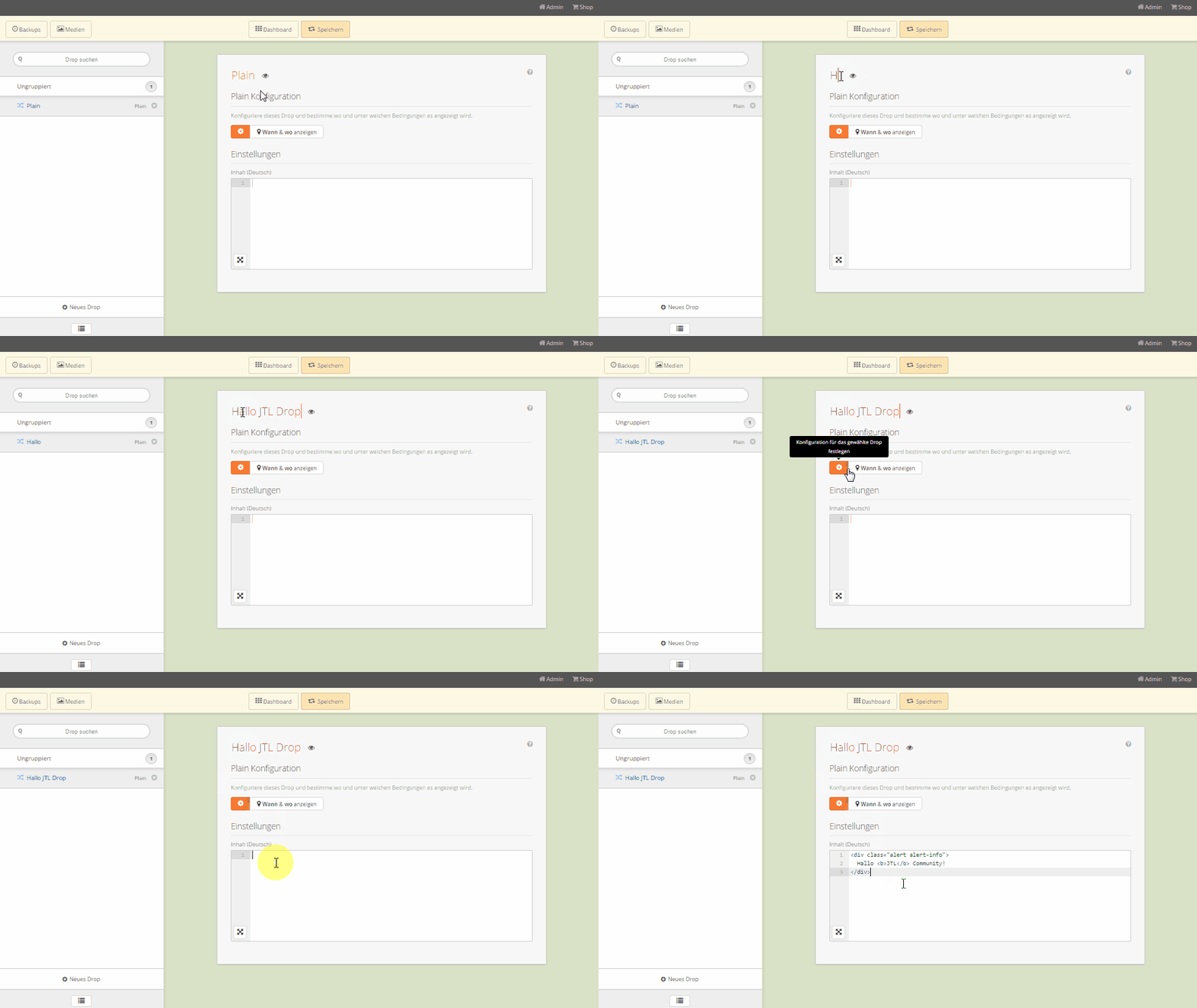
The drop can offer various elements and controls with which you can enter content or configure drops. From simple texts and image uploads to extensive HTML content – depending on the application, various input elements are available to you. Good overview of the possibilities can be found in our Wiki.
Placing drops with selector finder & display filter
The drop filled with content should now be placed in the store. With the selector finder, we offer a way to search for CSS selectors directly and easily in your own store. Once the right selector has been found, various functions can be selected, for example to attach the drop to the corresponding element or to replace it completely.
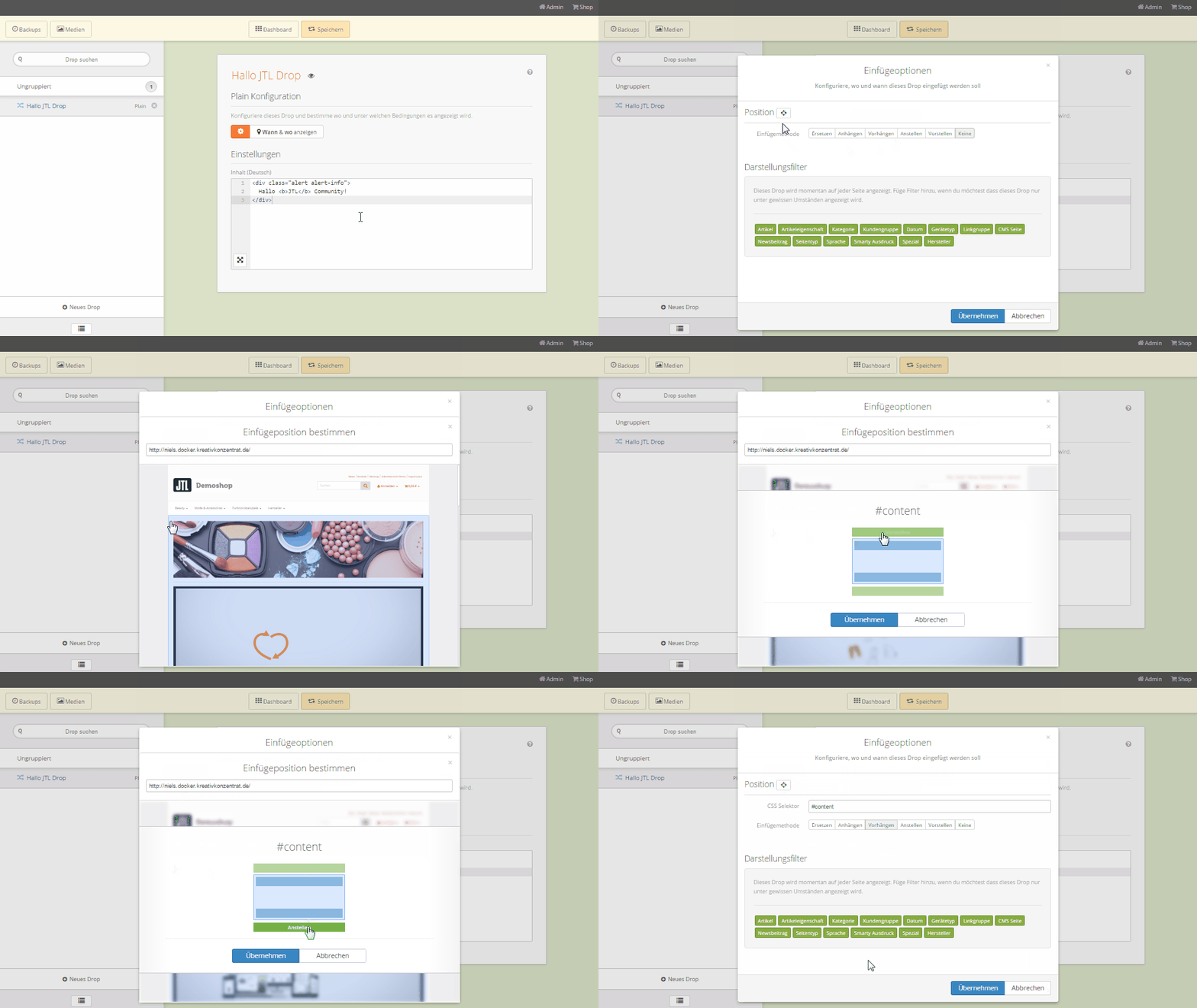
A selector alone is often not enough to determine exactly whether a drop should be displayed or not. This is where display filters come into play, which you can use, for example, to select on which devices or in which page types your drop should appear. By freely combining these filters, you can define extensive conditions that leave no questions unanswered.
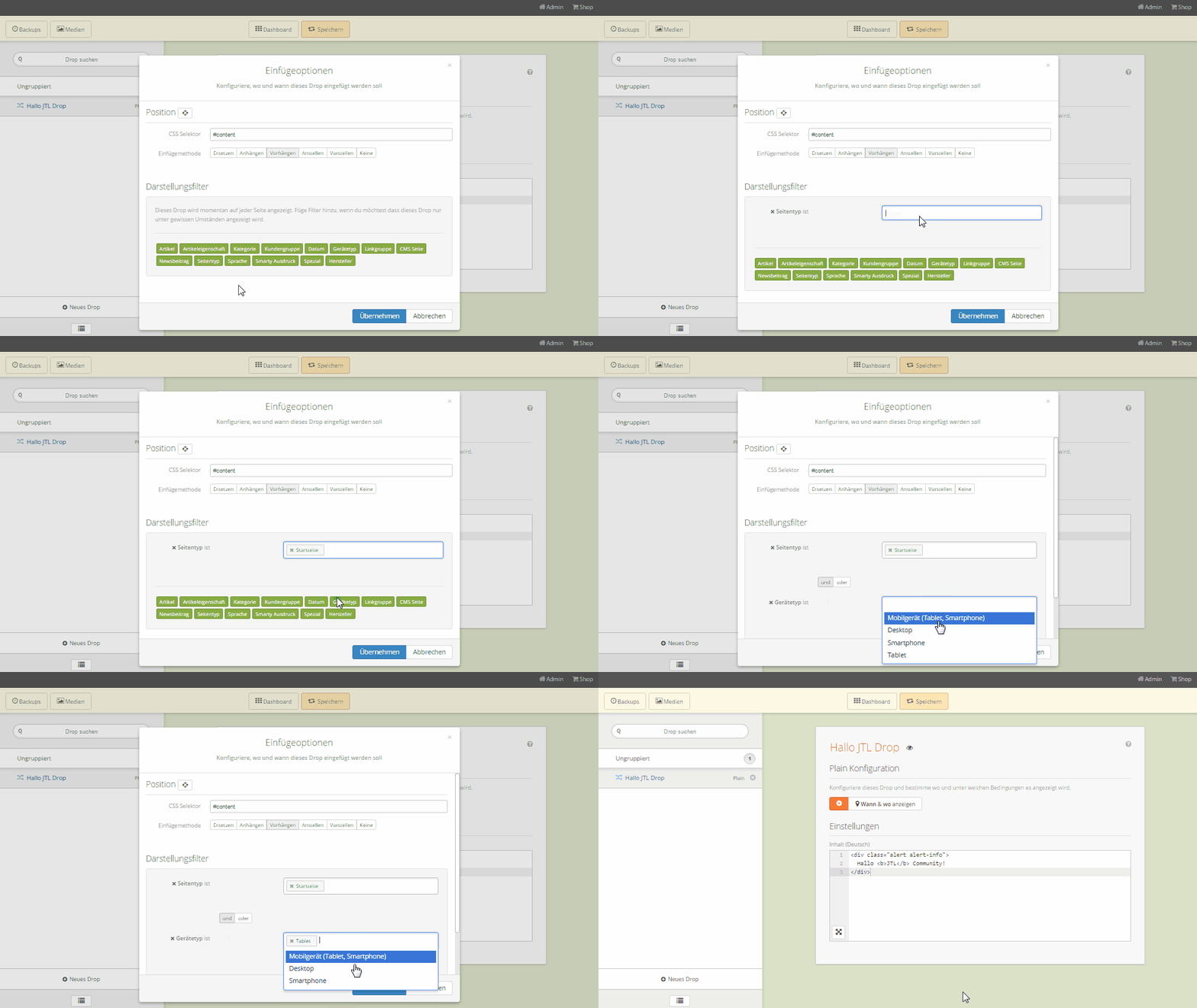
For example, it is possible to define whether a drop should only be displayed on detail pages of products that are from a certain brand or have a certain characteristic value. But that’s not all: the display of the drop can also be restricted to time periods (e.g. only from 01.12.15 to 24.12.15), customer groups (only retailers) and devices (only mobile devices). And all this with just a few clicks and clever search functions in the individual filter elements.
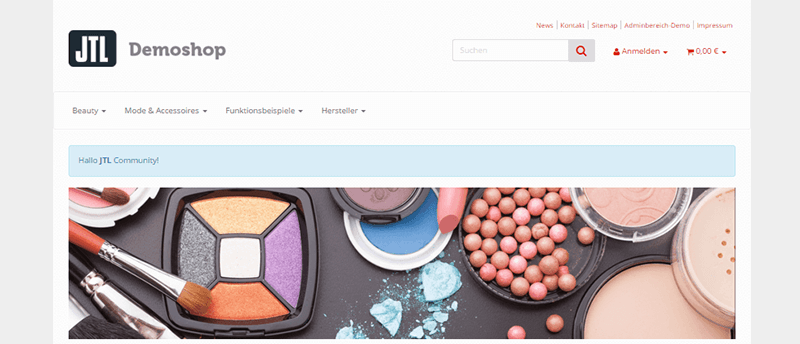
Complex drops for complex requirements
The presented Plain Drop offers the simplest possible functionality. Many of our drops are far more extensive. The Powerslide Drop, for example, can be used to create image sliders that also offer text overlays and preview images.
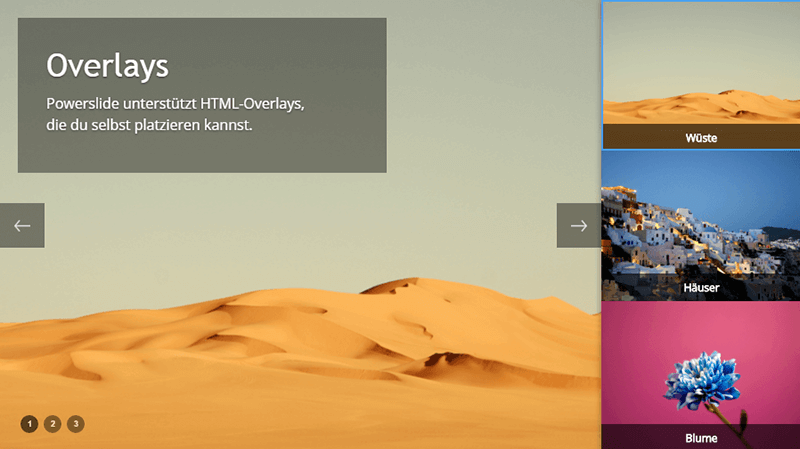
The Powerslide Drop is ideal for use on the homepage or on landing pages. It can contain any number of slides that can be extensively configured. The dynamic linking of items, categories or manufacturers, which is also used for many other drops, is particularly helpful here. If, for example, the name of an item changes in JTL-Wawi, the item linked in the Powerslide remains accessible, unlike with manually set links.
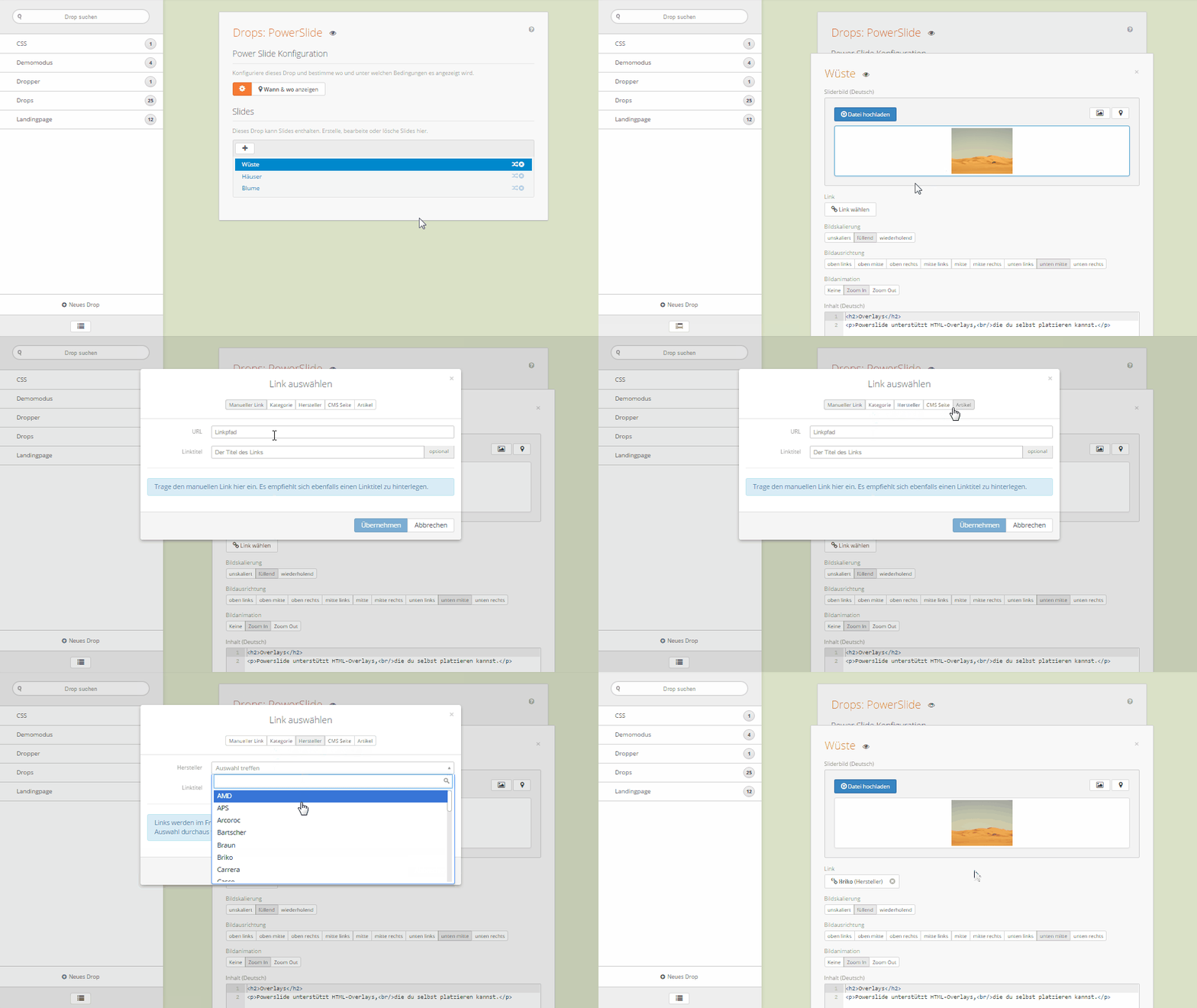
You can already see this from the two previous examples: All drops use the same infrastructure with Dropper and offer the same basic functions. However, the input options differ depending on the functionality offered. Some drops also come with their own input elements and allow very specific functionalities. More on this in a later blog article in our series.
Even more properties and functionalities of Dropper
In this article, we can unfortunately only give you a brief outline of Dropper and Drops. However, we would like to mention a few core functions and important properties of Dropper:
Compatible with JTL-Shop3 & JTL-Shop 4
Droppers and drops are fully compatible with JTL-Shop3 and the new JTL-Shop 4. No alternative installations are necessary. All drops are optimized for the Tiny (JTL-Shop3) and the new Evo template in JTL-Shop 4 and are also intensively tested in these templates.
Responsive design
JTL-Shop 4 comes with Evo, a responsive template. We also rely on “Mobile First” with Dropper. Our article slider is a good example: this drop initially shows fewer products next to each other if the screen width is too small, before the images are scaled smaller.
Multilingualism
Where it makes sense, content for other store languages can be stored for input elements (e.g. text, HTML, possibly also images). Here too, handling is standardized and intuitive.
Media management
Every upload to a drop ends up in the dropper media management. You can keep track of the media used in the drops at all times.
Package management
You can install and update the drops directly in the Dropper back end. Dropper also updates itself if required.
Backups, import & export:
Each save operation creates a save point that you can easily jump back to. Drops can also be easily exported and imported.
In addition to our wiki, to which we have already referred, you may also find our tutorial videos interesting in this context. In them, we go into more detail about the functions of Dropper and also present individual drops in detail.
Outlook for part 2 of our blog series: Landing pages for JTL-Shop
With Dropper, however, you can not only expand your JTL-Shop with individual drops in the desired places. Complex landing pages can also be created and are very easy to implement. Online stores such as click-licht.de, gastro24.de, jebe.de or kivanta.de successfully use these functions to create dedicated landing pages that address the visitor’s interests in a targeted manner. Alternative views for certain categories or manufacturer pages can also be easily implemented.
In about two weeks, we will explain the advantages of such landing pages and how you can implement them in your JTL-Shop in just a few minutes with the help of Dropper in the second part of our series of articles.
Already now: Test Dropper and Drops free of charge for 14 days!
Until then, we invite all readers to test Dropper and all Drops free of charge for 14 days. If required, we can of course extend the test phase – after all, there is a lot to discover. Anyone who knows us knows that we are always happy to receive feedback and suggestions. Hence the call now: Comment diligently here on the JTL blog or ask your questions directly to us – either via our store or on Facebook. We look forward to getting in contact with you.
See you soon! Your Kreativkonzentrat.