After the tips from Part 1, we are following up today with another speed supplier. Perhaps some of you have already had the opportunity to set up a new SQL server or optimize your own server maintenance. We guarantee that you won’t want to neglect the SQL server statistics either.
Realistic view - The statistics
Another important point for wear and tear is the database statistics. The server only updates these if more than 20 percent of the content of the respective table is changed. If a query runs via the server, it checks the statistics and creates an execution plan based on them. The latter specifies how many resources the system must plan to handle the query. However, due to the relatively infrequent updating of the statistics, the server often assumes incorrect data volumes. As the previously defined execution plan is not flexible, this results in a bottleneck. Unsure what this means in concrete terms?
An example: Imagine the server as your store, the content of the database is the warehouse. The statistics form the list of the current stock. Now a customer comes in, symbolizing the database query, and orders everything you have received in the last 30 days. The stock list reports no change, as the stock has not changed by more than 20 percent. However, the seller assumes that at least one new item has been added. He grabs his shopping cart, marches into stock and starts searching. However, he is shocked to discover that a total of 100 new items have been added. However, the sales assistant is stubborn and now picks up each of these items individually with the much too small shopping basket. You can imagine how long it takes the sales assistant to respond to the customer’s request.
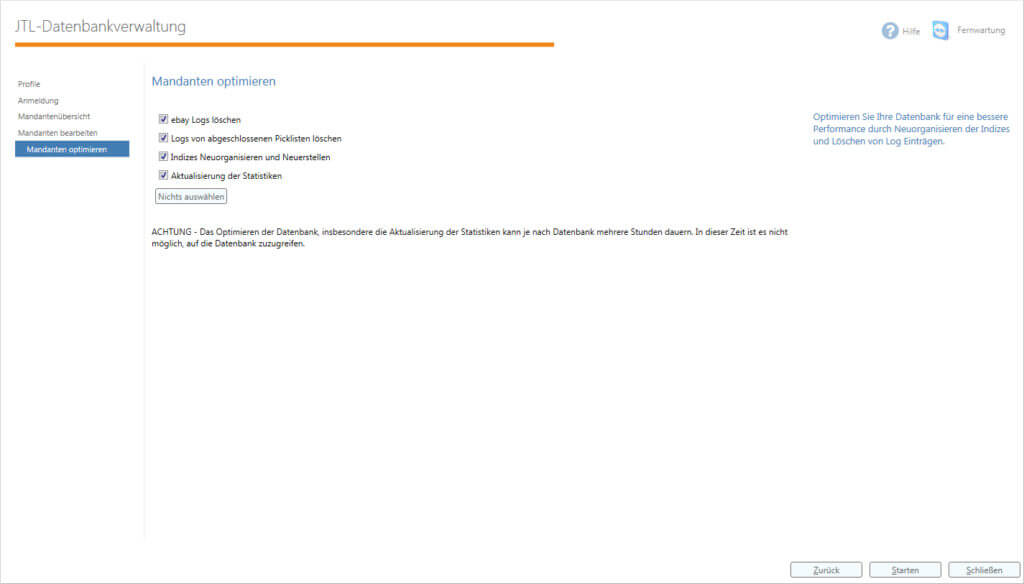
How do you solve the problem? Quite simply – with the JTL database administration included in JTL-Wawi. It allows you to optimize the database with just a few clicks. This includes checking and rebuilding the statistics. The construction sites mentioned in part 1, i.e. the database backup and the indices, can also be controlled manually using the Application. However, as with the indices, you should not check and possibly reconstruct the statistics during operation. This is because, depending on the extent of the changes to your data volumes, updating can be very time-consuming and resource-intensive. Also switch off the worker for this, as otherwise conflicts may arise in the processes.
You can achieve significant improvements with just one update a week, but once a month is not enough. In most databases, similar to the example above, the changes in this period are likely to be so large that the loss of speed is noticeable.
Do not exaggerate
If you have now acquired a taste for tuning your software – don’t overdo it! Do not interfere with the deeper functions of the database. Experience has shown that the consequences are often negative. We see many of the database optimization tools as equally problematic. In contrast to the database’s own tool and the tools we recommend, other little helpers like to make access from JTL-Wawi to the SQL server more difficult. Instead, make sure you install the regular security updates for the server to protect yourself against external attacks.
Conclusion
Maintaining and servicing your software is time-consuming and is therefore often put on the back burner. With our tips, however, you should be able to automate the three basic issues and their solutions. In addition, the gain in resources is not to be sneezed at – in the end, the customer and you benefit from the better performance of the database. Should any uncertainties arise, our service partners will be happy to help and advise you.