If you open an online store, you can also sell when your own store is closed. So now you want to start a second career as an online retailer? Then hopefully you didn’t miss the second day of our Quick Start Academy, which was dedicated entirely to building an attractive, competitive online store. If you did, we have summarized the most important content for you once again and made all of the day’s webinars available as video recordings.
The webinars at a glance
Webinar:
Opportunities and risks of your own online store
Having your own online store opens up many new opportunities for you as a retailer: You can reach a larger customer base and, with the additional foothold, you are better equipped to deal with temporary losses in sales in the store.
But as always, where there are opportunities, there are also risks.
Finding the happy medium
Before you decide to set up your own online store, you should carefully weigh up how many risks you are prepared to take. You should take various factors into account. One crucial question is whether you have the resources to continue running the online store when your store reopens in the post-corona period.
To give you some orientation, we have directly compared the most important opportunities and risks of having your own store:
Technical view| Opportunity | Risk |
|---|---|
| More reach and sustainable sales basis through second channel | Uncertainty as to whether the time and financial outlay is worthwhile |
| Technology (PC/laptop) for online store is usually already available | Is there still enough time “after the crisis” to maintain the online store? |
| New possibilities for product presentation | Maintenance effort (product description, images, etc.) |
| Opportunity | Risk |
|---|---|
| More target groups can be reached with existing and new products | Products are not suitable for online sales (e.g. because they require intensive consultation) |
| Customer needs can be served in a more targeted manner (e.g. customers can find out about the product in advance) | Customer group does not want to buy product on the Internet (e.g. because haptic impression is missing) |
| Supplier relationships are strengthened or expanded through higher purchase volumes | Delivery reliability can decrease due to higher requirements [icon name=”long-arrow-right”] higher possibility of failure |
| Opportunity | Risk |
|---|---|
| Consolidate or even realign the company’s image | Existing perception changes for the worse |
| Customer access due to larger target group (no longer just local customers) | Customer losses due to lack of acceptance of online sales among regular customers |
Of course, your financial, personnel and stock situation also play a decisive role in the risk/reward analysis. You should pay particular attention to these very individual factors, which depend on your specific business, and consult an experienced consultant if necessary.
Are you still unsure whether you have carefully considered all the opportunities and risks before embarking on your online business adventure? Then take a look at the video recording of our webinar, in which all the aspects mentioned are presented once again:
Webinar:
What makes a good online store?
The online store is your digital shop window. It must be designed in a correspondingly inviting and tidy way so that customers are happy to buy from you. Keep in mind that the willingness to linger on the Internet is rather low: visitors who don’t find their way around your store straight away will quickly move on to other websites with one click. A simple but appealing design creates a “feel-good atmosphere” in your store. The clever interplay of many other properties means that your store not only encourages people to browse, but also to buy.
Requirements for a successful start
You should consider the ingredients that make up the recipe for success of a good online store right from the start. What are they? We’ll tell you here:
FAQPrices vary greatly from provider to provider and depend on the desired functions and additional services. You can reduce costs by providing your own services, for example by supplying category images yourself. The costs also depend on whether an existing template is used as a basis or a completely new template is developed.
As part of our Quick Start campaign, our service partners also offer special discounts for programming a customized store template.
In this case, use the CFE (Community Free Edition), which is available including hosting for 14.99 euros (plus VAT) per month. This also gives you every opportunity to constantly expand your product inventory, as you can use up to 500 items as part of this tariff. Please note that each variation combination child is counted as a separate item.
Our current Quick-Start package includes the free use of JTL-Shop including hosting for 3 months.
In any case, you should offer prepayment / bank transfer and PayPal in Germany. Credit cards are also becoming increasingly important. With the implementation of electronic payment methods such as Apple Pay and Google Pay, more and more users have at least one credit card – at least as a debit version. It has therefore become an important means of payment.
In principle, the payment methods should not be a hurdle for customers and should work smoothly. Amazon Pay, for example, is therefore a good option. Also always among the top 3 payment methods in Germany: pay by invoice. However, please be aware of your default risk here and use payment service providers who assume this risk.
The selection of SEO tools is huge. As a fee-based option, we recommend the SEO module from Sistrix together with the on-page optimization tool from Ryte. A possible alternative to Sistrix is Xovi. However, there are also free tools that are also suitable for small websites. These include the SEO check with Seobility and the Ryte FREE account. Although these programs have a limited range of functions, they provide valuable information on the optimization potential of your online store.
With the solutions of our partners you can integrate the messaging service WhatsApp into your JTL-Shop:
Would you like to learn more about how to set up a visually appealing, user-friendly online store and what mistakes to avoid? In our webinar recording, you can expect lots of specific tips:
Webinar:
How does ERP support the success of your online store?
Online business is a highly dynamic process. There is always an exchange of information: Retailers present listings, customers submit orders. It is these data flows that keep your online business moving successfully.
The framework of your online store is in place. Now you’re wondering how best to manage all the complex information? Our recommendation: add a strong ERP system to your store. It will not only provide you with the necessary overview of all processes, but will also streamline them considerably.
JTL-Shop and JTL-Wawi work hand in hand
Our in-house online shop JTL-Shop and our ERP system JTL-Wawi are perfectly coordinated. Both systems function as a unit in day-to-day business by enabling a smooth data cycle. Here we would like to show you exactly how this cycle works and what role JTL-Wawi and JTL-Shop play in it.
JTL-Wawi sends article data
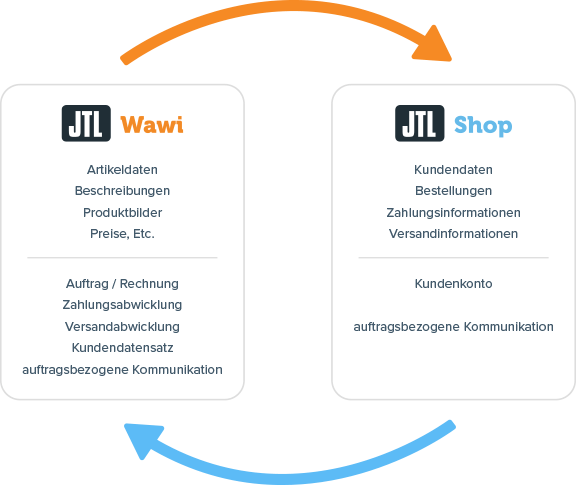
JTL-Shop sends customer data
When an item is sold in the store, various data is generated, such as customer, order, payment and shipping information. They are created in the customer account but, depending on the product, can also be sales-order-related (e.g. when a T-shirt is custom-printed). The purchase data is entered into JTL-Wawi as a sales order. This is where the order is processed and completed with shipping.
FAQThis option exists in the form of our RDP (Remote Desktop) hosting: It doesn’t matter where your workstations are located. The only requirement is Internet access. So you can work with JTL-Wawi from anywhere, with any computer or tablet and any operating system. Our Quick-Start package includes 3 months of free RDP hosting.
This was a brief outline of the interaction between JTL-Wawi and JTL-Shop. If you would like to gain a deeper insight, then watch the recording of the webinar:
Webinar:
Start with JTL-Shop: The first steps
Now that we have familiarized you with the more theoretical (albeit important) basics of an online store, it’s time to get down to business in the two remaining webinars. Have you installed your store system and want to get started quickly with the technical setup and presentation of your sales offers? Let’s go!
Joint look behind the scenes of the store
We will show you directly in the back-end of JTL-Shop which functions you should know right from the start and which settings are really important for the start of your online shop – and which features will only become relevant when you professionalize later. Get to know the different store areas (header, content area, footer), the dashboard, global settings, plugin management and much more. We will show you step by step how to fill your still “empty” store and set up your digital shop window attractively. We’ll keep switching back and forth between the back-end and front-end so that you can immediately see the effect of the settings you’ve made.
Webinar:
Connect JTL-Shop with JTL-Wawi
Now we’re going to dive deep into the details with you. Of course, we know that initializing the interaction between ERP and online store can be a challenge, especially for eCommerce newcomers. But don’t let this discourage you! We deliberately take a lot of time for this topic and carefully go through all the relevant settings with you.
All the basics explained in detail
We’ll show you click by click how to connect your online store to your ERP and synchronize the data from both systems. We’ll also show you how to create the master data for your items correctly and categorize them appropriately so that they are displayed as desired in the store. And what is the difference between attributes and characteristics? Take a look at the recording of this webinar, which will give you the best tools to familiarize yourself with the functions required for JTL-Shop in JTL-Wawi on your own.
To familiarize yourself with JTL-Wawi and the integration with JTL-Shop, we recommend the following tools:
Outlook
Over the past two days of our Quick Start Academy, we have familiarized you with the (legal) basics of online business and shown you how to bring your own online store to life. Now that the foundations of your own online business have been laid, on day 3 we will look at the next steps once you have received your first customer orders: Let us show you how order processing works in JTL-Wawi and which functions you need to know for this. We will also look at how you can organize and process your shipping efficiently with additional tools from JTL.
The other webinar days of our Quick-Start Academy: