Quick-Start Academy: Manage sales orders and organize shipping
The first orders have been placed in your new online store, on Amazon or eBay. But what happens now with the processing of sales orders? That’s exactly what we’ll show you on the third day of our Quick Start Academy. You will learn how to process customer orders in JTL-Wawi and how to get them on their way to your customers quickly with JTL-Packing Bench+ and the shipping service provider DHL.
Order received. And now? How to process sales orders in JTL-Wawi
To be competitive in online business, a fast, efficient shipping process is essential. After all, your customers want to receive their orders as quickly and accurately as possible. Our ERP system always provides you with a clear, up-to-date overview of the payment and delivery status of your customer orders.
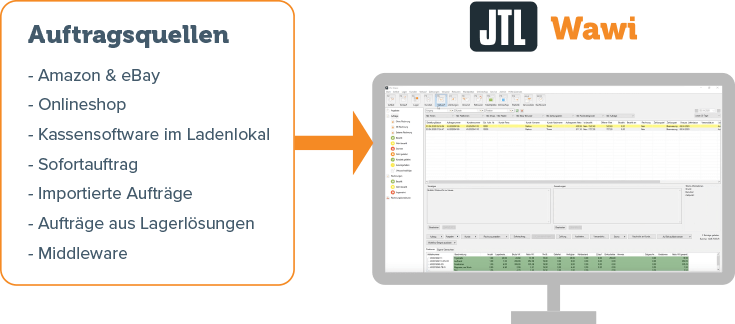
From which order sources are orders received?
JTL-Wawi bundles the orders from all your sales channels. Each customer order is created in JTL-Wawi as a separate sales order in the sales area.
Sales orders can be received in JTL-Wawi from the following sales channels and tools:
How are sales orders processed in JTL-Wawi?
Many processes relating to the processing of customer orders can be automated in JTL-Wawi to save time. However, in order to show you as a newcomer which work steps take place here, we will go through the individual points manually in this webinar.
To be able to process sales orders, you must fulfill two requirements:
The Sales area in JTL-Wawi bundles the listings, salesorders, invoices and invoice corrections folders. In the webinar, we will go into detail about the possibilities offered by the sales orders folder. We have briefly summarized the most important functions of the associated dialogs for you here:
The sales orders folder
In well-structured subfolders, you can see which orders your customers have already paid for or canceled, which sales orders you have already delivered and much more. Extensive search and filter functions make it easy for you to find a specific sales order. You can configure the list views as you wish. Simply choose which data you want to display here.
Here you can see the customer data, the delivery address and can call up the associated invoice or shipping information. You can also add custom line items, e.g. flyers or catalogs, which appear on the pick list and should be added to the parcel free of charge during the packing process. Items, shipping methods, payment methods and discounts can also be assigned in the order details. You can also make tax settings here – but please always consult your tax advisor.
Sales order documents such as invoices can be printed directly from the Orders folder. The relevant data such as sales order ID, customer ID, invoice date, items and prices are automatically filled in by the ERP. You can create the required document templates in JTL-Wawi using the integrated form editing function.
In the Delivered complete folder, you can create a return for the desired sales order via the context menu, create a return label and enter the reason for the return. You can also initiate the creation of an invoice correction in the same dialogue box.
With the payment module, you can view incoming payments from various sources directly in JTL-Wawi – e.g. payments via bank transfer, credit card or via payment service providers such as Amazon Pay and PayPal. You can also use the payment module to initiate the payment of A/P invoices or refunds to customers directly from the ERP.
You can automate many of the processes shown in the webinar with JTL-Workflows. To do this, you define once which events should trigger certain actions or chains of actions.
Yes. In principle, you can use any accounting software with the DATEV export. JTL2Datev from Jera or Nexus from Dekodi work almost completely automatically.
In the number ranges of JTL-Wawi. Here you can also work with prefixes or suffixes.
This was a brief summary of order management in JTL-Wawi. If you would like to get to know the functions and possibilities in detail, you are welcome to watch the recording of our webinar here:
Webinar:
Organize shipping: How JTL-Packing Bench+ helps you
We have already introduced you to the processing of sales orders. Now let’s go one step further and take a look at shipping. JTL offers numerous tools that can make your day-to-day work in the warehouse much easier. In this webinar, we will introduce you to two free software solutions that are ideal for new sellers: JTL-ShippingLabels and JTL-Packing Bench+.
Finding the right logistics partner
But before we get to the technical side of things, there’s another important decision for you to make: Which shipping service provider do you want to use? After all, you need a reliable partner at your side to handle shipping and returns professionally. Matthias Wäßle, Strategic Partner Manager at DHL parcel, therefore presents the following content to you.
Online retailers who decide to work with DHL enjoy numerous advantages as business customers in terms of the logistics provider’s services and prices. The DHL Business Customer Portal is the linchpin here. There you have access to all services, can view invoices or order shipping materials such as cardboard boxes.
DHL's recommendation for new sellers in online business
DHL parcel national (up to 31.5 kg)
Individual shipping options & prices
Collection from 200 consignments per year
Fast and comprehensive delivery – even on Saturdays
Liability up to 500 euros per package included
Dimensions: min. L 15 cm, W 11 cm, H 1 cm / max. L 120 cm, W 60 cm, H 60 cm
Supplementary services
Time and place delivery specifications
Transport insurance for high-value goods
Secure payment processing thanks to cash on delivery
Bulky goods for shipments outside the standard
Personal delivery
Many other services
National returns
Simple returns solutions for your online store
Returns label as a flyer in the shipment
Returns label available online and on mobile devices
Returns label will be provided on collection
Convenient collection
Included as standard in the package price
Collection of regular and special quantities
Digital ordering via a single touchpoint in the DHL Business Customer Portal
Shipping and returns with DHL are fully integrated into JTL-Wawi. Your advantage: You don’t have to constantly switch between JTL-Wawi and the DHL Business Customer Portal. Essential tasks such as shipping a parcel can be initiated from the JTL software at the touch of a button.
At DHL Paket, we try to find a quick and easy way for you to use our product portfolio directly from eCommerce software solutions such as JTL-Wawi.
Retailers who choose DHL as part of the Quick-Start online business campaign receive numerous special conditions when starting with the DHL Business Customer Portal. You can see exactly how onboarding in the business customer portal works in the webinar recording at the end of this blog post.
Print shipping labels with JTL-ShippingLabels
JTL-Wawi can exchange data with DHL and many other logistics providers via an interface. The tool required for this is called JTL-ShippingLabels and is already automatically integrated into the ERP. To activate JTL-ShippingLabels, all you need is a free license from our JTL-Customer Centre.
In the webinar, we will click through the first steps with JTL-ShippingLabels together so that you are ready to print shipping labels yourself:
Activate free license for JTL-ShippingLabels
Connect your account with your logistics provider to JTL-Wawi
We have developed JTL-Packing Bench+ especially for use in the warehouse. The interface is optimized for use on the touchscreen and can also be operated with gloves thanks to the particularly large buttons. With JTL-Packing Bench+ you can manage incoming goods, outgoing goods and returns in simple steps. You can also conveniently carry out internal work such as plus and minus postings or changing item conditions after a return. JTL-Packing Bench+ is automatically integrated into the JTL-Wawi ERP system. To use the software, all you need to do is activate a free license in the JTL-Customer Centre.
In the webinar recording, we present the possibilities with JTL-Packing Bench+ in detail:
Configure the workstation, e.g. set printer settings or integrate scales
Select language: German, English or Polish
Configure warehouse, e.g. set basic settings for goods receipt and dispatch
Packing sales orders
Creating pick lists and adding orders to pick lists
Unfortunately, JTL-Packing Bench+ is currently not available as an Android version.
However, you can use our JTL-WMS warehouse management system with the JTL-WMS Mobile app. In addition to Android, the app can also be operated via iOS and Windows Phone.
Swiss Post is not yet supported, but integration is currently being planned. In the JTL-IssueTracker you can vote for the integration of Swiss Post and follow the development status.
Would you like to learn more about the possibilities of shipping with DHL Paket and the advantages of JTL-ShippingLabels and JTL-Packing Bench+? Then watch the recording of our webinar:
To become familiar with JTL-Wawi, JTL-ShippingLabels and JTL-Packing Bench+, we recommend the following tools:
Step-by-step instructions for getting started with JTL-Wawi: JTL-Guide
E-learning on JTL-Wawi & Co. and individual online business topics: JTL webinars
Exchange your questions with JTL employees and other merchants: JTL forum
Step-by-step instructions in video format: YouTube channel
Detailed JTL-Wawi basics for new sellers: Online course
Outlook
On our fourth day of the Quick-Start Academy, we will focus on the topic of online marketplaces. First, we will introduce you to the eBay and Amazon platforms. Then we’ll move on to the practical part: We’ll show you how you can use JTL-eazyAuction to play the two largest marketplaces directly from JTL-Wawi.