
A large proportion of our JTL-Wawi users use eazyAuction tomanage eBay and Amazon listings and their order processing. A particularly important function here is automatic stock reconciliation. If, for example, a product is sold via the webshop or a goods receipt is posted in JTL-Wawi, this automatically affects the stocks on eBay and Amazon. How exactly this reconciliation works and which settings in JTL-Wawi are decisive are among the frequently asked questions from our customers.
With the updates to JTL-Wawi 1.0.5.0 and 1.0.7.0, changes have been made to the logic of stock reconciliation (please note the corresponding changelogs in the release forum!). The stock levels provided for eBay and Amazon are now determined in the same way – except for one special case – and can be controlled in the same way via the respective fields in the listing management. We would now like to introduce you to these correlations and explain them in detail.
The following fields in JTL-Wawi are important for stock reconciliation:
In the article detailsIn the eBay listing templates:In the offer templates Amazon:Relevant settings in the article details
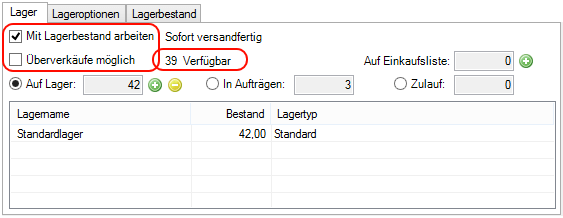
If you “work with stock”, the “Available” field shows you the internal stock that can be made available to your webshops, eBay and Amazon as available stock. It is initially made up exclusively of the real stock, i.e. the stock visible to the ERP system, minus any existing reservations (“In sales orders”). The following therefore applies:
“Available (internal)” = “Actual stock (in stock)” – “Reservations (in sales orders)”
Use the “Oversales possible” check box to set whether an item can still be sold or listed if a shortage is supposedly displayed. Overselling can be useful, for example, if frequently requested items are listed on different platforms and the stock reconciliation does not return the current stock movements to the platforms quickly enough. With this option, you basically override the importance of stock for supply management.
Alternatively or additionally, it may be interesting for you to set up a so-called “buffer” if you offer a good-selling item on several platforms at the same time. The buffer is an optional safety margin that you can also use for very fast-moving items to prevent overselling on the respective platforms. You can find the corresponding input field in the “Stock” tab:
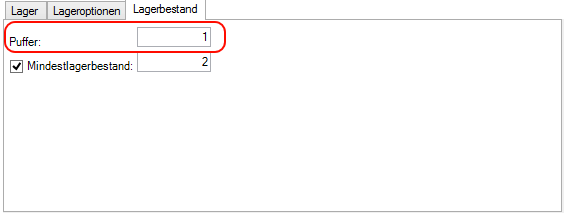
Please note that setting up a buffer has no discernible effect on the available internal stock in JTL-Wawi. In fact, if a buffer is set up, only the stock reduced by the buffer is transmitted to all platforms. We then speak of the so-called “externally available stock”. The following therefore applies:
“Available (external)” = “Available (internal)” – “Buffer”
Relevant settings in the eBay and Amazon listing templates
When you create a listing template for eBay, you will find the management area for the “Quantities” that you want to make available for your listing in the first tab “Listing”. You can optionally activate the input field “Automatically fill quantity up to a maximum of …” via the check box for both new and current eBay listings.
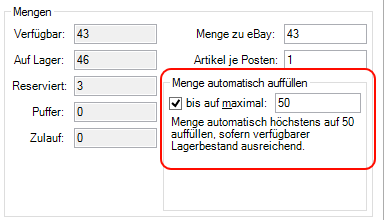
For the sake of simplicity, we will now refer to this field as the “Max quantity” for your eBay listing. A value stored there ensures that the stock on eBay is replenished up to a maximum of this quantity. If an item works with stock and allows oversales, the quantity is always set to “Max quantity” as soon as the quantity on eBay deviates from “Max quantity” – for example after a sale.
Special case: If the “Max quantity” for eBay is specified as “0″, this behaves in the same way as if the “Max quantity” was not specified or disabled. The eBay stock would not be adjusted.
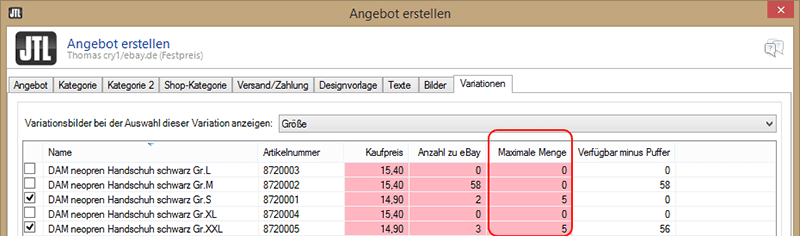
You can also assign a “Max quantity” per child item in the “Variations” tab of your variation offers on eBay:
You can also set and enter the value “Max quantity” for your Amazon listings.
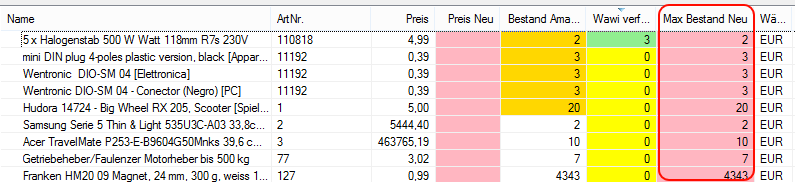
Under Marketplace -> Amazon -> Listing management you can edit the corresponding table field “Max stock new” directly:
Regularities in the calculation of stock levels
The information and values for the fields described above play an important role in calculating the stock that is sent to eBay or Amazon. The following rules and correlations apply:
1. the item does not work with stock:
2. the item works with stock and does not allow overselling
3. the item works with stock and allows oversales
Possible constellations for stock calculation
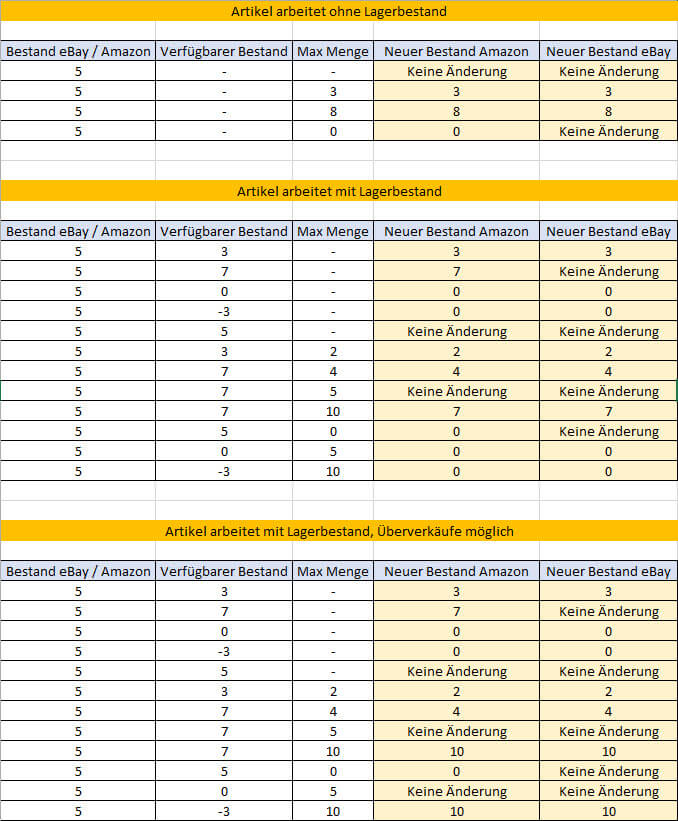
In the following table you will find examples of all constellations that can occur in the inventory calculation from JTL-Wawi 1.0.7.0. Using the resulting table or new inventory fields for eBay and Amazon on the right-hand side, you can directly see the effects of different entries/values of the relevant output fields.
With regard to the special cases mentioned above for your eBay stock, it is therefore important that you enter a “Max quantity” (> 0) if you want to ensure that eBay automatically adjusts your stock upwards.
You will soon be able to read more information on this topic in our guide. Until then, we wish you continued success in trading on the eBay and Amazon marketplaces!






