In support, we are always talking to customers who are reluctant to carry out a JTL-Wawi update. Some encounter problems and don’t know what to do. As part of our stable release of JTL-Wawi 1.3 from last week, we are now providing you with tips for a successful update. We also discuss some common errors and how you can avoid them.
Fear of the update
Some customers refuse updates from the outset. The fear of data loss or annoying bugs is great. We understand these concerns, but would like to allay them.
Data loss, for example, is very unlikely because an update does not delete any existing data. In fact, the JTL-Wawi database remains completely intact during the update. Of course, an additional backup of the database is always advisable.
We have been curbing the problem of annoying bugs at least since the changeover of our release process. This is because anyone using our stable releases is using a JTL-Wawi version that has already undergone extensive internal and external productive test phases.

Three common mistakes when updating JTL-Wawi
We discover three errors in support after every release of a new version of our ERP. They may seem completely obvious at first glance, but in the heat of the update battle they seem to occur again and again.
1. the blind update
New JTL-Wawi version is here? Great! And the update has already started. Only then do some people realize that familiar processes now work differently, plugins and extensions refuse to work or one or the other button has changed position. To avoid any unwanted surprises, we advise every customer to find out about the changes before updating the software. If you also rely on the stable release, you can also take a look at other retailers’ experience reports with the release candidates to get an even clearer picture of the new version.
2. system requirements have changed
If a new version is based on changed system requirements, we have usually informed you of this in advance. So if you have paid attention to point 1, you should not be surprised by point 2. In general, however, we recommend keeping the systems used for our products up to date as far as possible – especially the Windows and server versions. If we have announced a change to the system requirements, adjustments should of course be made before the update.
3. simultaneous updates on several computers during active operation
You are informed, the system requirements are met – so here we go, right? No, not necessarily. First of all, none of your employees should be working with ERP at this time. Ideally, you should therefore choose a time outside your business hours to carry out the update. Then start the update on a single workstation and only when it has been completed there, proceed with the rest. Avoid updating several devices at the same time before the first update has been carried out on a single workstation.
Particularly important: The JTL-Worker must be switched off during the process, you must also refrain from ant imports and checkout processes.
If you pay attention to these three points, you can avoid a lot of frustration when updating your software.
The ideal update
Some of you may be wondering what the ideal case looks like. Our support team has created a small checklist for you to use as a guide:
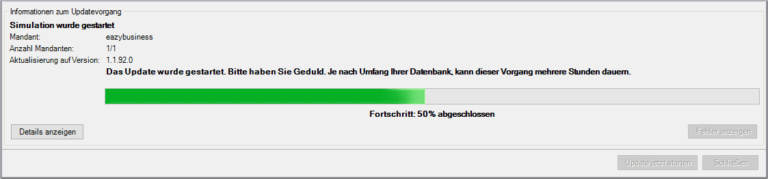
If you receive error messages during the last two steps, take a screenshot and send it to our support team in a ticket. If you have not booked fee-based support, you can find advice and help on error messages in our forum.
Conclusion
Even if an old principle for software is “Never change a running system”, regular updates bring numerous advantages. In addition to security improvements and optimizations to existing functions, such updates often also bring important new convenience functions for retailers. If you want to go through the update process as smoothly as possible, stick to our stable releases and follow the steps mentioned above. Our stable release for JTL-Wawi 1.3 is an ideal test candidate for this!