We have recently received numerous inquiries about Amazon’s changes to the Amazon Marketplace Web Service (MWS). We understand that the problem affects a large proportion of our customers who also sell their goods on Amazon. In this article, we will therefore show you how you can resolve the problem yourself in just a few steps.
What is it about?
Amazon has made specific changes to the authorization of the Marketplace Web Services. In some cases, customers have received an email from Amazon in advance informing them that their developer access for Amazon MWS is about to expire. Some time later, they then receive the following error message in JTL-Wawi when trying to synchronize with Amazon: “Error with account X: Your account is not active, please contact JTL support.”
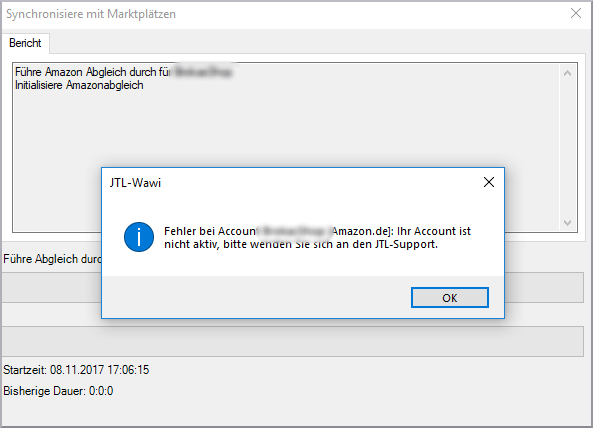
The reason for this: Amazon has removed application-based access, as originally described in our guide. All that remains is developer access, to which Amazon has automatically switched customers. However, this is limited in time and leads to the above error message after expiry.
The solution
We are currently adapting the error message so that users will know exactly what the error is in future. This will most likely look as follows:

You can fix the problem yourself in just a few steps:
As already explained, developer access is limited to a period of 12 months. You must therefore reconfirm this every 12 months, as in the case of this message.
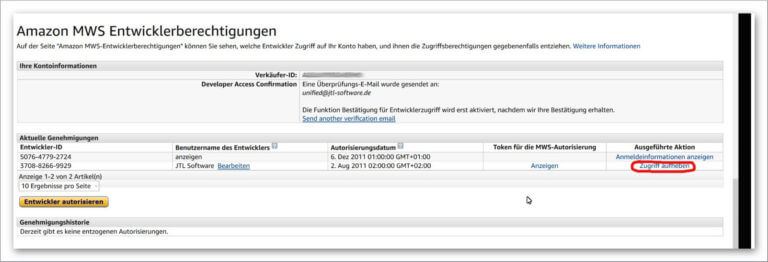
You have not yet reached the end. You also need to make an adjustment in JTL-Wawi:

Select the relevant Amazon account. If it is indicated there that the account is now inactive due to an expired MWS approval, click on “Check account”.
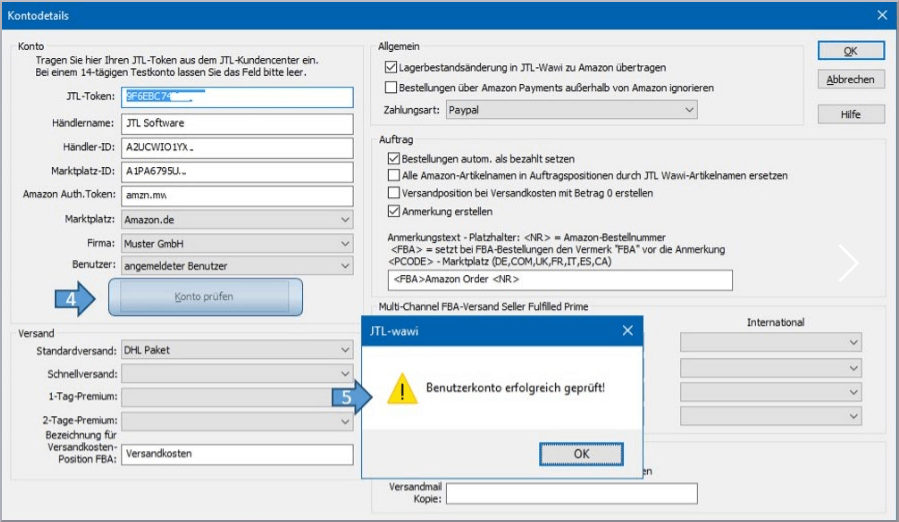
Of course, we have also added all the steps in the corresponding guide article:
https://guide.jtl-software.com/jtl-eazyauction/amazon-einrichten/
We also refer to this in the adjusted error message. New customers only encounter the problem to a limited extent, as only developer access is available for selection during setup. The above steps would only be necessary after the authorization has expired.
Conclusion
If you still encounter problems, please contact our support team. As mentioned above, this problem should only occur in future if the 12-month limit is exceeded. We are already checking whether the procedure can be further optimized from our side.