Many of you have been benefiting from the JTL-Shipping extension since JTL-Wawi 1.0. Especially frequent shippers are happy about the possibility to conveniently control shipping, label printing and co. from the ERP. With version 1.1 of JTL-Wawi, our shipping solution also received some new features, including integration with the shipping service provider UPS. However, only a few people know this: JTL-Workflows can also score with efficiency gains in the shipping business.
JTL-Shipping - when is it worth using?
At JTL Connect, we heard from customers that some retailers are reluctant to use it because they are not “big enough” for it. For this reason, here is a brief explanation:
JTL-Shipping is part of our free ERP system JTL-Wawi. It gives you access to the interfaces of numerous major logistics providers, such as DHL, DPD or Hermes. You can track your shipments within the Wawi and print shipping and return labels. But more importantly for many: If your trusted logistics provider goes on strike right at Christmas time, you can easily access one of the interfaces of other providers at short notice and thus use different shipping options in parallel. Retailers who ship a lot abroad can use automated processes to initiate customs declarations and other bureaucratic steps.

In short, it is worth using for any retailer that sends parcels to customers. By providing access to the functions of the individual logistics providers within the ERP, the solution simplifies all processes relating to shipping.
But that’s not all, because if you also bring workflows into play, you can avoid numerous pitfalls and idiosyncrasies of your customers and logistics service providers.
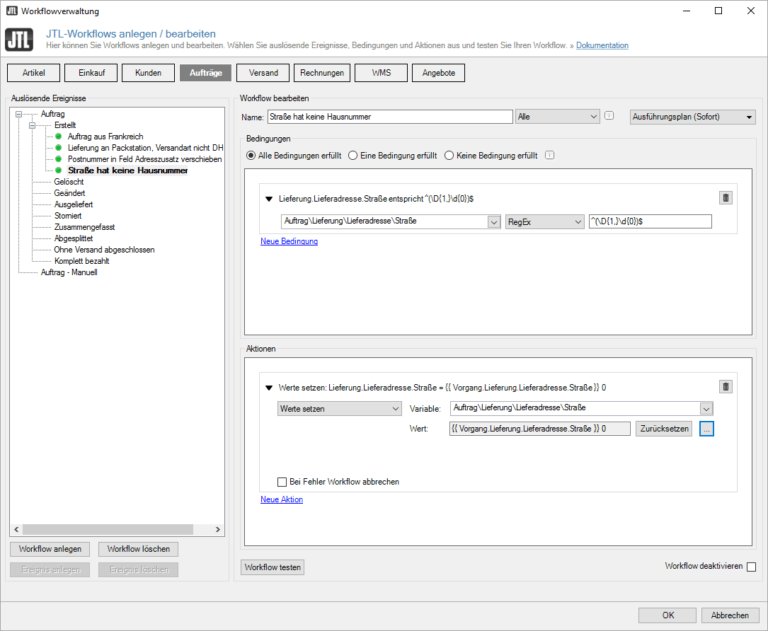
Workflow 1 - Automatically correct addresses without house number
Not every shipping service provider can deliver parcels without a house number. A simple workflow helps to ensure that the order can still be processed smoothly in the system and eliminates the need for manual corrections later on.
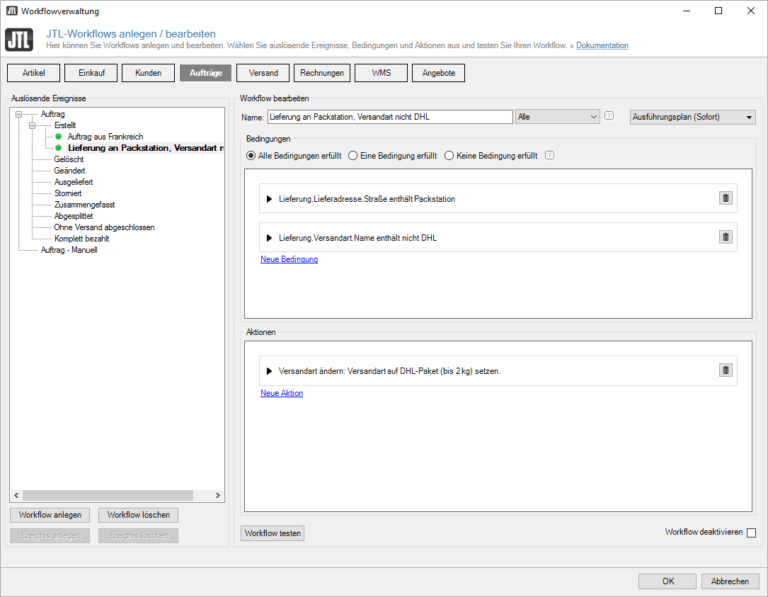
Workflow 2 - Change shipping method if Packstation without DHL was selected
If your customers enter a Packstation as their address but fail to select DHL as the shipping service provider, this will lead to problems within the system. Here too, the solution is simple using workflow:
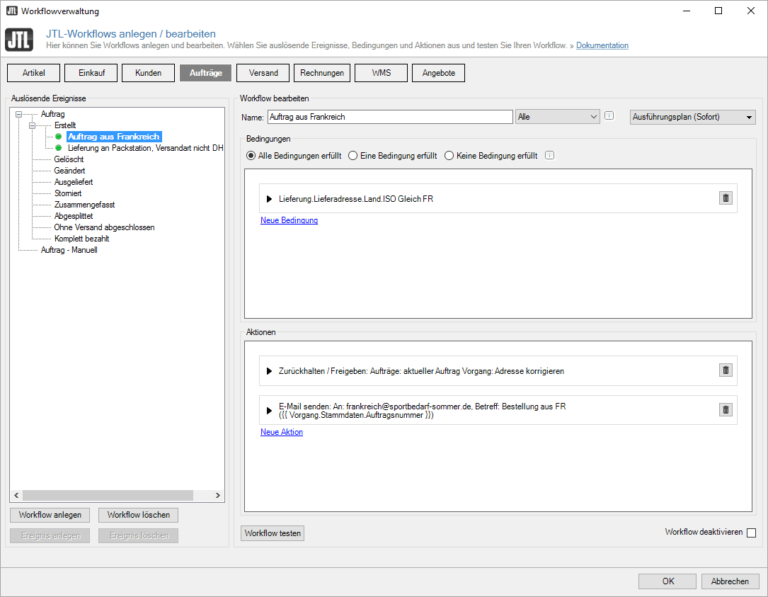
Workflow 3 - Define manual check for international shipping
Anyone who regularly ships abroad but frequently encounters errors in the information from certain countries can have orders from there automatically added to a checklist. The list can also be assigned to a responsible employee by e-mail. And this is how it works:
Some of you may already be thinking that there are certainly various other automation options in addition to these three examples. In fact, we have a few more approaches ready for you, which we will document for you in the JTL-Guide. You can already find another workflow here:
JTL-Shipping (DE)
We will be expanding this section in the coming weeks and months to include useful assistance, and we will keep you up to date.
Conclusion
JTL-Shipping is already a powerful tool for online and mail order merchants, with numerous advantages that every JTL-Wawi user can use free of charge. The workflows presented above round off its use even further and make everyday life easier for merchants. However, JTL-Shipping itself will receive a number of enhancements in the coming months. So be curious to see which logistics service providers and new functions will expand the solution’s profile.
We hope that this article has given you an insight into the range of services offered by our mail order solution and the possibilities offered by JTL-Workflows. If you are particularly interested in the latter, you should also keep your eyes open next week when we will be looking at the winners of the “Show me your Workflow” campaign.