Social Commerce – Successfully implemented with JTL-Shop and Facebook Pixel
Social commerce is one of the big eCommerce trends for 2022, but how do you implement a successful sales campaign on social networks? All you need is a combination of JTL-Shop, a plugin from WebStollen and the easy-to-understand 5-step plan from kreativkarussell. You too will soon be conquering the lucrative world of social commerce.
A trend that has come to stay
ECommerce is booming. And social networks are also experiencing ever-increasing demand – mainly due to limited contact options during the pandemic. In 2020, there were 4.2 billion active social media users, with 1.3 million new users joining every day. These figures are likely to increase significantly again in 2022. Increased usage is also changing consumer behavior: The target group of 16 to 24-year-olds in particular are no longer using traditional search engines for their product and brand research, but primarily social media.
It is therefore not surprising that more and more online retailers are selling their goods there. Social commerce is the name of this new growth area that enables retailers to address their target group in a completely new way: More personal, more emotional and more approachable than would be possible via the online store or marketplace presence. This is because social media is not just about selling goods, but about a holistic experience.
Successful social commerce with JTL
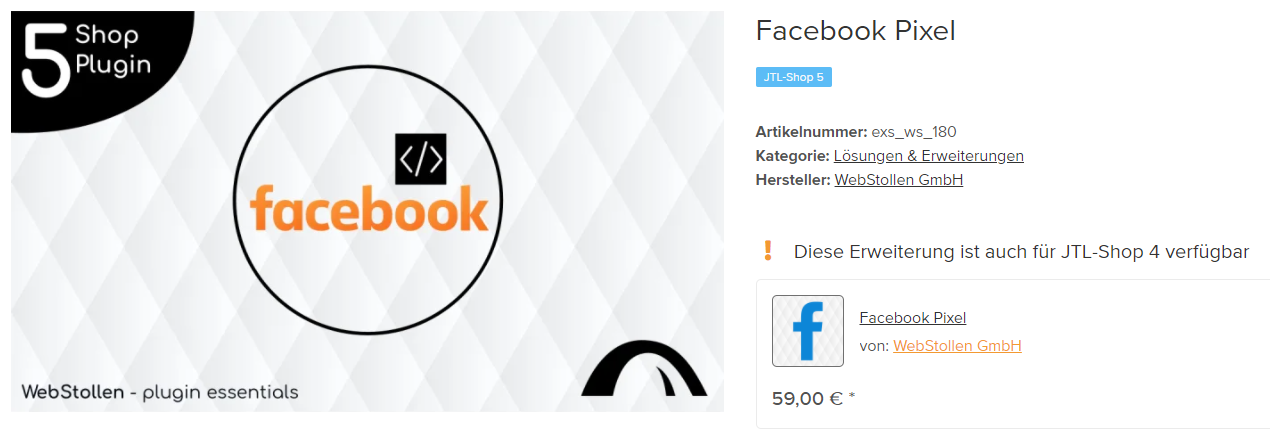
You can also successfully place sales campaigns on Facebook and Instagram with JTL-Shop 5. All you need is the Facebook Pixel plugin from WebStollen, for example. Facebook Pixel helps you, among other things, to transfer your product catalog to Facebook, measure your advertising success and create your target group (custom audience) precisely.
You can find out what else the plugin can do and how you can easily integrate it into your JTL-Shop 4 or 5 in WebStollen’s detailed documentation.
Our JTL service partner kreativkarussell has already used this extension to implement successful “catalog sales” for social media for numerous customers – including our joint customer Rum & Co:
We have been successfully using the Facebook Pixel plugin from WebStollen for over five years to export products to the Commerce Manager in our JTL-Shop. We are extremely satisfied and will continue to use it! What we particularly like about the plugin is that it is always up to date and technical innovations such as CAPI are already integrated.
Below we have summarized how you can do this in just five steps:
5 steps to a successful catalog sales campaign with JTL-Shop
You can use the Commerce Manager on Facebook and Instagram to create so-called catalogs that contain information about your items. This allows you to prepare certain product groups individually for a specific target group and then display them in the form of different ad formats (also known as “ads”).
1. install and set up the plugin
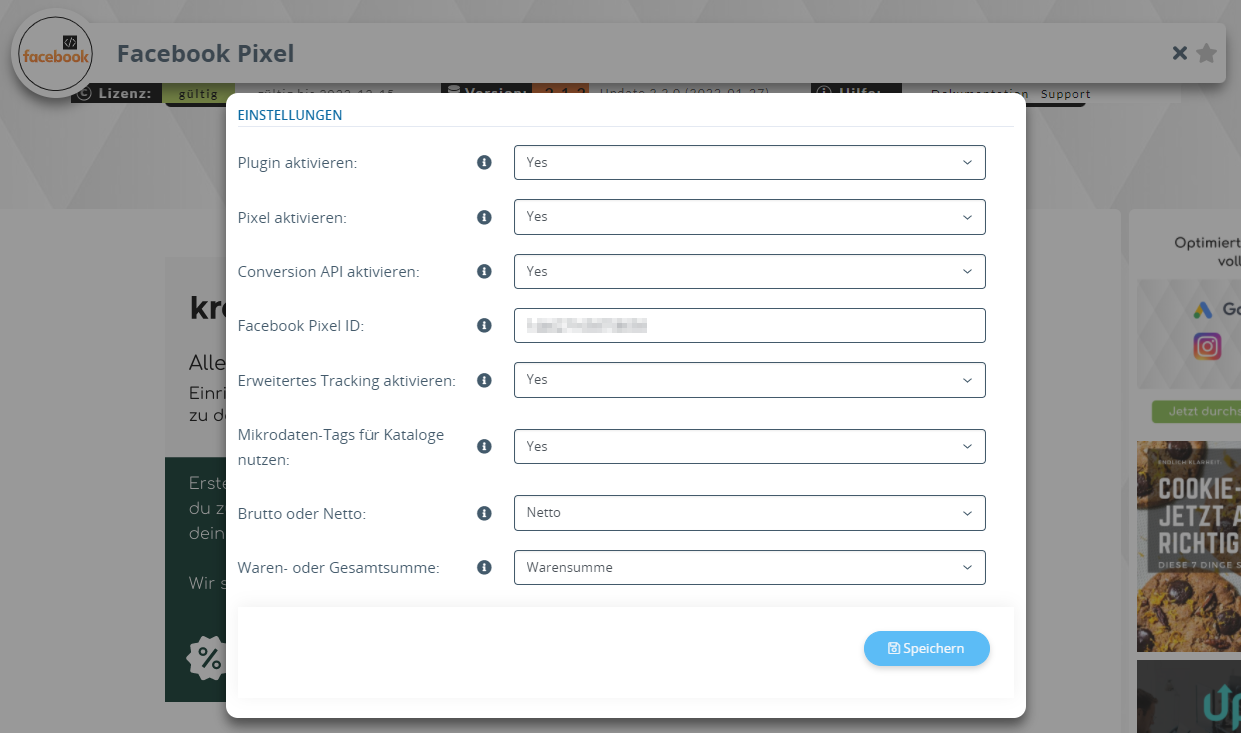
With Facebook Pixel from WebStollen you get a plugin that also directly sets up Facebook tracking including Facebook Conversion API (CAPI) and the events for optimization.
Within the plugin, there are some setting options regarding tracking: For your catalog sales campaign, you need either the Facebook Pixel or the Conversion API, which are linked by the ID or the Access Token.
It also makes sense to use the microdata tags to automatically update the catalog.
2. create product export
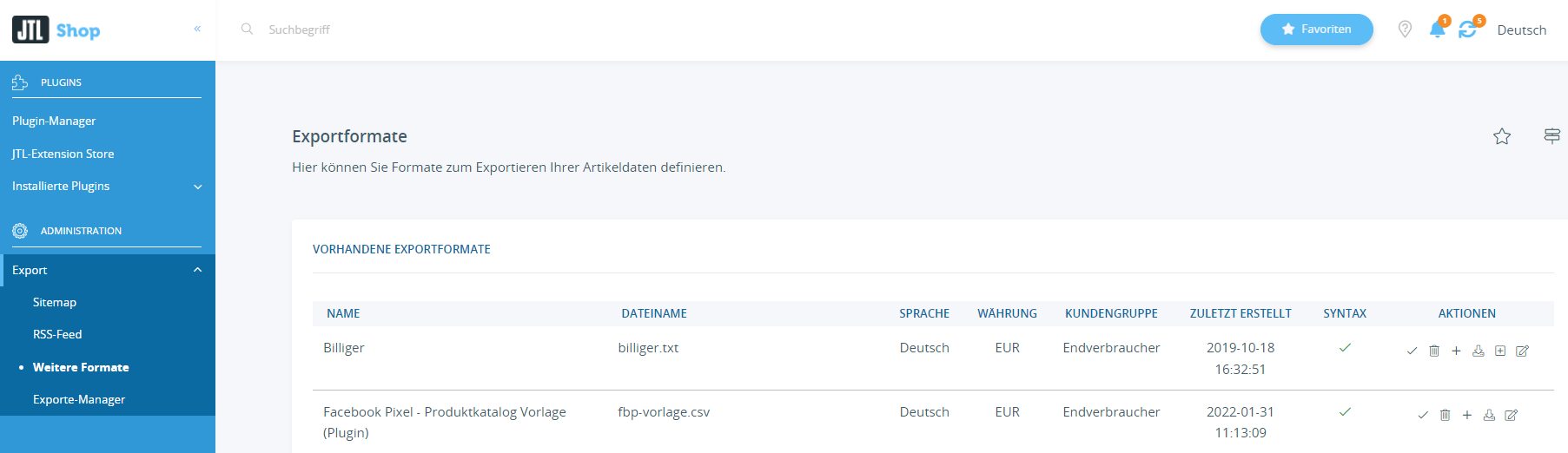
Under the menu item “Export” → “Other formats” you can check the format “Facebook Pixel – Product catalog template (plugin)” and adjust it if necessary.
To ensure that the product selection is as up-to-date as possible, the export should be updated at least once a day. You can find the setting for this under “Export Manager”.
My expert tip: If you often make adjustments to the product range at a certain time of day, you should start the export shortly afterwards in order to transfer the most up-to-date data to the campaigns.
3. product import commerce manager
Next, you need to import the previously created export data to Facebook via the Commerce Manager. If required, you can also make adjustments to the data here, for example via regex rules.
First, select your company account and the assets in it. If you have not worked with the Business Manager before, you will need to open it once. You then create your catalog for “eCommerce” via “Add catalog” and select “Upload product information” as the upload method.
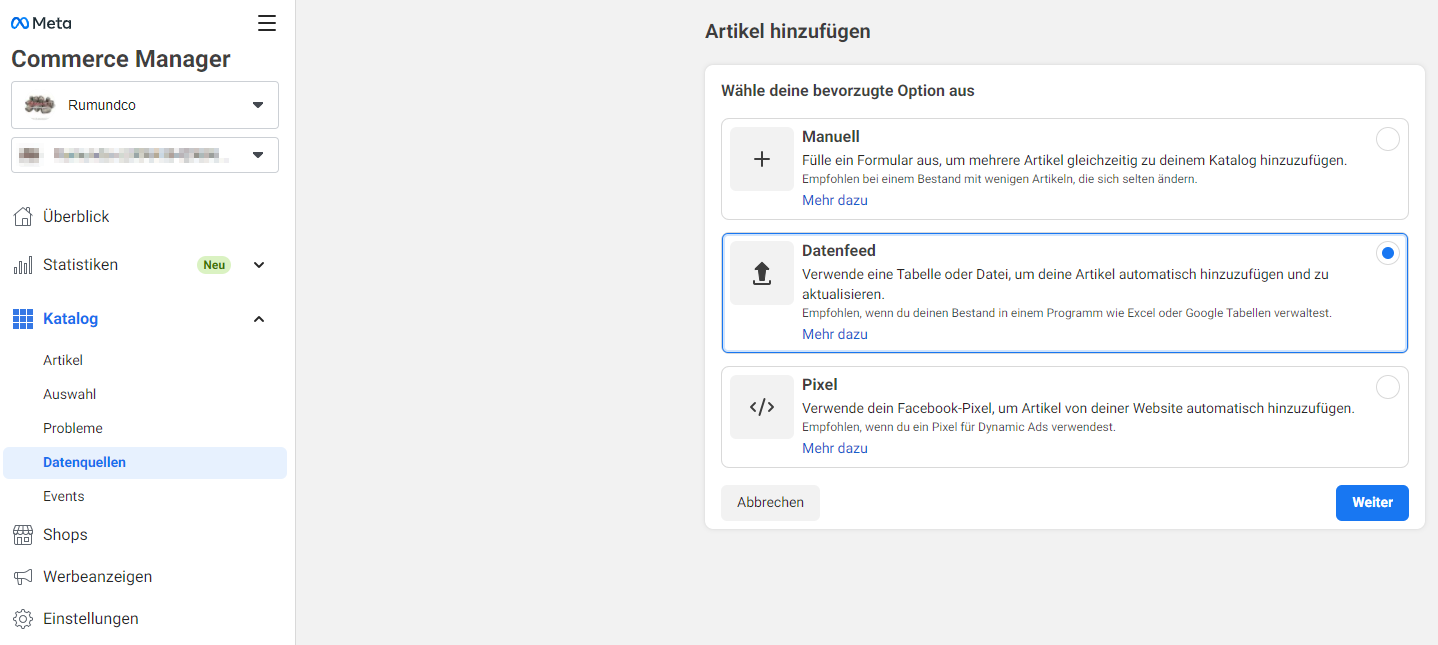
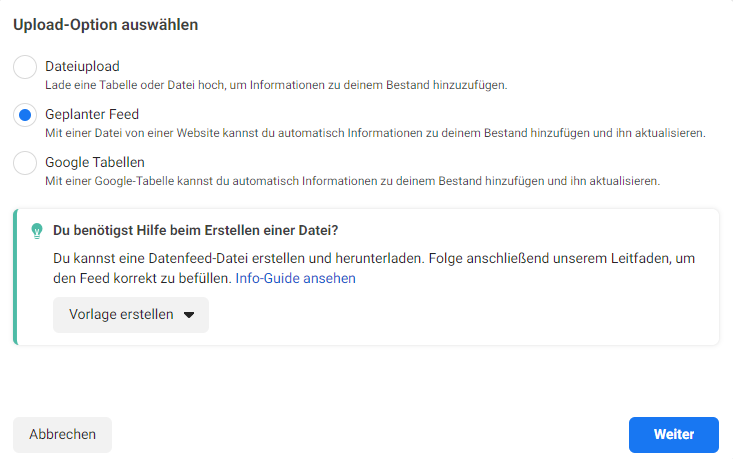
In the next step, you then create the automatic import of the export file previously created in the back end. To do this, select the “Data feed” option under “Catalog” → “Data sources”.
The URL in the next step is made up of your own JTL-Shop URL and the ending /export/fbp-vorlage.csv. For example: https://www.kreativkarussell-shop.de/export/fbp-vorlage.csv.
You should then create the update schedule in the next step according to the export with some time buffer in order to use the latest data here too.
You should also connect your catalog to the pixel to ensure optimal campaign performance. You can find the option for this under “Events”.
4. create campaign in the ad manager
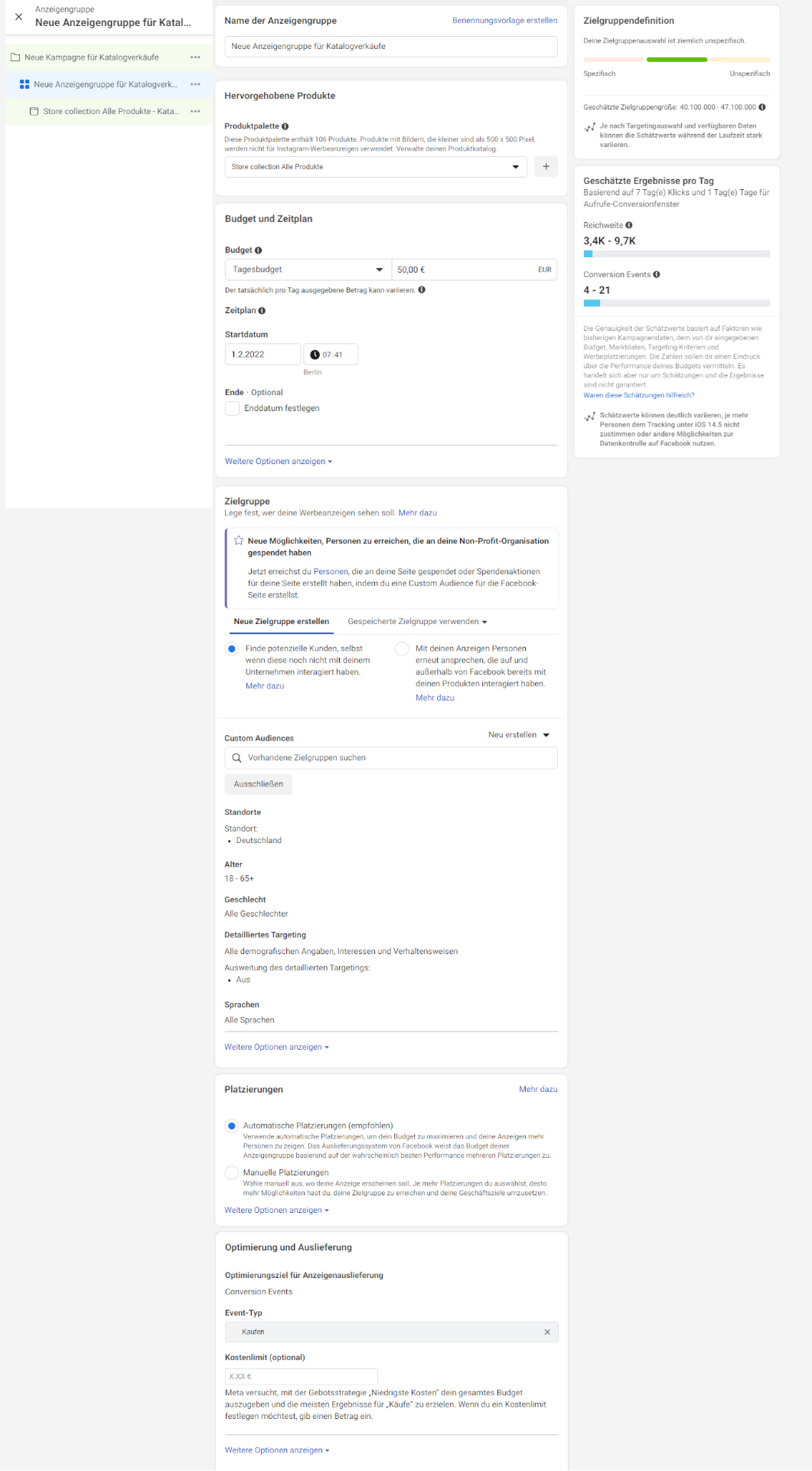
You can then create your catalog sales campaign via the Ads Manager. To do this, select the campaign goal “Sales” at the campaign level and set the slider for catalog to “On”. With the catalog you created previously, you now go one step further to the ad group level settings.
Here you have the option of first determining the product range to be advertised. In the Commerce Manager, you can create a selection using various filters (name, category, price, etc.) so that you can then use it here.
In addition to budget and dates, the settings for the target group, i.e. the people who are most likely to make a purchase according to the algorithm, are very relevant. The easiest way to do this is to use the “Find potential customers, even if they have not yet interacted with your company” option and then customize it to your target group.
Finally, select your campaign objective. For an online store, for example, “Buy”, “Add to cart” or “View content” events are possible.
By the way: The product data can also be used to feed your own Facebook or Instagram store with the required information. If you want to create these two additional sales channels anyway, you can kill two birds with one stone.
5. advertisement placement
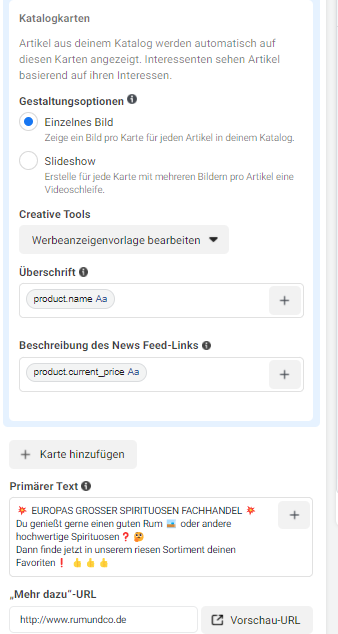
The last step is ad design: Here you determine what users will see on the various placements.
For example, if you want your products to be arranged next to each other for “swiping”, select the carousel format. The algorithm decides which products are shown to which user. All your ads are therefore always personalized.
You can use dynamic attributes of the products in the headline, the description or in the primary text to enrich the individual product images even more specifically with related information.
Would you also like to be successful in social commerce with your JTL-Shop, but still need support with the implementation? Our two partners kreativkarussell and WebStollen are your competent partners for implementation.
About kreativkarussell
We invigorate our customers’ online business with our enthusiasm for all things digital. A friendly and collaborative relationship is important to us. This is the only way to be successful in digital business. We are close to home and have been creating our solutions from the land of a thousand mountains – Sauerland – since 2013.
In the area of social commerce, kreativkarussell uses a variety of current options for its customers in order to achieve the desired goals. Both organic (unpaid) and paid placements are used, which can be found on the largest social media platforms. Among other things, users are addressed according to specific targeting criteria via the Meta Group’s platforms or existing followers are provided with targeted news and information.
WebStollen has stood for high-quality software development since 2010. As a specialist for the JTL-Shop shop system, we have focused on its expansion and integration of functions using plugins and apps. The goal and vision of the founders and the entire team is to make online business easier and more user-friendly in order to achieve improvements that ultimately also benefit the individual store operator. With the help of innovative ideas and agile software development, both ambitious store operators and fast-growing eCommerce players who want to fully exploit their potential are addressed.
20 years of experience
20 employees
Over 100 plugins implemented
Over 12,000 store operators and numerous solution providers in the industry rely on the plugins and apps from and by WebStollen.