A large number of our developers are currently working feverishly on JTL-Wawi 1.4 and we have big plans for this version – our project 2.0. This is synonymous with the many revisions we are making to elements of the ERP. An important area here is the customer overview and customer details, which we have summarized under the title “Customer 2.0”. We will explain what we are planning here below.
Customer overview and customer details - what is what?
The customer overview itself can be found in JTL-Wawi by pressing F5. Here, users can filter to display a list of their customers and find the most important master data and transaction information about the customer. From there, the customer details, i.e. the master data of each customer, can be called up and edited.
The actual state
Customer management and the customer overview are among the older components of JTL-Wawi and have hardly changed over the years. However, this also means that the code is only partially flexible for today’s requirements. Although it is possible to insert additions, it is difficult to change the basics. But that is exactly what we want. In order to be able to respond more closely to customer requirements in this area, it is necessary to reprogram the area from scratch and replace it with the old elements.
Our goal
If we’re going to rebuild everything, we want to do it properly. Our actual goal is initially very simple: we want to greatly simplify the work of customer advisors for our own customers. Online retailers should be able to display all relevant information about the caller at a glance with just a few clicks when the customer calls. Who is the customer and what were their last actions? We want to provide quick and uncomplicated answers to these questions. It’s easy to say, but what’s behind it?
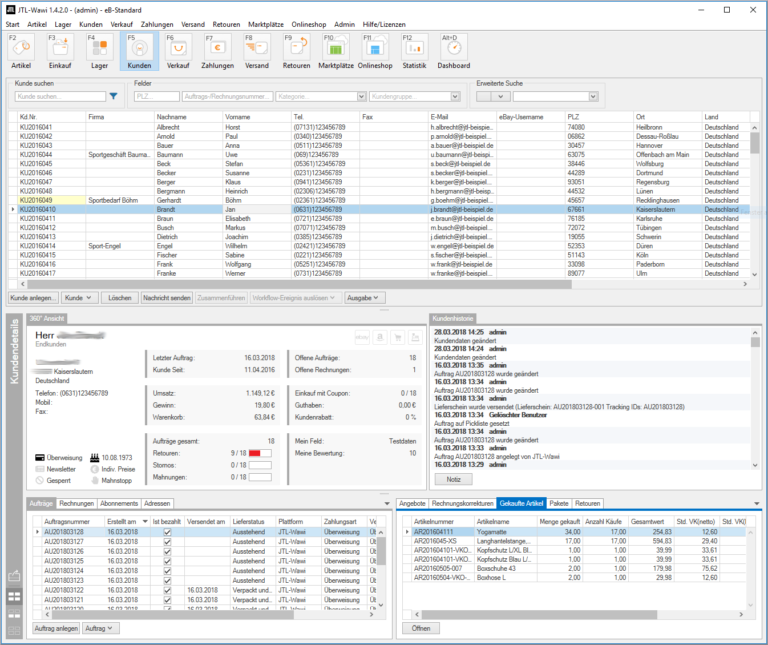
We are currently developing a mask that will serve as an entry point for this customer communication. We want to be able to display information such as customer status (regular customer or new customer), sales amount, invoice status and so on. Because such a major change to our functions also involves relearning on the user side, we are investing a lot of time and effort in making the UX/UI design as accessible as possible. Of course, we can only find out whether this is any good through practical feedback. That’s why we showed the new elements to a few selected customers at an early stage and asked them for unsparing feedback – which we received promptly. And which we naturally implemented.
Here are some specific points that we are currently revising:
Customer list:
- In the customer list, which shows you an overview of the requested customer search results, you can display the following dialogs when you select a customer.
Customer history:
- The customer history shows the last relevant actions of a customer in chronological order. It is important to us not to offer too much, but also not too little information – the decision on the final amount of information is still pending.
360-degree customer view:
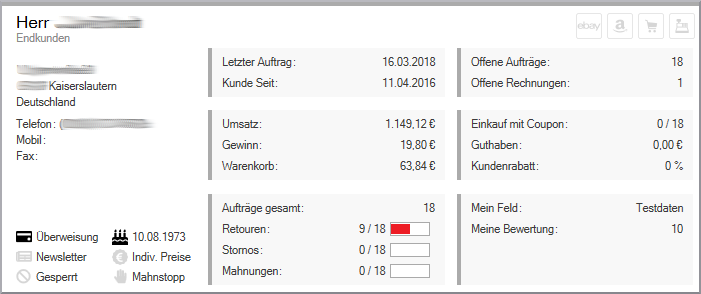
- This is an element that provides information to enable us to better assess the customer. We have already defined the key figures for this in consultation with some selected customers.
Quick access:
- Using detailed tabs for invoices, sales orders, parcels and so on, you should be able to display this customer data with just one click in future. Does your customer have a question about their invoice? One click on the tab and you will receive all the detailed information on the topic.
Customer information plays a role in many different places in ERP, including returns, sales orders and shipping. To make this information available to you there as well, the history, quick access and 360-degree view can be undocked as a widget and displayed on a second monitor parallel to the ERP. The data shown there is always updated as soon as something customer-related is selected in JTL-Wawi. This means that the most relevant data for each customer will be available to you at all times in future.
State of development
We have already resolved many important issues for us. But there are still a few areas that need to be addressed. For example, we would like to offer a separate customer widget for fulfillment. On the other hand, we are still working on the final designs for the customer history.
The basic forms of the “Customer 2.0” project have already been tested by the first selected customers. As mentioned above, their feedback has already been incorporated into our builds. The current build is now with the first pilot customer, and we want to add more to the product page in the coming weeks in order to carry out concrete practical tests. In this way, we are approaching an optimal user experience and amount of information on the one hand and can ensure that a robust and functional customer overview and customer details are included when JTL-Wawi 1.4 RC is released on the other.






