
eazyAuction has been a direct, bidirectional interface to eBay in JTL-eazyAuction since 2006. What began with a simple listing function and order processing within the JTL-Wawi ERP system has been expanded over time. Today, eazyAuction is one of the most popular eBay solutions for professional eBay sellers, with over four million listings on eBay.de and well over one million orders processed per month.
The eBay integration has now been completely redeveloped in JTL-Wawi 1.0. The numerous new functions and possibilities are the reason for this blog post. We would now like to introduce you to some of them.
Trade on 16 eBay marketplaces worldwide
eBay accounts are global, i.e. you can also list your products directly on other international eBay marketplaces via a German account. To do this, simply check the appropriate boxes in the eBay account in JTL-Wawi to specify the countries in which you want to trade with the respective account:
JTL-Wawi will then retrieve all metadata with the next eBay synchronization and you will be asked which marketplace you want to list on when creating new eBay listing templates. All marketplace-relevant data such as categories, payment methods, shipping methods, etc. are automatically updated daily in JTL-Wawi.
Change description and pictures of current eBay listings
One of the major innovations is that you can now change all the details of current eBay listings – including the descriptions and images. This even happens fully automatically. It is only necessary to change the global item description or, if available in the item, the eBay-specific description and the adjustment will be passed on to eBay the next time the item is synchronized. The same applies to images that are assigned to the eBay platform.
If you do not want the description to be changed automatically on eBay, you should not use the description from the master item as the variable for the description in the design template.
The 'Out of stock' option
eBay has been offering the ‘out of stock’ option for some time now. ‘Good til canceled’ or GTC listings with sold out stock can thus be paused and are not available for purchase on the eBay site. It is irrelevant whether the last item is sold on eBay or the quantity 0 is transferred to eBay by JTL-Wawi so that the corresponding listings are paused on eBay. As soon as these listings reach positive stock levels again, they are then automatically activated on eBay. This option protects both the eBay ranking of the listings and the seller’s wallet. eBay listing fees are credited if a listing has been continuously disabled (i.e. with stock level 0) for the entire listing period of 30 days.
In JTL-Wawi 1.0, you only need to check the option “‘Out of stock’ is enabled on eBay” in your eBay account. From now on, JTL-Wawi will no longer terminate GTC listings, but will send the stock level 0 to eBay for sold-out products so that these listings are paused. As soon as stock is booked into JTL-Wawi again, JTL-Wawi automatically sends the available stock to eBay and reactivates these listings.
Global eBay listing templates
Until now, when creating eBay listing templates, some fields had to be filled with the same values over and over again. Now you can create global templates that serve as a template when creating listing templates for specific products.
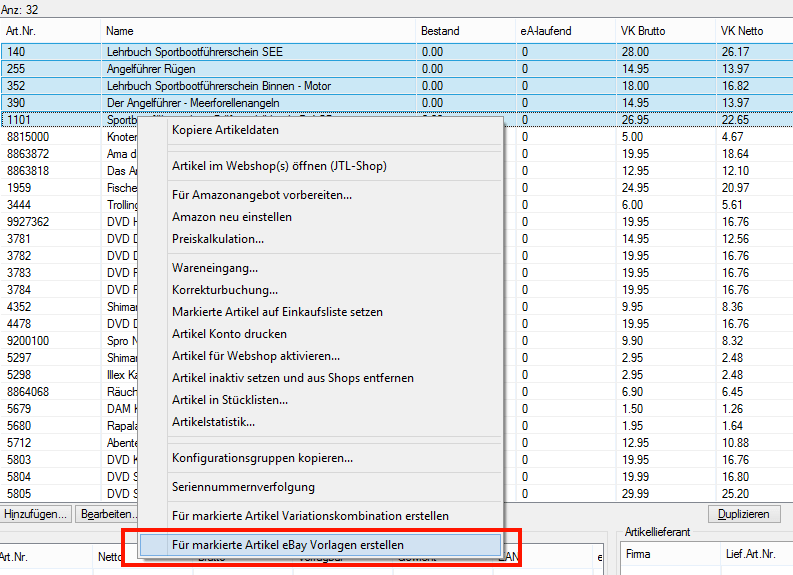
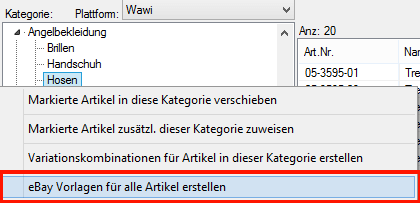
Everything that is already specified in the global template is now pre-filled in the specific template for the respective product. In item management, several items can also be selected at the same time in order to create listing templates for these items based on a global template by right-clicking on “Create eBay templates for selected items”. You can also add eBay templates to all items in a category by right-clicking on it:
The global templates are also necessary if you want to generate mass eBay listings with JTL-DataTransfer. We will introduce you to this in a separate blog post at a later date.
Automatic posting of listings
This new feature automatically posts listings if they are not yet running on the respective marketplace and the specified stock is available. This setting is stored directly in the eBay listing template and therefore applies to both auctions and fixed-price listings.

So you only need to check this box once in the listing template and never have to worry about whether the item is listed on eBay again. JTL-Wawi takes care of this and automatically posts the item as soon as the requirements are met.
This option can also be used in global listing templates, so that a large number of eBay listings can be processed with little effort, making work much more efficient.
General conditions for shipping, payment and returns
Some time ago, eBay introduced a framework conditions management system in which you can create templates for shipping, payment or return conditions and give them your own name.
These general conditions are read into JTL-Wawi 1.0 for each marketplace and eBay account and can be stored in the listing. This saves you having to select the relevant details for shipping, payment and returns and saves you a lot of time.
Support for the entire image interface
As of JTL-Wawi 1.0, up to 12 images can be uploaded directly to eBay. These are not only available to the design template – as before – but also to the eBay image gallery. Furthermore, in JTL-Wawi 1.0 you have the option of defining separate images for eBay.
The vehicle application list
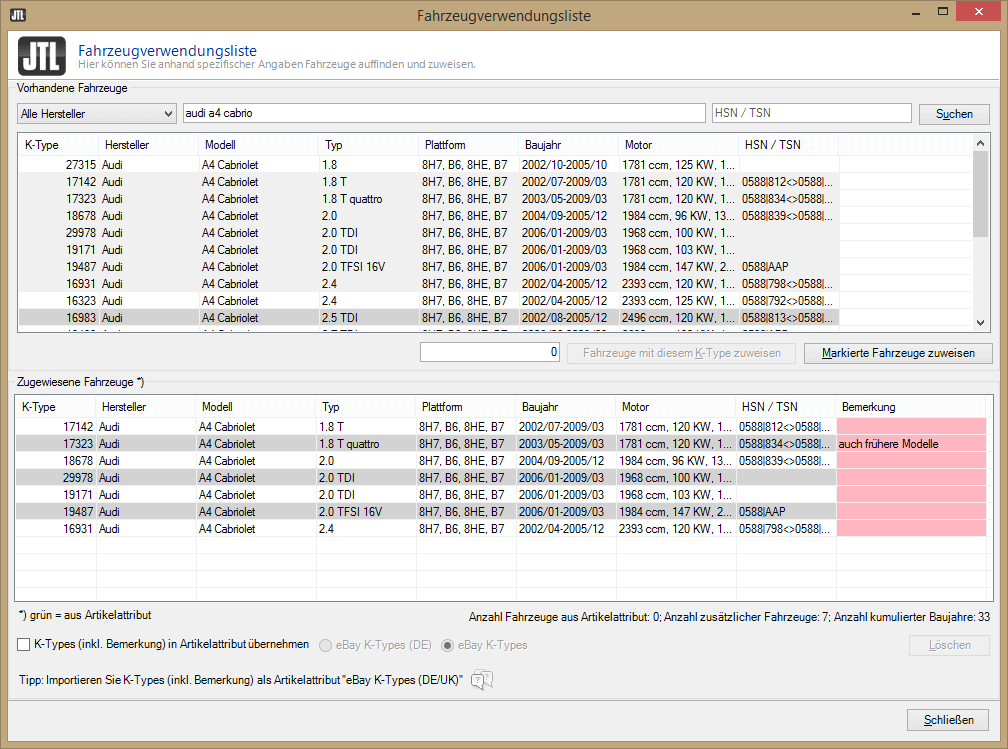
Vehicle parts dealers can now list their products on eBay.de and ebay.co.uk with the complete integration of the vehicle usage list. In addition to the manual assignment of vehicles to eBay listings, it is also possible to use attributes containing the so-called K-Types (eBay vehicle codes) directly in the item master data. If an item is listed with such an attribute, the respective vehicles are automatically assigned to the listing. As usual, these attributes can also be imported in bulk via JTL-DataTransfer.
Our eBay listing import imports your eBay listings including vehicle usage list data! An easier entry into the world of JTL is hardly imaginable for vehicle parts dealers.
New design template management, eBay galleries and a state-of-the-art new template
In the old JTL-Wawi, it was very cumbersome to create individual design templates. There was hardly any scope for design, such as dynamically generated store categories. This has changed dramatically with JTL-Wawi 1.0. Here, the templates are managed and edited directly in JTL-Wawi. You have access to all relevant data of the item and the eBay listing. By using DotLiquid, there are hardly any limits to creating dynamic and dependent content.
In addition, you have a live preview of the entire eBay description as it would actually look on eBay when editing the template and when adding or changing current listings. Changes to a design template are immediately reflected in all eBay listings that use this design template. It’s never been so easy to get the entire eBay channel working in your direction.
As a special bonus, JTL eBay galleries have been introduced. These eBay galleries show the viewer of a listing other listings running on eBay and are therefore the perfect cross-selling tool. There are a number of different galleries available as standard, such as
This comprehensive cross-selling tool opens up limitless possibilities for you!
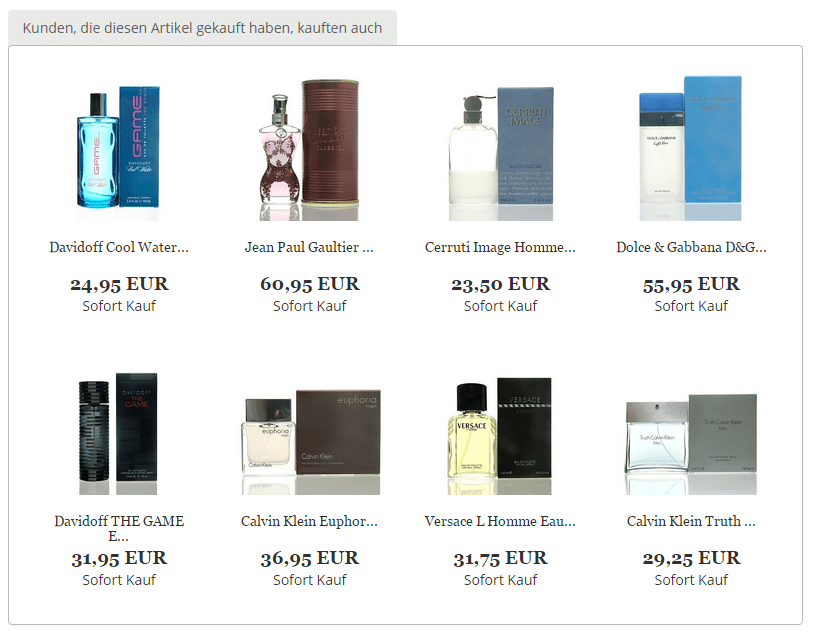
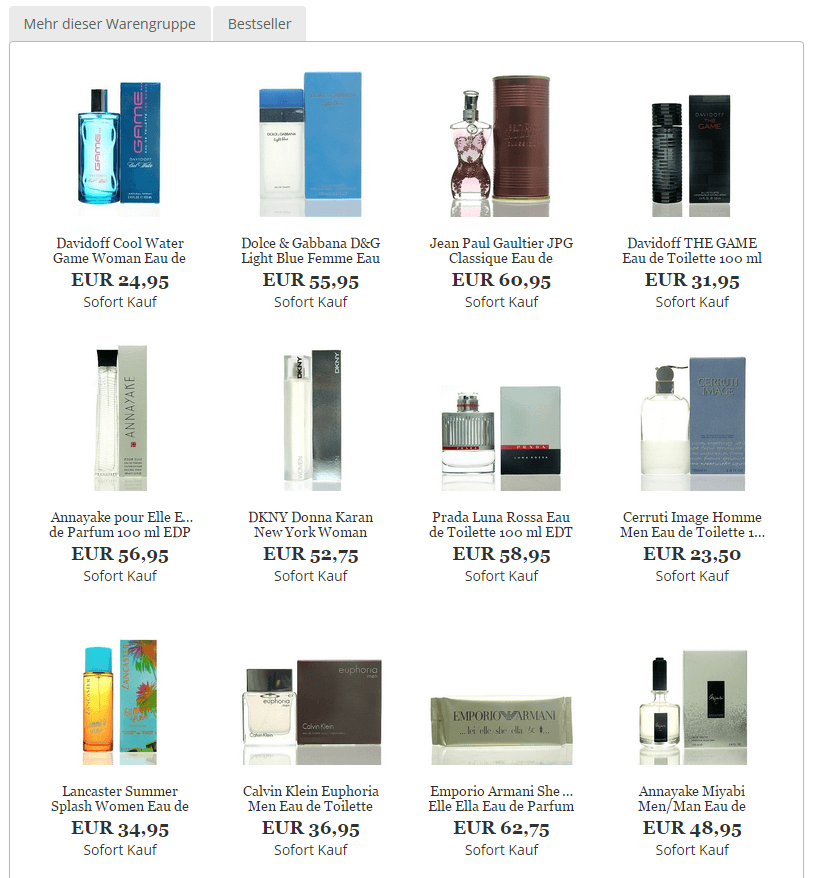
The special feature of JTL eBay galleries is that they work with the entire data of the JTL-Wawi database, i.e. bestsellers, for example, are determined on the basis of total sales across all channels and not just via eBay. In contrast to the usual eBay galleries from other providers, JTL eBay galleries are created in HTML and optional JavaScript and not in Flash, which is no longer supported by any modern browser.
The galleries are also responsive – as is the new EVO eBay template that has found its way into JTL-Wawi 1.0. However, this innovation is so extensive that I will cover it in detail in another blog post in the coming week.
By the way, the galleries at eazyAuction are free of charge, so you can save yourself from having to pay for external galleries that may even use Flash.






