Eagerly awaited by many, JTL-Wawi version 1.1 will be available for you to download from Monday, June 13. Over the past weeks and months, we have already given you some insights into the new release in our blog. However, if you don’t remember all the features and new features, you can find a brief overview below. You can also find detailed information on our landing page for JTL-Wawi 1.1:
News JTL-Wawi 1.1
You can download the new version here from Monday:
JTL-Wawi download
Returns management
Even if returns are a red rag for many retailers, they are still an important factor for customer satisfaction. In order to make their processing convenient and smooth in the future, the new returns management awaits you in version 1.1. Based on JTL-WMS and JTL-Packing Bench+ and linked to newly configurable item details, you can identify, check and inbound post returns quickly and easily from version 1.1.
You can access our developer diary here:
Returns management as of JTL-Wawi 1.1
Returns management in our documentation:
Returns management documentation
Relocation & line storage
The Wawi update introduces drop shipments and stock transfers between several warehouses. To ensure that you always know where your goods are located, ERP first transfers the goods to a drop-ship warehouse when they are outbound posted until they are booked into the target warehouse. This prevents you from selling goods that are already displayed in the target warehouse but have not yet arrived there.
This process is also easier than ever via stock transfer. It is similar to a typical sales order that covers all the items you want to transfer – there is no need to learn completely new functions.
Our developer diary on relocations and route storage provides further information:
Stock transfer & third-party storage as of JTL-Wawi 1.1
The relocations in our documentation:
Documentation stock transfers
Automatic price comparison
See directly in the Wawi at what prices the competition is offering an item – no problem with the new automatic price comparison. The item details of JTL-Wawi 1.1 now provide you with information about the market development of the respective goods. You can choose between different marketplaces, including numerous international Amazon variants, Hitmeister or Guenstiger.de.
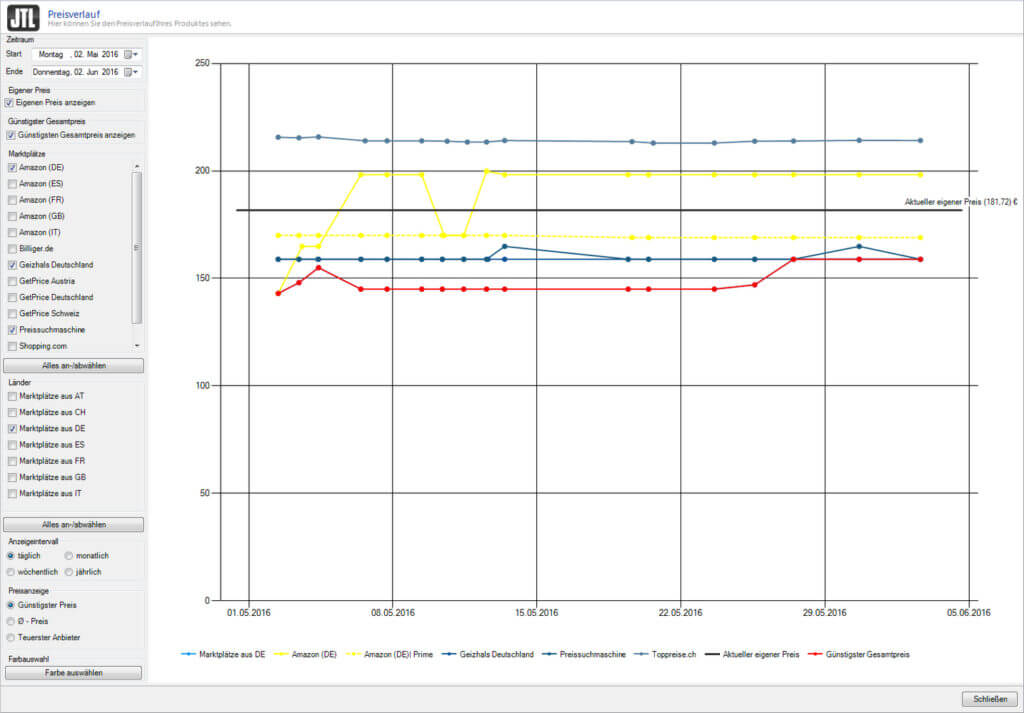
There was also a developer diary on price comparison some time ago:
Automatic price comparison from JTL-Wawi 1.1
The price comparison in our documentation:
Documentation price comparison
Extensions for JTL-Shipping
JTL-Shipping receives two enhancements as part of the new version. In a nutshell, the new release enables international shipping with DHL. We have also integrated integration with UPS. As of the release, the shipping options UPS Standard, Express, Saver, Expedited and Saturday delivery are available to you. Important note: From June 2023, UPS will no longer assign API access keys.
JTL-Shipping in our documentation:
JTL-Shipping documentation
New menu structure
Version 1.1 gives the Wawi a small facelift. Not only new icons await you, but the menu structures have also changed somewhat. With a logical arrangement and sorting of frequently used functions to unique settings, we want to shorten work paths and enable more efficient operation. The more intuitive arrangement also makes it easier for new users to familiarize themselves with the system.
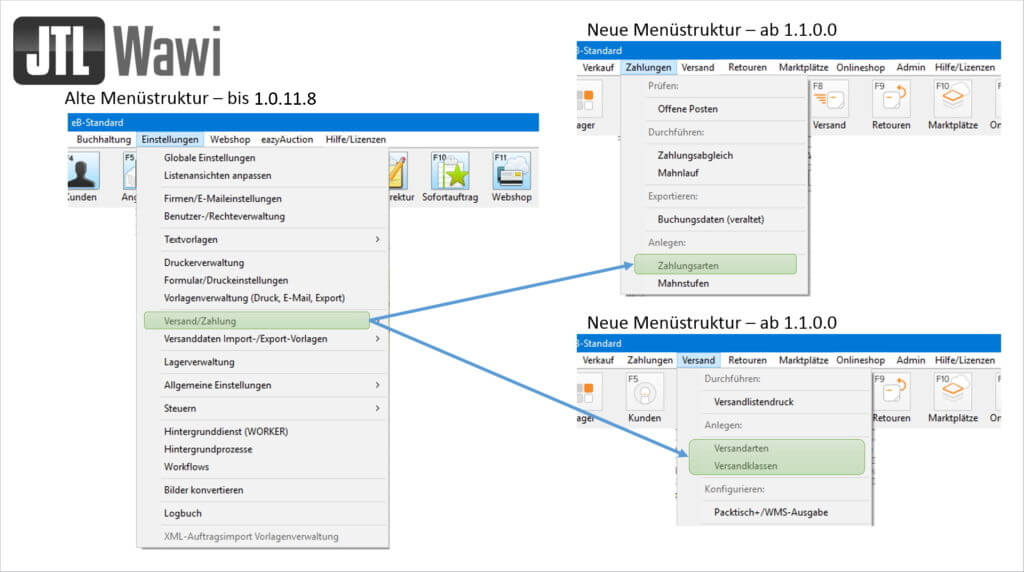
If you are curious about the direct comparison between the old and new structure, you can find examples in the developer diary:
New menu structure as of JTL-Wawi 1.1
JTL-Packing Bench+
The new JTL-Packing Bench+ is not only free of charge, but is also equipped with new functions compared to its predecessor. While medium-sized retailers in particular previously benefited from the practical picking tool, the packing table+ is now also ideal for retailers with a small warehouse or low sales order volume.
You can find the developer diary for the JTL-Packing Bench+ here:
The new packing table+ as of JTL-Packing Bench+ 1.1
JTL-Packing Bench+ in our documentation:
Documentation JTL-Packing Bench+
Manual workflows
Full automation and the associated time savings have so far been the goal of our workflows. But what if these workflows need to include critical actions that you don’t want to leave to full automation? The manual workflows provide a remedy here. Now create a manual event for which you can set up as many workflows as you like. The associated workflows only come into effect when you trigger the event itself. In this way, we offer you the combination of time savings through automation and control over certain processes in one.
Exercise patience one last time. From Monday you can update your Wawi to version 1.1 and experience the new features and extensions in action!






