
Part 3 of the blog series: SEO for online stores
The success of SEO measures results from very different sub-areas, and paying attention to them will give you a solid foundation for success in eCommerce. In our four-part blog series SEO for online stores, we have already covered the topics of information architecture in the online store and optimally preparing content in detail. In this third part, we will focus on the important technical foundations of your online store, which are essential for successful search engine optimization. They form the prerequisites for your online store and your listings to be perceived at all and to be and remain as accessible as possible. We deal with crawlability and indexing, page load times and their optimization as well as monitoring and rectifying technical errors.
Crawlability and indexing
Probably the most important prerequisite for SEO is that search engines are granted the necessary access to all the pages that should appear in the search results. Because even first-class content does not generate traffic if it is not seen. There are technical help files and instructions that you can use to precisely define access rights for crawlers and the indexing of pages.
The robots.txt makes the start
The robots.txt file is one of the first pieces of information read by the bots and is therefore a crucial tool for controlling search engine crawlers. In this text file, you define which directories, subdirectories or even individual pages or files may be visited by Google & Co. and which you would like to block. You are free to give the various bots and user agents different instructions and rights.

To ensure that search engines find and take the robots.txt file into account, you must place it in the root directory of your domain. It is important to understand that the robots.txt is merely an aid and a guide for crawlers. Blocking certain areas does not guarantee that search engines will not examine, read and, if necessary, index these locations and pages. For example, if the page is linked to a crawlable external page. The “Disallow” from robots.txt should therefore not be confused with the “noindex” tag for index control (see below).
Please note that the robots.txt does not offer any protection against unauthorized access. Rather, it also provides uninvited guests with information about where hidden or critical areas may be located. For security reasons, we recommend using password protection on your web server.
How can you configure the robots.txt?
Special care must be taken when handling the robots.txt file! Small errors in the syntax can block entire pages or directories. So familiarize yourself with the specifics of your online store and product range and the individual settings to be made within the file and exclude, for example, the pages of the administrative back end or pages of the checkout process. In most cases, filter and feature pages of your store do not offer any relevant added value for the crawlers and do not achieve any top positions in the index. Clear instructions and the exclusion of non-relevant pages and areas not only save crawl budget, but also promote better understanding by Google and other search engines by focusing on important content.

The crawl budget is the maximum number of pages that Google searches in your online store. It is determined by Google and depends on your ranking. Pages with a higher ranking receive a larger crawl budget, which determines how often important pages are crawled and how deep the crawling goes.
The use of (robots) meta tags
As previously mentioned, meta tags fulfill important functions to provide search engines with additional information about the current page. For example, you can use the robots meta tag and the rule <meta name=”robots” content=”noindex”>, which is placed in the <head> section of the page, to instruct search engines not to include the page in their index.
When using “Noindex”, the same page must not be excluded at the same time via a “Disallow” in robots.txt. Otherwise the crawler would have no access, could not read the <noindex> tag and the page would possibly remain in the index unintentionally.
You can find out more about the specifications for robots meta tags in Google’s extremely helpful documentation. The other sections of the chapter “Crawling and indexing” are also worth reading and will enable you to find the right settings for your online store.
XML sitemaps support the search engine
The XML sitemap makes it easier for search engines to obtain a comprehensive list of all the pages in your online store – especially pages that are difficult to access or have no internal links. Especially for new (still few external links) or large online stores with possibly deeper directory structures, you should not do without the use of one or more sitemaps (for videos, images, etc.). They can also provide search engines with important information about the last update or alternative language versions of the site.
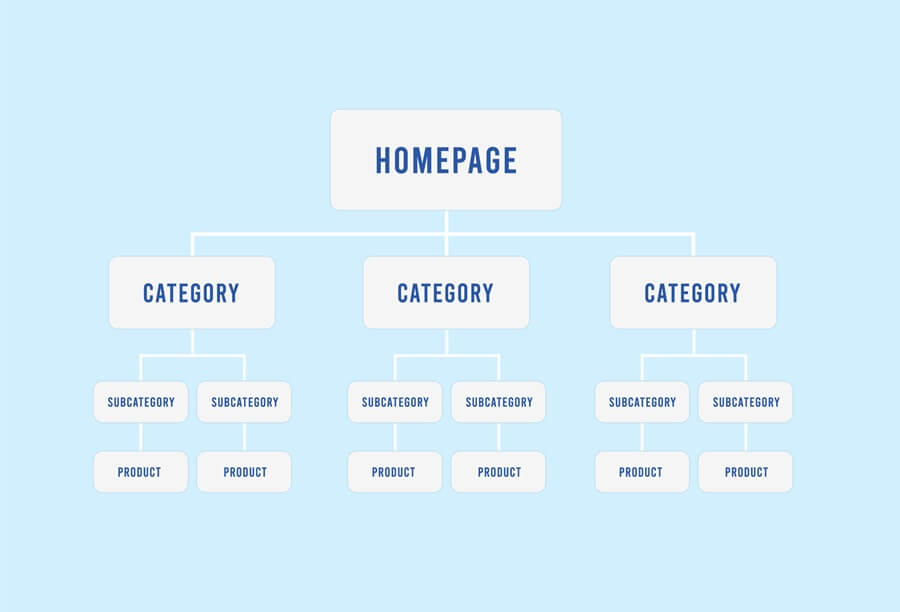
The structure of your XML sitemap should be logical and reflect the hierarchy of your online store. Make sure that the most important pages are at the top and that no redundant or duplicate pages are included. Once set up – and this closes the circle – the XML sitemap should also be referenced in the robots.txt file.
Page load time and speed optimization
The loading time of a website is also referred to as pagespeed. It goes without saying that short loading times make your store visitors happy, while a slow and delayed page load can quickly lead to a purchase being abandoned and cause the conversion rate to shrink. Search engines have long since recognized this and Google confirmed pagespeed as a key ranking factor years ago. Growing numbers of hits via mobile devices are also increasing the pressure not to put users’ patience to the test. But what are the technical factors behind long loading times and what can be done about them?

Optimize file size of images, videos and code
The total amount of data that a server has to provide to load the store page plays a major role in the loading speed. This is where content such as images or videos carry the most weight. If, for example, item images are over 1 MB in size, the size of a page can very quickly shoot up in height if several images are called up at the same time and delay the page load enormously. Images and videos should therefore never be uploaded in a higher resolution than is required. A separate mobile version of the respective file should therefore always be provided for the mobile version of a page. There are also many other tools or plugins available that compress the data volume of images, CSS, HTML or JavaScript and thus improve your performance.
Providing data via a content delivery network
A content delivery network (CDN) is a network of servers at different locations that deliver requested data to users as quickly as possible due to their geographical proximity. The data is mirrored from the original hoster to other servers and the server with the shortest distance retrieves it for the user, which further reduces the loading time. This form of data provision is generally used for streaming, but is also used by other sites with a wide reach in order to optimize load distribution and performance.
How can you check page speed and performance?
Numerous online tools are available to check loading times. With the Lighthouse browser extension and PageSpeed Insights, Google also provides its own tools to check and optimize the speed and behaviour of pages. Various metrics are analyzed here, such as the “Largest Contentful Paint” (how long it takes to load or render the largest image or text block). Take a closer look at the other metrics and benefit from the detailed information and suggestions for improvement in the tool’s diagnostics section.
These indicators are collectively referred to as Core Web Vitals. Google defined these in 2021 with the aim of customer review and improving the user experience of websites. For your online store, you can use the primarily performance-oriented metrics and the recommended guideline values as a checklist for fast loading times and generally good usability.
Technical inspection and troubleshooting
The central measures of technical search engine optimization include the regular checking and monitoring of your pages. You should allow sufficient time and resources for monitoring important performance values, readjusting sensitive settings and, if necessary, quickly rectifying errors. Due to the numerous aspects that technical SEO entails, but above all due to the frequent (core) updates rolled out by Google & Co, there are always new framework conditions that make it necessary or at least advisable for you to react. The Google Search Console is an extremely helpful tool for technical monitoring and analysis.
How can you use the Google Search Console?
The Google Search Console (GSC) is a free service from Google that enables website and store operators to monitor and manage their presence in Google search results and find ways to improve performance or fix errors. You can use the GSC to gain valuable insights into how Google sees and reviews your online store and obtain information on (technical) health, usability and search engine friendliness.
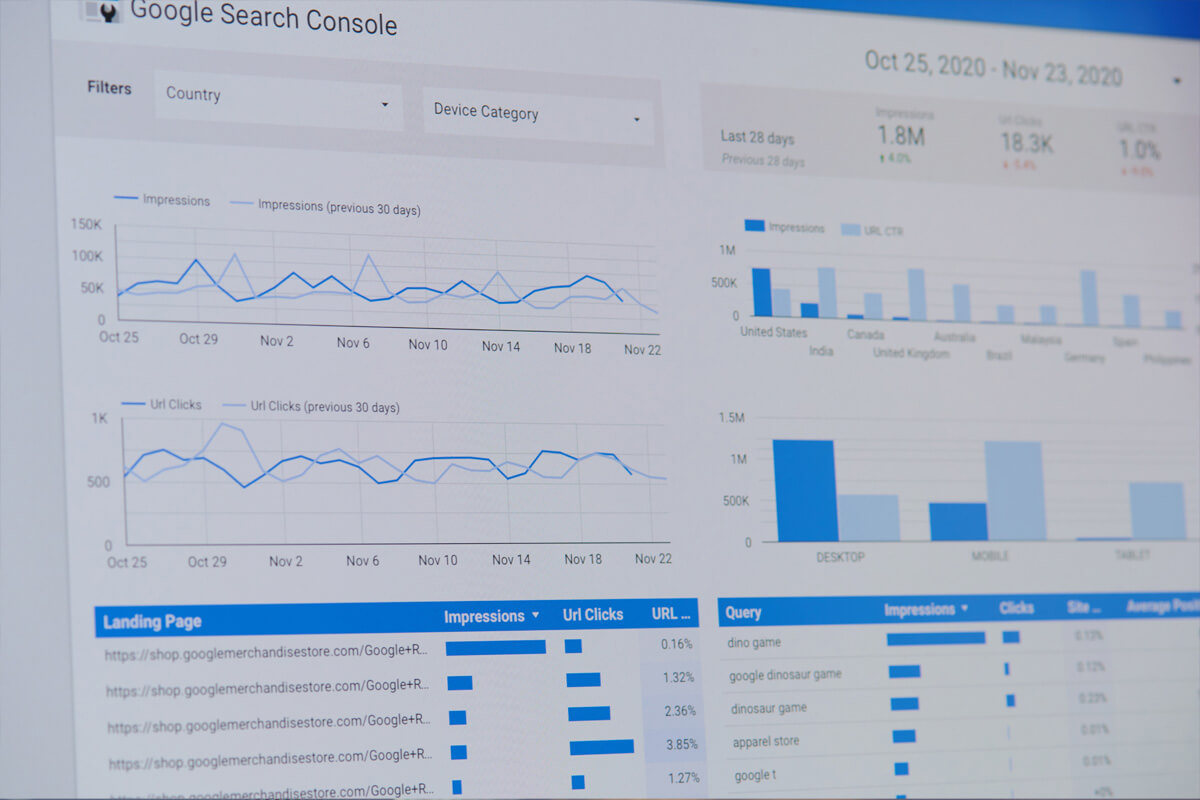
The most important functions of the GSC in the area of crawling and indexing include insights into the indexing report and the crawling statistics report. Here you can not only view the ratio and overall status of your indexed and non-indexed pages, the report also gives you detailed information on why pages are not indexed. This report is therefore a frequent starting point for tracking down redirect errors or incorrectly set canonical tags, for example.
The crawling statistics (the report can be found somewhat hidden under the GSC settings) in turn show you how often and with what results the various Googlebots interact with your online store or the server. For example, all crawling requests can be broken down according to the server’s response codes in order to identify 404 pages, 5xx server errors or the extent of 3xx redirects.
There are numerous other analysis functions and recommended strategies for using Google Search Console effectively for your online store. We therefore encourage you to take a closer look at this topic, explore all available options and check back regularly to see what the tool has to tell you. There is also a wealth of high-quality videos or webinars available online, not least the documentation from Google itself: https://search.google.com/search-console/about
A solid foundation for further SEO measures
There are many technical aspects to consider in order to set up your online store well and better for search engines. By following our tips and advice or taking the most important findings from tools such as the Google Search Console to heart, you are already creating very good conditions for achieving better organic visibility. Ideally, your technical improvements will be accompanied by other important measures as part of a holistic, overarching SEO strategy.
If you have not yet read the previous items in our four-part series on search engine optimization, we strongly recommend that you do so. The fourth and final part deals with AI tools in eCommerce and their importance for search engine optimization.
All posts in the SEO blog series at a glance:
Part 1: Information architecture in the online store
Part 2: Content – preparing content optimally
Part 3: Technical SEO to improve performance
Part 4: Artificial intelligence: SEO application areas