
In the last blog post before the spring changeover, we will show you how you can communicate with your customers directly from JTL-Wawi in the future. We will focus on a new component that is currently being developed: the ticket system of our ERP. Jens, a developer of the project, will answer your questions about the current state of development and the features still planned.
What customers want in online business
Nowadays, customers want to be able to inform themselves independently, compare similar items, correctly assess the quality of the goods in advance, order with just a few clicks, pay and receive delivery the next day, “same day” or at a desired delivery time.
And the higher the general standard in eCommerce becomes, the more likely it is that sellers will receive questions about delivery times or even critical feedback on product presentation. In addition, there are all those cases in which the customer wants to cancel an order or place it by telephone – or if defective goods are complained about.
Retailers who respond to their customers in a timely and friendly manner are generally rated well, even if the error or defect was on the retailer’s side.
What salespeople want for their customer service
The biggest efficiency killer in ticket processing is non-integrated software solutions – so-called “system breaks” in the work process. This is why retailers want to be able to control as many tasks as possible from one software. This is the only way to directly analyze incoming customer messages and automatically provide all the associated data to the customer advisor.
Even more efficient are solutions in which standard cases can be largely automated and only exceptional cases require the attention of the processor.
If a retailer also strives for genuine customer relationship management, i.e. in-depth and long-term customer relationships, then a quick assessment of the customer becomes important: How important is the customer to me? Should I be accommodating here because the customer often generates larger shopping baskets?

The JTL-Wawi ticket system
Our online and mail order retailers have long wished for a ticket system integrated into JTL-Wawi. A real CRM would of course be even better, but our developers are also very busy and therefore a scarce Good. And so we decided to first implement the most important functions with the greatest leverage effect. Further wishes will then be analyzed and, if necessary, supplemented from the workflow. But let’s start with what the ticket system can do so far.
Note: The blog series Developer’s Daybook shows our features in the middle of development. The screenshots therefore do not show the final version, but a rough version. The user-friendly design in particular will only follow once the technical processes have been finalized.
Multiple email accounts
So Jens, would you like to tell us how many email accounts I can currently integrate?
“Yes of course, gladly. Before the ticket system, JTL-Wawi only had an outgoing mail service. Invoices and other online business documents have been sent via this service for many years. The outgoing mail service is therefore already very mature.
We have now added an inbox component. Here you can integrate as many email accounts as you like via POP3 and IMAP, for example if you have a separate email address for product questions and another for billing questions. This is often because you want different customer advisors to answer these questions.
You can read all these emails in JTL-Wawi and reply to them from there and also forward them. In the future, it will be possible to automatically label incoming messages differently depending on the email account, so that certain emails or tickets can be assigned directly to specific processors.”
As a retailer, can I also process my Amazon and eBay correspondence via the ticket system?
“Sur initial discussions with retailers showed us how important news from marketplaces is in everyday life. The topic is currently being hotly debated internally.
The eBay marketplace, for example, offers an API that we could use to retrieve messages. Regardless of this, it is already possible to centrally manage email notifications from eBay in the ticket system. The only thing that doesn’t work at the moment is replying.
Amazon, on the other hand, generates its own email addresses, which you as a retailer must use to communicate with your customers. If you would now like to use our ticket system, you can have all customer inquiries forwarded to the ticket system as email copies and answer them from there. In special cases, however, replies cannot be forwarded reliably – a daily check in Seller Central therefore helps to uncover stuck inquiries. Whether and when this technical peculiarity can be solved remains to be seen.”
Tickets with correspondence history
For those new to online business – can you briefly explain what the difference is between a ticket and an email?
“The word ticket system comes from customer service. Tickets are entire processes that are considered open until they have been fully resolved. A process can end in several solutions, while a single email is merely an intermediate step on the way to one of these solutions. Often enough, the customer writes back again – then the ticket, i.e. the process, would be reopened.
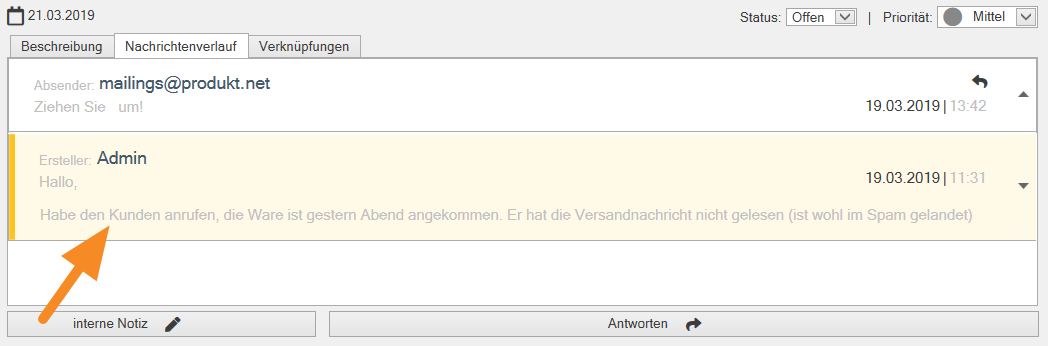
Tickets have the advantage that all exchanged messages and attachments are summarized in a case history. This means that the customer advisor always knows what steps have already been taken in a particular support case. You can also add internal comments in the form of a note, which then also appears in the history. Attachments such as scanned documents can also be added to a note.”
Parallel work in the inbox
You’ve touched on an important aspect: Several customer advisors working in the same inbox. How does JTL-Wawi ensure that two people do not reply to the same customer message at the same time?
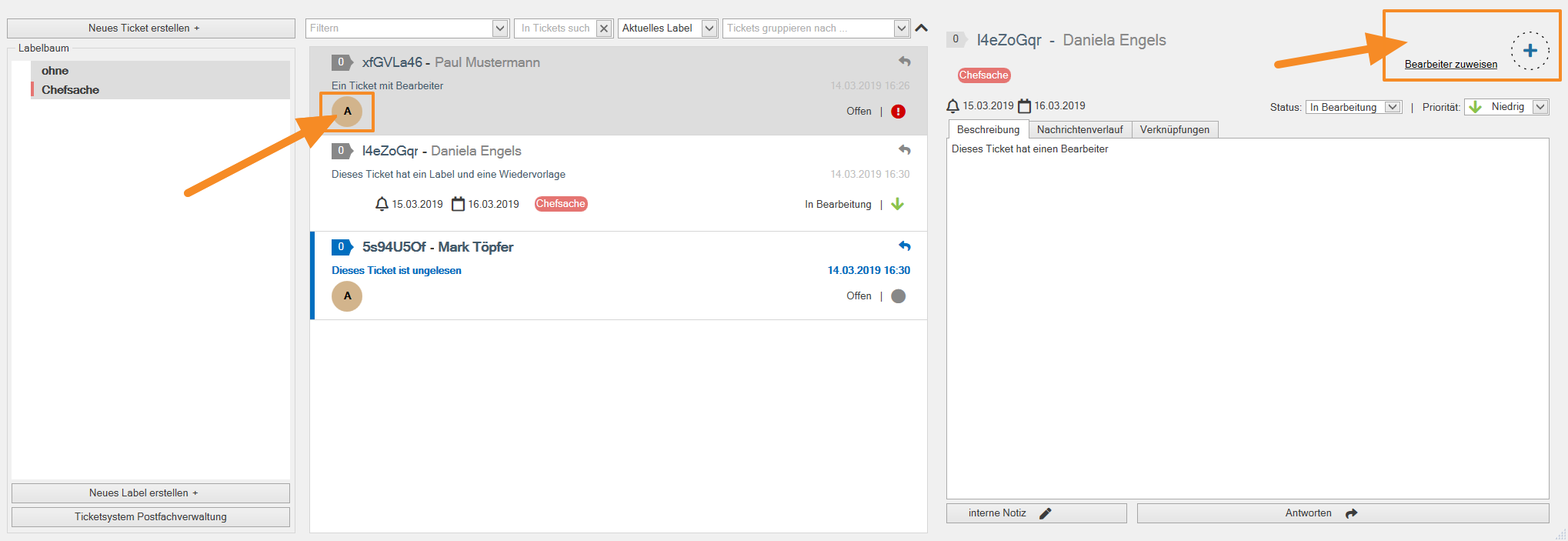
“Well, thereare actuallymany sophisticated methods that we could have integrated. At the moment, we keep it simple: as soon as a customer message creates a ticket in the inbox, an agent can assign this ticket to themselves with one click. The customer advisor in question is then displayed as an agent in the ticket overview, easily recognizable to others.”
In the first step,customer advisorsoftenwant toassess whether they can answer the customer’s request at all …
“Yes, exactly – or whether the ticket should be answered by a specialized colleague or the boss. Here, the processor can assign a ticket to themselves, read through it, then optionally label it and then share it again. The ticket is then reset to unread, but is labeled as a matter for the boss, for example. Later in the day, the Managing Director then processes all marked tickets in the block.
In addition, there is an indication when someone is reading a message. Their JTL-Wawi user name then appears in the top right-hand corner. This allows colleagues to recognize that someone is working on the same ticket.”
Labels, filters and resubmission
You talked about labels. What exactly is a “label” and can I define them myself? Our sales staff will also be interested to know whether they can put processes on resubmission …
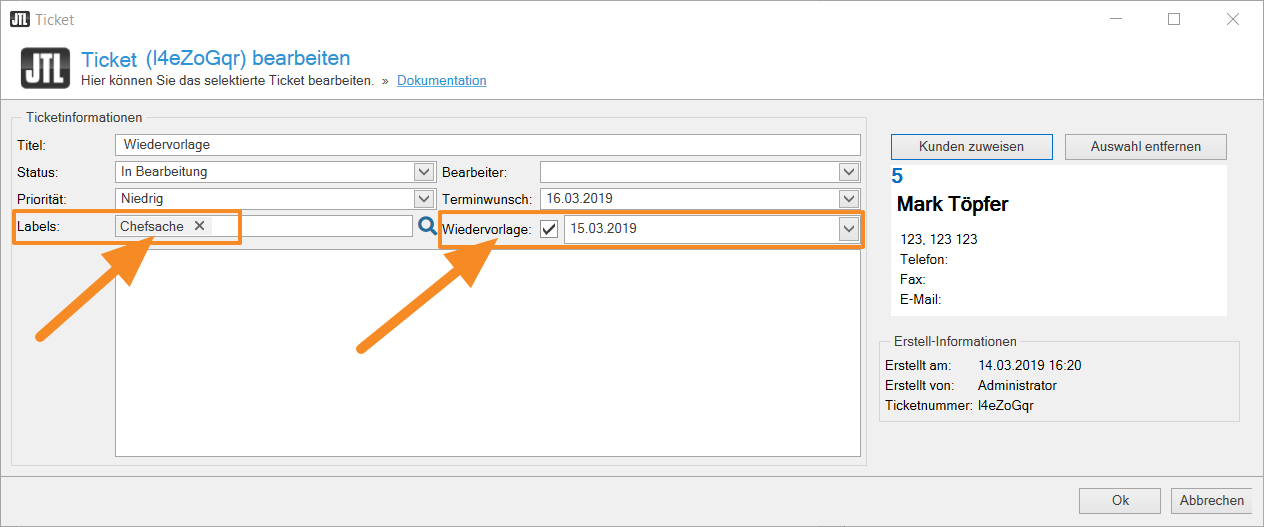
“Labels are also known as tags. Translated into German, one would probably speak of Labels speak. In the past, management tools worked with folders and fixed categories – today, labels are used. The clear advantage is that labels are multidimensional. This means that you can assign the same ticket to several categories at the same time.
Basically, the online retailer can come up with any number of work processes and use the appropriate label to identify all tickets that correspond to a specific work process or are to be processed by a specific group of people, for example the complaint of damaged goods.
To do this, it is of course necessary to be able to filter by label. In JTL-Wawi’s ticket management, for example, you can filter by label, creation date or resubmission. Keyword resubmission: Yes, customer advisors can set a reminder for each ticket.”
Interaction with the 360-degree customer view
As a team, the customer service employees can therefore coordinate and organize themselves. But how does the processing of customer concerns itself work? In a sophisticated CRM, I would be able to view all the relevant data for a customer with as few clicks as possible…
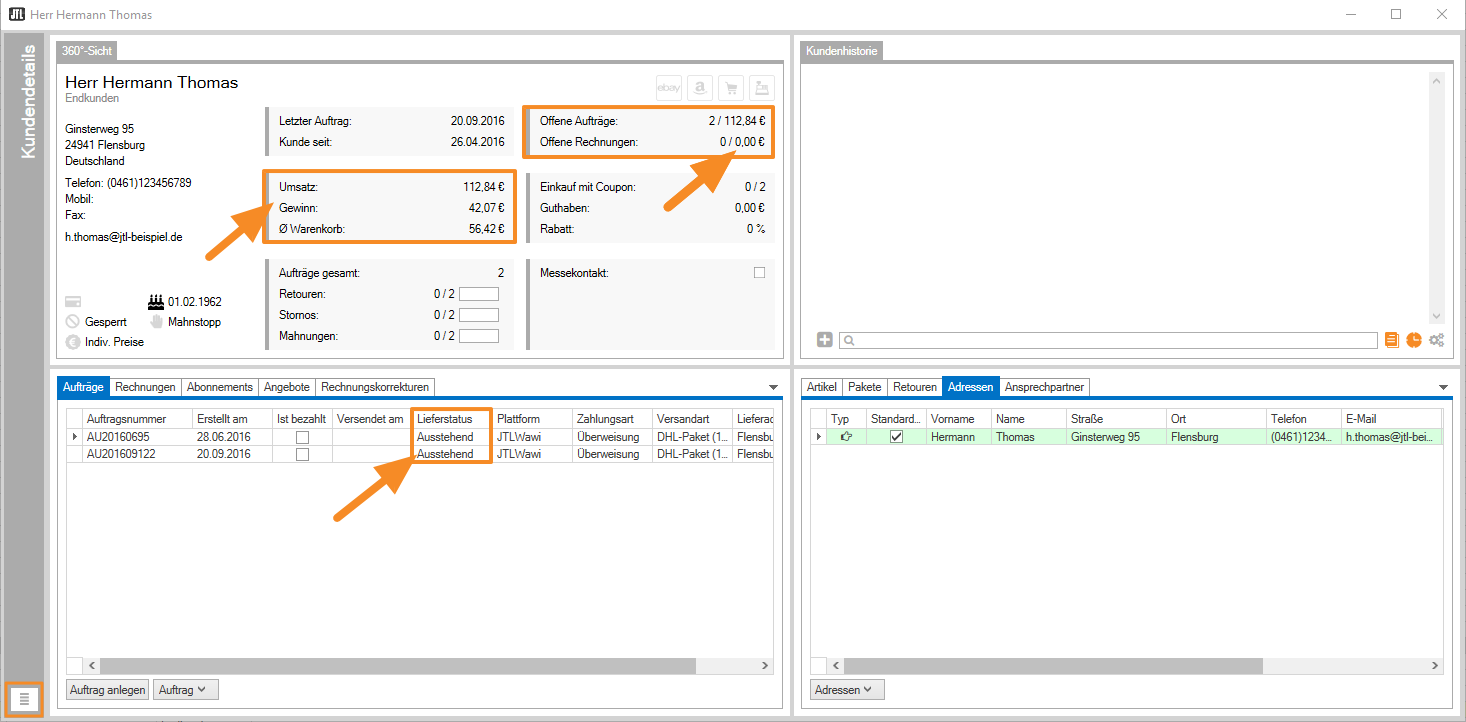
“This brings us to one of my colleagues’ projects: the 360-degree view. A dockable widget was created with a lot of love, in which all master data and processes for the customer are clearly grouped. The widget can be placed on a second monitor. When a new customer message comes in, JTL-Wawi tries to identify the customer based on the email address and automatically creates a link between the ticket and the customer.
If the assignment is successful, the appropriate customer is called up directly. In the widget, you will then find interesting additional information such as last orders, total sales, average shopping cart, past cancellations or unpaid invoices. The customer can therefore be quickly assessed and the required documents can be accessed with little effort.
We think it would be great if the email message itself could also be analyzed for certain key information. For example, if the customer provides a specific invoice number, we could link to the number in the text and make it accessible with a click. But we’re not quite there yet.”
What if the customer cannot be assigned automatically?
“The assignment will always be successful if the customer’s email address(es) are up-to-date andthere are no duplicate customer records in JTL-Wawi under the same address. However, this can happen if several online stores and sales channels are operated at the same time. However, JTL-Wawi also offers the option of identifying and merging duplicate customer records.
If the automatic assignment does not work, the customer should be identified using other data and the data record should be assigned manually. This is always the case, for example, if the customer contacts us by phone without having previously written an email. In this case, customer service creates a ticket itself and links the relevant customer directly during the call. They can also use templates for this.”
Email templates, predefined responses and attachments
Do you mean templates in the sense of ready-made text modules? Or also layout templates?
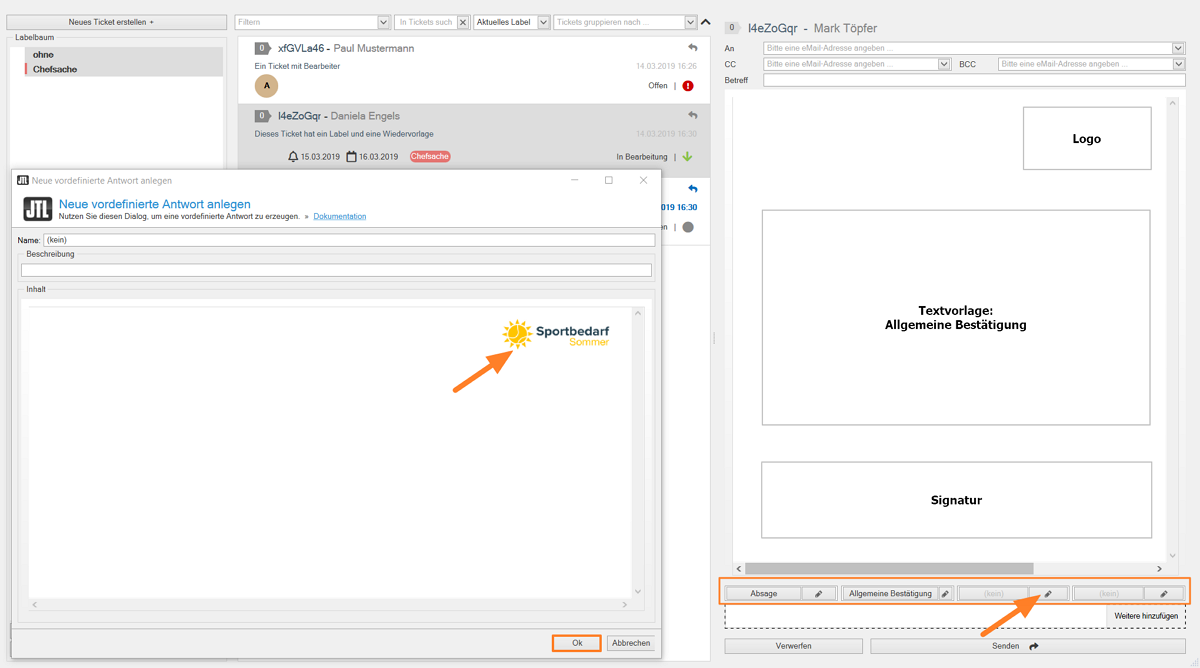
“Both as well as. We currently allow every JTL-Wawi user to store up to 4 templates. The number is arbitrary, we could easily raise the limit to 10 templates if our merchants so wish. In any case, the emails are HTML-enabled and so each employee could create a global design template with a personal signature. The template is then copied into the message with a single click. Frequently recurring text modules or pre-formulated replies, for example, could be stored in the other templates.
In the medium term, we would like to integrate DotLiquid into the message editor. Then you could also use variables in the text, for example in a Title: Good afternoon #Title #Last name. Currently, such data still has to be entered manually – or you can choose a neutral form of address.”
A word about the attachments. Some emails also contain images, for example when a complaint is to be made. Do our dealers need to worry that such image files will overload their database?
“We store file attachments in the JTL-Wawi database – but with a filestream technology provided by Microsoft especially for large data packages. This means that attachments do not fall within the database limit of the SQL Server Express Edition (currently: 10 GB), because the files are stored separately on your database server. This means: If you use the ticket system and generate many attachments through your customer communication, the computer on which your database is located must have sufficient storage capacity. And when you back up your database, the attachments are automatically backed up as well.
One more note: Customers do not always make sure to send attachments in appropriate file sizes. However, a limit for attachments is not set in JTL-Wawi, but by your email provider.”
As a customer advisor, can I also add documents to a case, perhaps a scanned PDF?
“Yes, processors can upload additional documents to a ticket. This is the first small step towards process and customer-related document storage.”
Possibilities with JTL-Workflows
Will our merchants also be able to work with JTL-Workflows process automation?
“Yes, that will be possible. Manual workflows in particular are of great interest here. Customer advisors will be able to combine a whole range of routine tasks, such as labeling and prioritizing, and execute them with a single click.”
Wonderful. Then thank you very much, Jens, for your detailed answers.
OutlookAs you can see, our ticket system can already do a lot. Unfortunately, it is not yet possible to control access per user, i.e. to make certain requests visible only to a specific processor – for example, price negotiations with suppliers or email correspondence with a tax office. A comprehensive authorization concept would have to be created for this. However, it will of course be possible to generally restrict the answering of customer inquiries to certain JTL-Wawi users.
When is the ticket system coming and what will it cost?
Our product owners are currently taking the view of you retailers and checking the current development status in terms of its user-friendliness. Your improvements will be passed on to the development team and incorporated. The status will then be presented to you as a video in our JTL forum. We hope to be able to present the ticket system to you in a live preview at JTL Connect 2019. A pricing model has not yet been determined.
You can also find videos and surveys on current developments in the JTL forum, e.g. a video on the new order processing:
If you are already looking for a ticket system for your customer communication, you will find solutions from our partners: