
From now on, we will be reporting to you at regular intervals from our JTL development departments. Our new JTL developer diary will give you an insight into topics and product features that we are currently working on. We would like to give you a preview of exciting innovations that you can look forward to in future JTL product versions.
Let’s start with the new returns module, which will be available in the upcoming version 1.1 of JTL-Wawi. Since JTL Connect in October 2015, we have been working intensively on the processes for optimized returns processing. It is important to us to enable simple and clear returns management, but it must also be sufficiently configurable to transparently map your individual process cases.
Returns in the mail order business - what is it actually about?
Returns are an irritating topic for many mail order companies. Depending on the sector and product range, retailers are sometimes more and sometimes less affected. However, professional returns processing should be a top priority for almost all mail order companies. On the one hand, it leads to reduced storage costs, as the returns are processed quickly and the returned goods are therefore put back into circulation more quickly. On the other hand, professional returns processing ensures satisfied customers, which also has an economic impact. Many customers are happy to buy again if they are sure that the returns will be processed quickly and correctly.
In JTL-Wawi 1.1, we create the conditions you need for efficient returns management. Defined processes and transparent views ensure clear allocations in your warehouses and improve communication with your returns customers. We will now tell you what this will look like in detail.
Definition of item conditions in JTL-Wawi
In most cases, returned items can or may no longer be declared as “new goods” and listed again. In order to do justice to this circumstance in JTL-Wawi, we will introduce the concept of item conditions. This means that an item can be assigned different statuses in future, e.g. it can also be labeled as “Used”, “Defective” or “Refurbished”.
The special feature is that setting an item condition creates a completely new, separate item in JTL-Wawi. This means that you can store your own prices, descriptions, images, etc. here. Such items, e.g. “Used” items, can then be listed and sold at different conditions and with corresponding notes and other images.
The respective statuses of a (main) item are linked to each other in such a way that you can also see the stocks of the other statuses in each status item. A transfer between the statuses is possible without any problems and the relabeling of, for example, repaired goods from “Defective” to “Used” is done in no time at all.
The new functionalities can also be used outside of returns management from JTL-Wawi 1.1 onwards. For example, retailers who offer mixed assortments of new and used goods will quickly learn to appreciate the new possibilities.
The life cycle of a return in JTL-Wawi
A return passes through several statuses in JTL-Wawi. The main statuses are predefined by us and are “Created”, “Accepted”, “Arrived” and “Completed”. However, you can set up any number of sub-statuses in order to map your specific processes optimally and as desired. The current status of each return is directly visible and can be conveniently filtered in the corresponding overviews.
Creating and processing returns
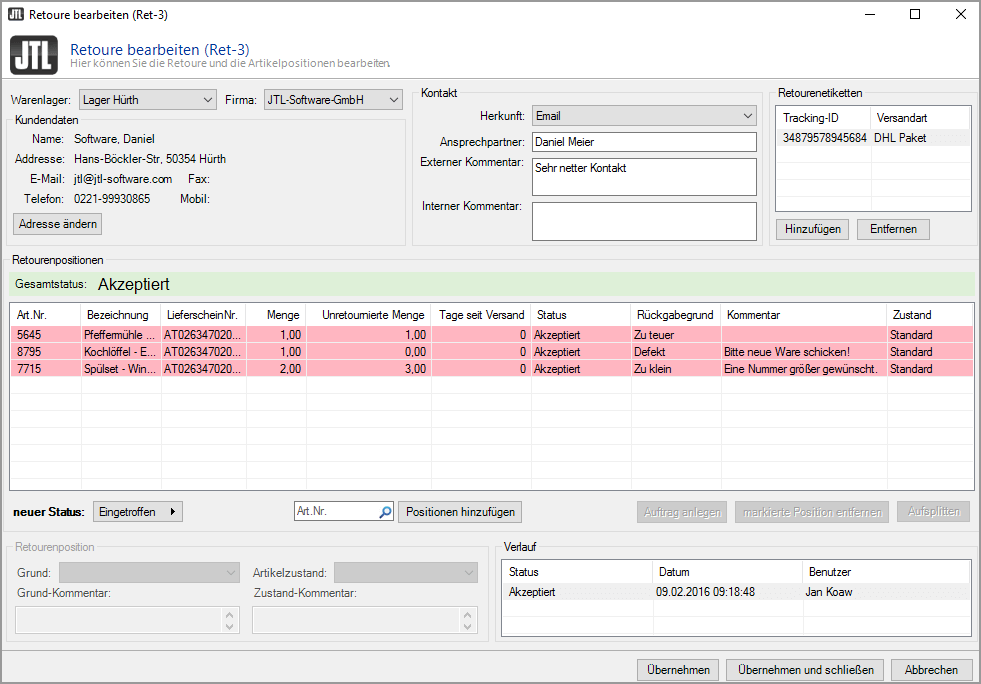
In JTL-Wawi, returns can be recorded and created in two different ways. On the one hand, this is done via a specially developed returns dialog in JTL-Wawi. As soon as a customer contacts the office or support by email, phone or Fax, all the necessary information can be entered in this dialog. With just a few clicks, the return is created, accepted and a confirmation email is sent to the customer. The returns dialog can also be used to change addresses, enter reasons for returns for each item or create shipping labels, to name just a few options.
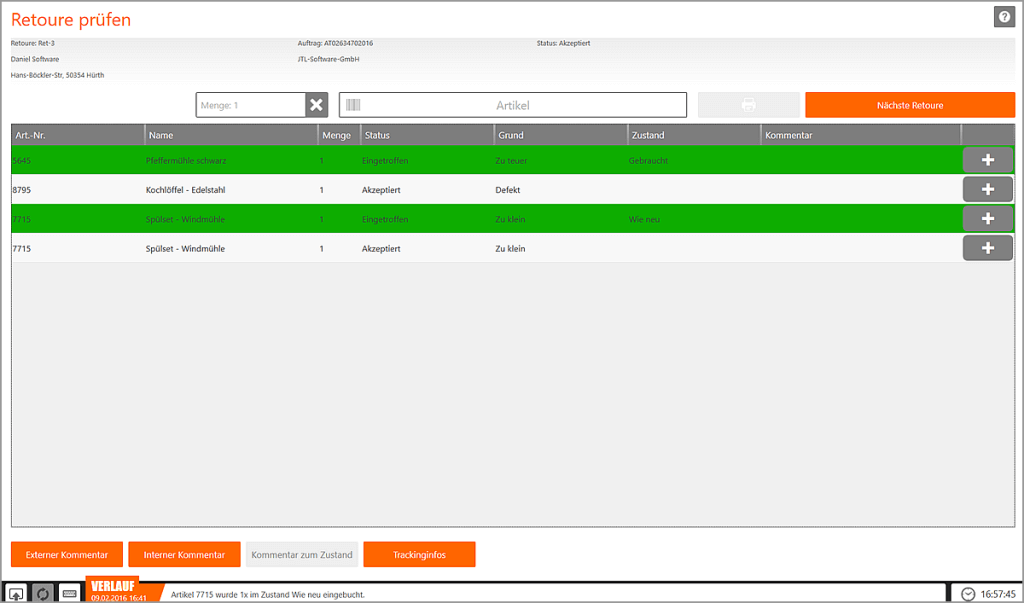
The other option for recording and processing returns as efficiently as possible is provided by a new free returns application for the warehouse, which we are delivering with JTL-Wawi 1.1. The dialogs in this new warehouse module are similar to those in JTL-WMS and JTL-Packing Bench+. They can be used to quickly and easily identify, check and inbound post returns. Using the free returns function in the new tool saves a considerable amount of time, even with a small number of returns.
Efficient returns processing in practice
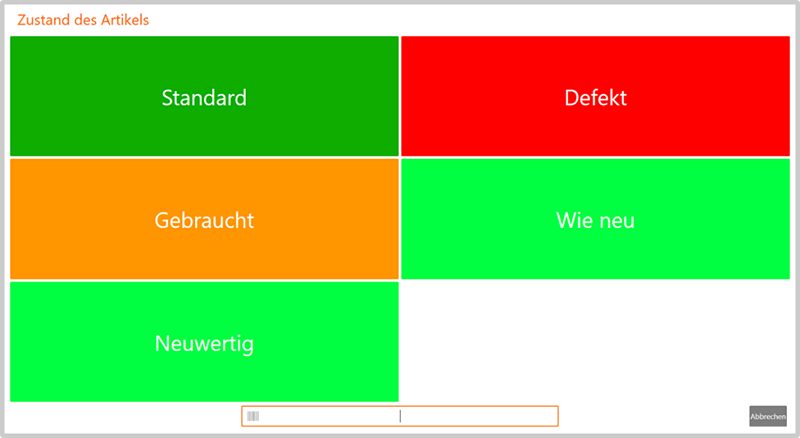
In practice, the process in the warehouse looks like this: The employee scans any ID related to the return – this could be the returns number, the tracking ID, the sales order ID, an SKU or even parts of the customer data, for example. Once the return has been identified as such, the items can now be scanned one after the other or “checked off” manually. A desired item condition can be assigned to each returns item, to which the stock is then posted directly.
Of course, your employees in the warehouse can also store external or internal comments and notes so that your customer support is well informed in the event of any queries.
Optimized returns management with the help of JTL-Workflows
Returns processes vary greatly depending on the industry, products and platforms. It is therefore important that the respective processes are easily configurable and adaptable to your own requirements. This is where the JTL-Workflows come into play. We have linked these closely with returns management so that even complex processes can be mapped quite easily. As an example, we would like to introduce you to two returns processes that you can implement using JTL-Workflows from JTL-Wawi 1.1.
Example 1: Announcement of a return by the customer
The customer calls your support team and wants to return a pair of shoes and a pair of glasses. However, he already purchased the glasses 4 months ago. After entering the items and the reasons for the return in the JTL-Wawi returns dialog, the glasses are automatically set to the status “Rejected – deadline for product group expired”. Your employee on the phone can now give the customer direct feedback. However, the pair of shoes can be returned and the customer will automatically be sent a corresponding return label by email.
Your customer’s returned goods arrive at the warehouse a week later. Your warehouse employee now scans the EAN label on the shoe box. The return is now identified and can be set to “Used” status after inspection. As a result, the shoes are booked into your warehouse as used, own items and are directly available as used goods with their own prices on all platforms. Based on the defined product groups and the item condition “Used”, a refund is automatically created for the customer in JTL-Wawi.
Example 2: Unannounced arrival of a return at the warehouse
A customer sends a defective lamp directly back to your warehouse without having logged in the return beforehand. Your warehouse employee can now create a return themselves. The sales order is identified by scanning the item, entering the customer data from the shipping label or entering the enclosed invoice number. If an item does not have a bar code for scanning, the employee checks off the item in the returns mask and assigns the status “Defective” with a brief description of the damage.
As the defective goods cannot currently be put into circulation, no stock is posted and the employee places the goods on a shelf with defective items. The “Defective” status and the manual creation of a return mean that no automatic refund is created. Instead, the return now receives the status “To be checked in the office”. There it can be decided – if necessary after consultation with the customer – whether a refund will be issued or not.
Conclusion
With returns management from JTL-Wawi 1.1, you have numerous design options to process your returns clearly and efficiently. We are convinced that the new functions will give you a lot of pleasure and will noticeably relieve your daily business. We look forward to your feedback – also in order to continuously improve this module!






