eBay has a new face – the EVO design template from JTL! As of JTL-Wawi 1.0, there is a fully integrated administration for eBay design templates. Here you can easily create and customize eBay design templates. By using the template engine DotLiquid, which is already used several times in JTL-Wawi, you now have a convenient and extremely flexible way to dynamically and individually adapt design templates to your eBay listings.
The editor with which you create your DotLiquid templates has been completely revised. The functions of DotLiquid have been extended especially for eBay design templates: For example, you can integrate customizable cross-selling galleries into your design template with just a few clicks.
To demonstrate the colorful spectrum of possibilities opened up by the new eBay design templates, we are delivering a new standard design template – the fully responsive design template EVO. In this blog post, we would like to introduce you to the template in more detail and show you how you can use the new technology effectively.
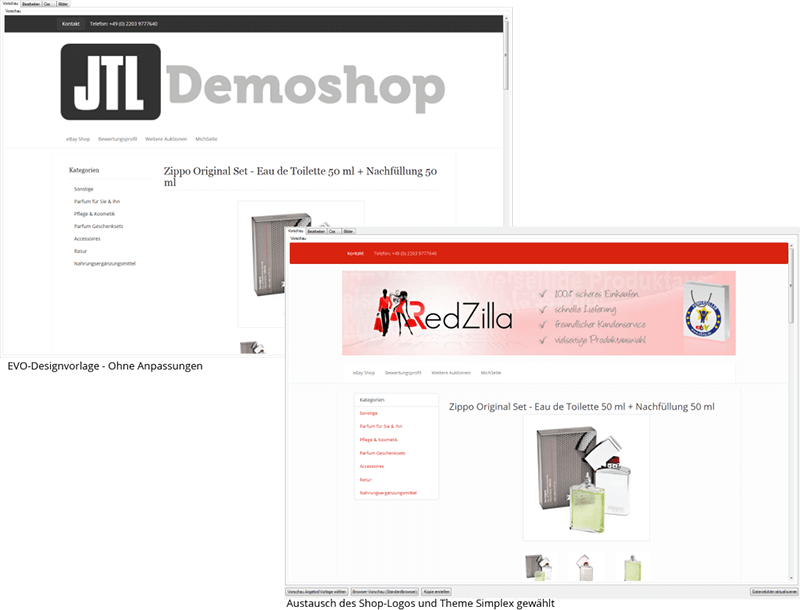
Simply change responsive themes
The EVO design template uses the free CSS framework Bootstrap for the design, which is also used in our new JTL-Shop 4. Based on the EVO template, your eBay listing now looks consistently good on all devices. Thanks to the responsive design, the design template adapts to the size of screens – from smartphones to desktop PCs.
You can choose between 15 different themes, which you can easily change via the DotLiquid editor in the eBay design template management. Of course, you can also design your own themes based on Bootstrap 3. Would you also like to offer your products in the upcoming JTL-Shop 4? Then you only need to create a single design. Simply use the same theme that you designed for your JTL-Shop 4 for your eBay design template. Simply enter the corresponding path to the CSS file of your theme. All colors, fonts and other style elements are then identical in the shop and in the eBay listings. Changes to this theme will automatically affect the appearance of all eBay listings.
Multilingualism integrated: One template for all marketplaces!
JTL-Wawi 1.0 has opened the door to worldwide trading on up to 16 eBay marketplaces. Would you like to find out more? Then take a look at our blog entry http://blog.www.jtl-software.de/verbesserte-ebay-integration-in-jtl-wawi-1-0/.
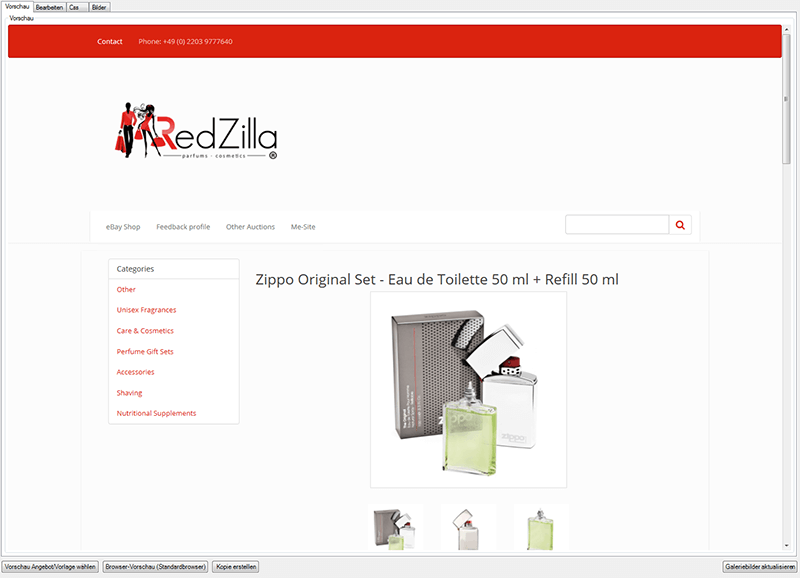
So far, so good. But you would theoretically have to create a design template in the appropriate language for each of these marketplaces. With the new, multilingual variables as you can find them in the article descriptions or the global texts, we provide you with a tool with which you only need to create a single design template for all languages.
The correct language information is determined via the current eBay listing, more precisely via the marketplace on which your current listing is placed.
JTL's eBay galleries: the perfect cross-selling tool
JTL’s new eBay galleries are another highlight, especially for merchants with a large number of eBay listings. They provide optimal support for your cross-selling activities!
How do the new galleries work? Beautifully illustrated references to similar, current listings of your items are nothing new on eBay. However, unlike the usual eBay galleries from other providers, JTL eBay galleries are created in HTML and optional JavaScript – and not in Flash, which is hardly supported by modern browsers these days. Another important difference: Since JTL eBay galleries work with the entire JTL-Wawi database, the cross-selling suggestions are not only determined via eBay. Instead, bestseller galleries are compiled based on the total sales of all sales channels.
If you update JTL-Wawi to 1.0, you will already be offered various galleries directly in the design template editor. Of course, you can also include the galleries in your current eBay listings. We would like to introduce you to two of these galleries in more detail and briefly outline how you can add them to your EVO design template.
Gallery example: Bestseller of the product group
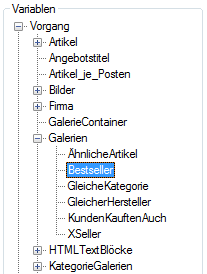
All available galleries are listed in the variable tree of the DotLiquid editor. Double-click on the path > Galleries > Variable: Bestseller, for example, to define a list of all your current eBay listings.

You can use filter criteria to sort the listings that should be listed in your bestseller gallery. The “Number of sales” criterion, for example, indicates how often the item was sold via your JTL-Wawi – regardless of whether the sale took place via eBay, Amazon or your own web shop.
The criteria also serve as filters to dynamically adjust your gallery depending on the listing. Simply always refer to the listing you are currently viewing. The DotLiquid variable “Process” gives you access to all important information about the eBay listing as well as the complete item details.

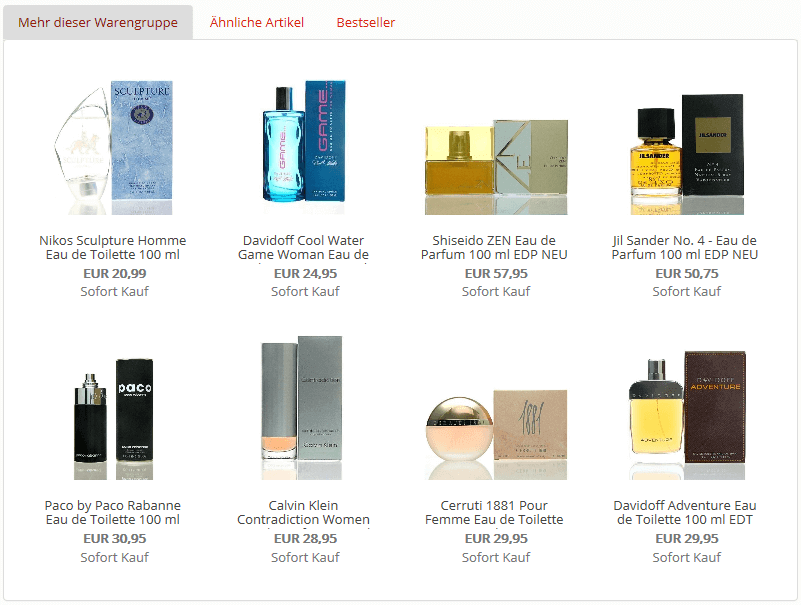
Gallery example: Category galleries
Category galleries are a special type of gallery. Listings in these galleries are not calculated by the system, but you yourself can specify which listings should appear in your gallery.
And how do you do that? Simply add a JTL-Wawi category to the items you want to appear in your category gallery. Please note that the category must contain the category attribute “Gallery”. This is because the value of this category attribute is also the name of the eBay gallery. Take a look at the following example of a “SALE” gallery:
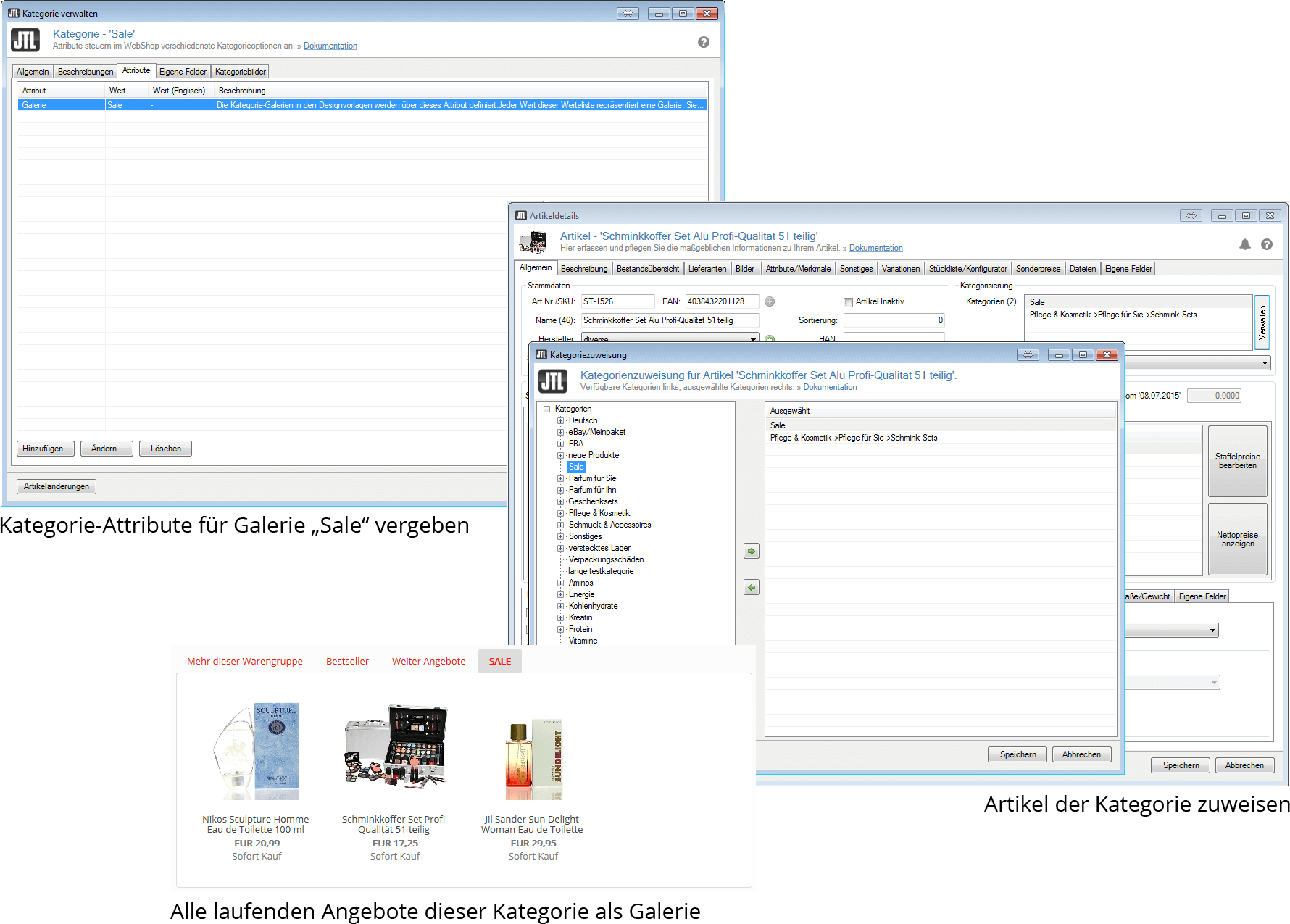
Available as standard: Examples for further galleries
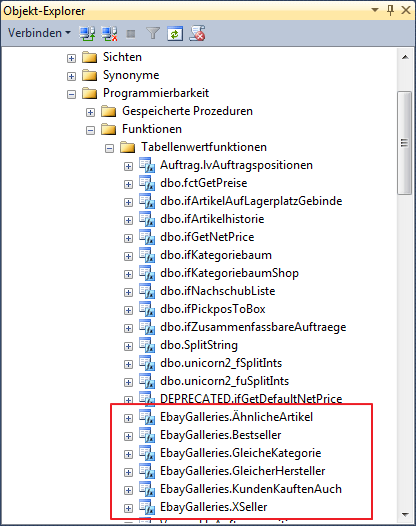
In addition to the bestseller gallery and the category gallery, there are a number of other predefined galleries available to you:
Similar items
Compares the features assigned to the item with other current listings.
Same category
Current listings of the same categories to which the current item is assigned.
Same manufacturer
Current listings from the same manufacturer.
Customers also bought
Lists all listings that were most frequently ordered together by customers.
X-Seller
X-Seller listings that have been defined in the item details for the current item.
There are no limits to your imagination: your own galleries
Your list of available galleries can be extended by service partners or experienced JTL-Wawi users with SQL knowledge. All galleries listed in the variable tree of the editor are images of so-called SQL table value functions, which calculate the list of eBay listings for the corresponding gallery. This allows you to create complex galleries that are highly customized to your own requirements.
Manage texts and templates globally
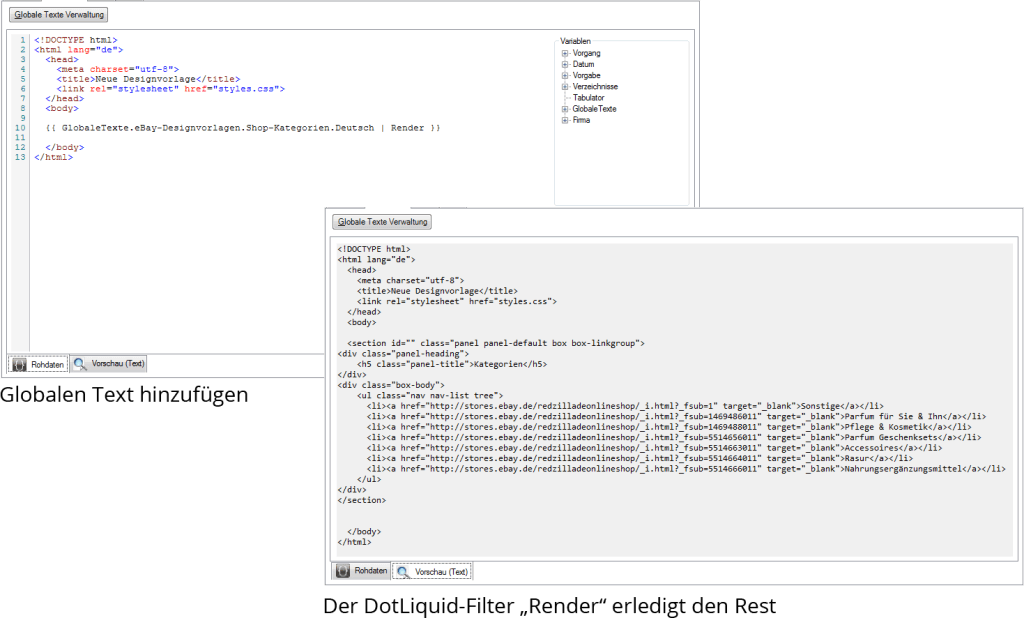
The global texts, which are newly introduced with JTL-Wawi 1.0, not only offer you the possibility to manage texts globally in several languages. Even more – entire DotLiquid templates can be managed centrally there!
Do you have different eBay design templates in which you always want to list your eBay shop categories? Then create a global text “Shop categories”, for example. As the content of this global text, you define a DotLiquid template that lists all categories of the first level of your eBay shop in an HTML list adapted to the EVO design template.
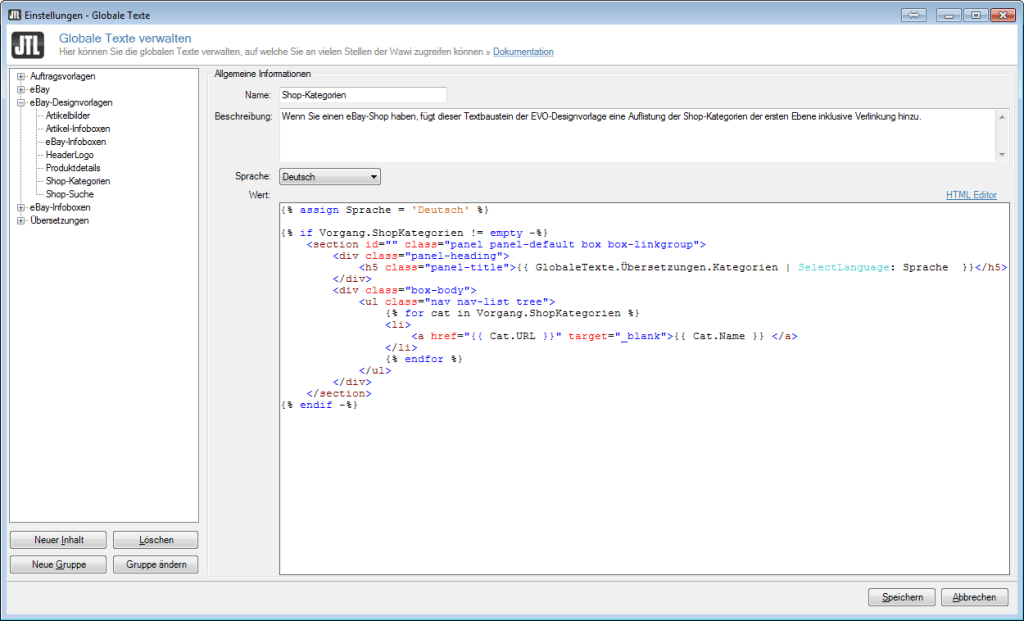
You then insert this global text into your design templates. To ensure that the DotLiquid template is also translated into the complete HTML code, you only need to render the content. You can do this using the DotLiquid filter “Render”:
Designing the eBay footer: Global info boxes
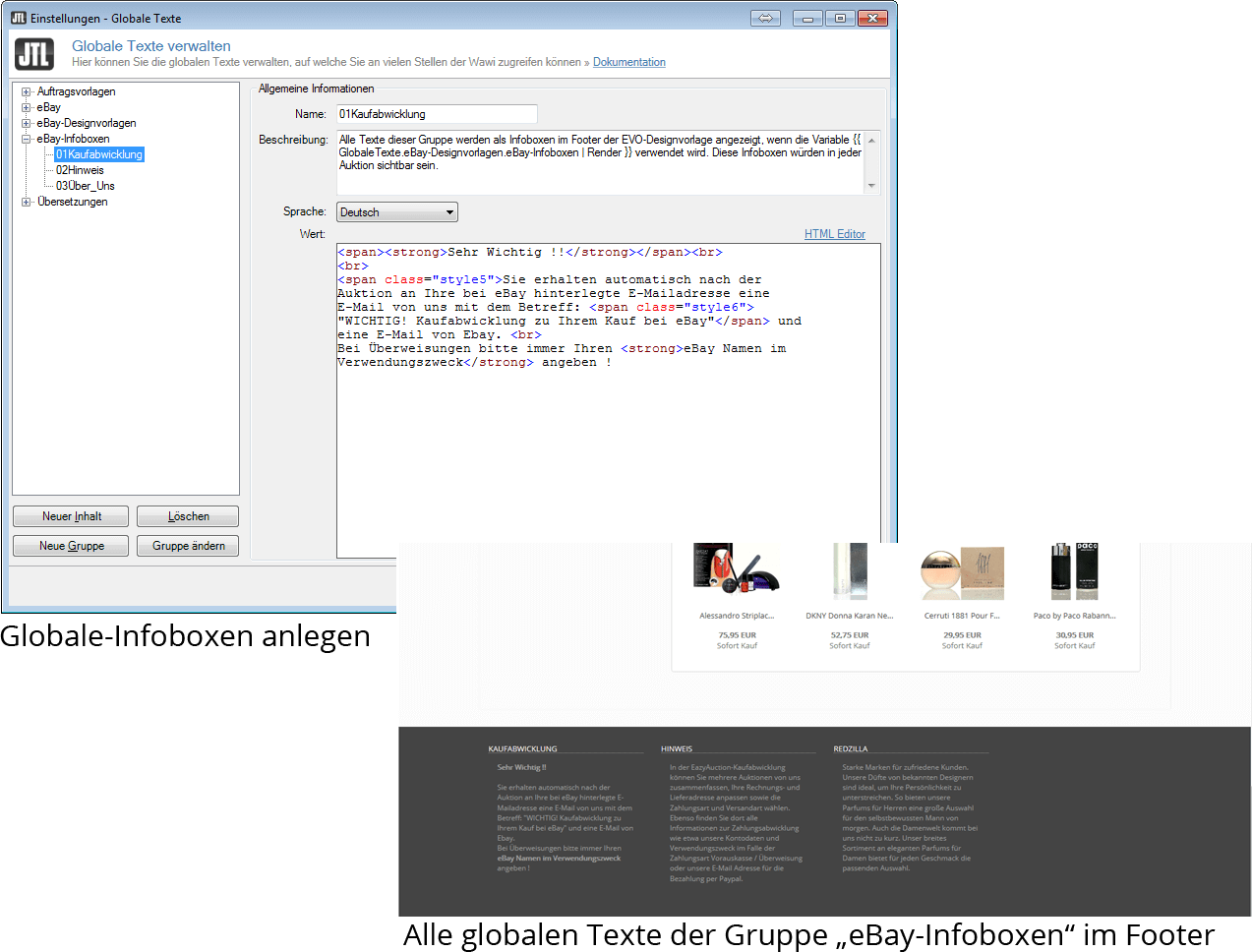
Similar to the item info boxes, you can also define global info boxes. The global info boxes are displayed in the footer of the EVO design template and typically contain information about the purchase or payment process, warranty or shipping conditions – i.e. texts that apply to almost every listing. If you use these info boxes, then it makes sense that they will also be visible in each of your eBay listings.
And how are global info boxes created? Quite simply in the same way as the item infoboxes, i.e. we have predefined a DotLiquid template for the footer display with the name “eBay infoboxes”, which you can find in the global texts. The template then generates an infobox for the footer of your EVO design template for each global text in the “eBay infoboxes” group.
Our conclusion: User-friendly operation!
As you can see, we have made every effort to always use the same procedure for the same principle. This means that you can make your first adjustments independently after a much shorter training period than before! Take a look at the detailed comments within the EVO design template. We have divided the new design template into two parts: the top part is configured, so to speak, while you don’t have to adjust almost anything in the lower part of the source code.
Yes, and when can you get started?
The new EVO design template is available to you as a beta tester from JTL-Wawi version 099978.
We look forward to your feedback!