Welcome to the second part of our blog series. As already introduced yesterday, we are releasing the code for our new product JTL-Track&Trace with JTL-Wawi 1.4, which will enter the open beta phase in spring. For the time being, shipment tracking is available for DHL (and now also for DPD and GLS! | Update: June 2022).
Today we present three further, highly practical application scenarios for the shipping channel. And of course there are countless other solutions that can be designed. We also answer initial questions about pricing, setup and future development plans for JTL-Track&Trace.
Read part 1 of the blog series now
Case 3: Proactively notify customers in the event of delivery delays
If a parcel is in transit for an indefinite period of time, this may be due to both the shipping service provider and the customer. However, many retailers want to react proactively to unplanned delays. Some examples:
- Due to a routing error, the shipment is at the wrong location and this detour pushes back the delivery date.
- Delivery requires a signature, but repeatedly no one has been able to accept the item, so it now has to be collected from a post office.
- The goods have been irretrievably damaged in transit:
Good afternoon Mr. Lehmann,
Unfortunately, we have to inform you that your shipment was damaged during delivery. We have immediately sent a second shipment. New delivery date: 1-2 days, i.e. probably 24.02.2019. We apologize for the inconvenience.
Good regards,
Your sports equipment Sommer
You can now react proactively to problems of this kind and, for example, inform your customers of new delivery times or announce other planned steps.

Tip: We recommend keeping an eye on the peculiarities of the logistics industry: DHL often communicates the status Damaged, but just a few days later the parcel can be processed further and you will receive the message Shipment has been repacked. In such cases, it would not necessarily be necessary to intervene. Fully automated customer communication should therefore be carefully considered and in some cases it is advisable to allow for certain waiting times.
Case 4: Informing employees about problems in the shipment process
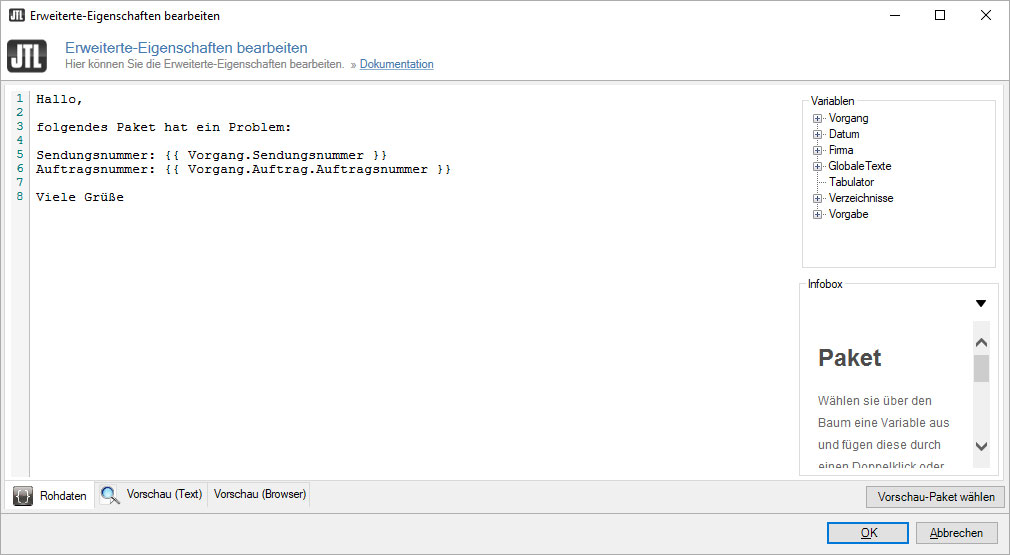
You don’t want to send the customer an email directly, but still want to be aware of any problems that occur? Then you can set up a very simple workflow that automatically sends an email to you or a responsible employee if there are problems with the shipment.
Tip: For such internal, rather informal emails, you do not need to create an email template in the template management, but can use the editor for advanced properties directly in the workflow management.
Once you have been notified by JTL-Wawi, you can investigate the problem in more detail and react individually. However, the subsequent routine handling can still be automated with the help of manual workflows that are only triggered when required.
Case 5: Sending automated tracing requests for missing parcels
A typical scenario for which fully automated processing is very suitable is the follow-up request. After a critical time period of 10 days, for example, a workflow checks all parcels that were created 10 days ago. If one of these consignments has still not reached the statusDelivered, there are indications that the consignment has been lost. In this case, you may want to search for the parcel.
In the following, we roughly outline the two most important steps to map this scenario with JTL-Wawi and JTL-Track&Trace.
Step 1: Create template for investigation request
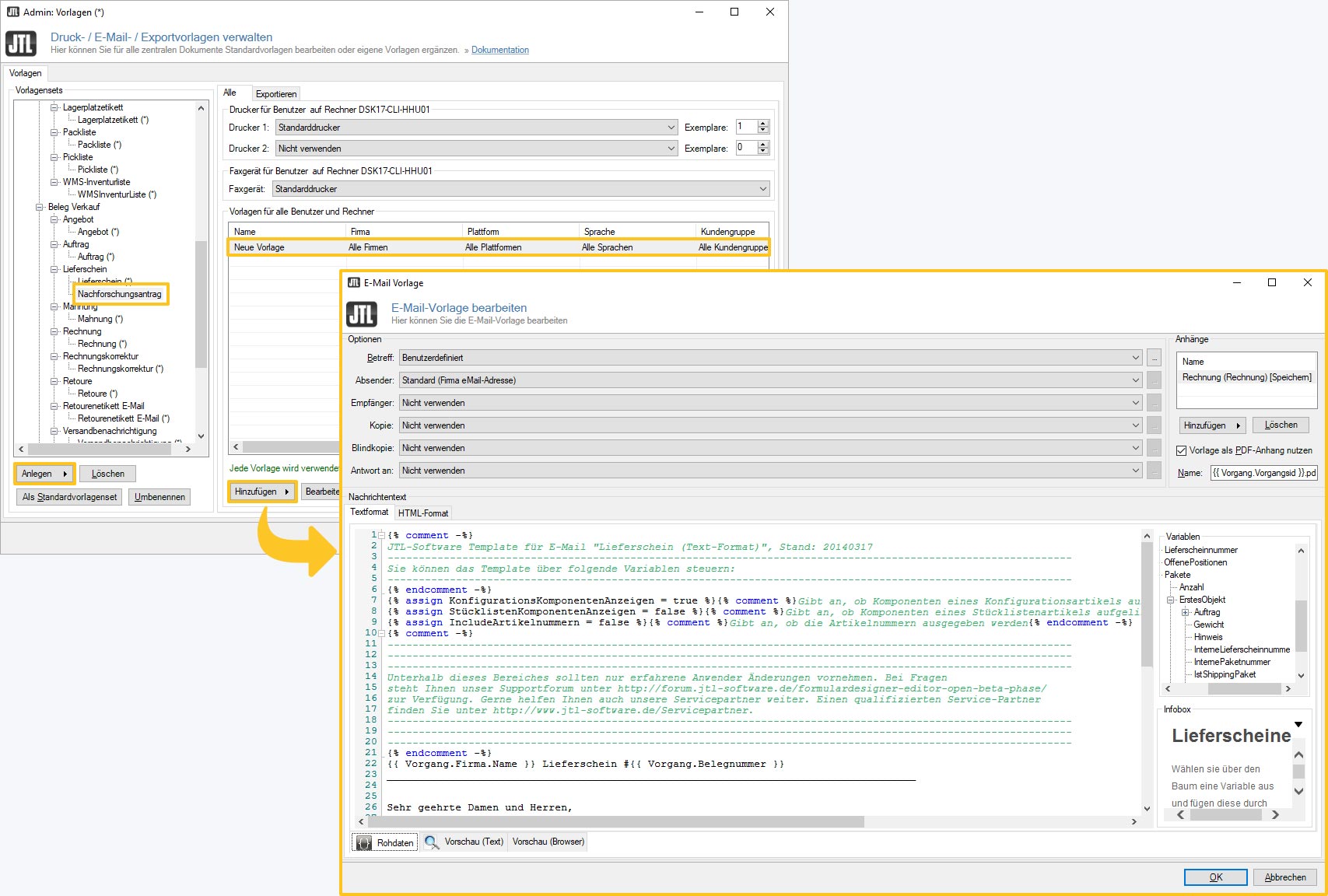
First, you switch to the JTL-Wawi template management and create a template set for an inquiry request and an email template that contains all relevant information for an inquiry request as variables. An important variable here is the consignment number of the missing parcel. You can find it in the variable tree under Process > Delivery bills > First object > Parcels > First object > TrackingID.
Step 2: Create a time-shifted workflow
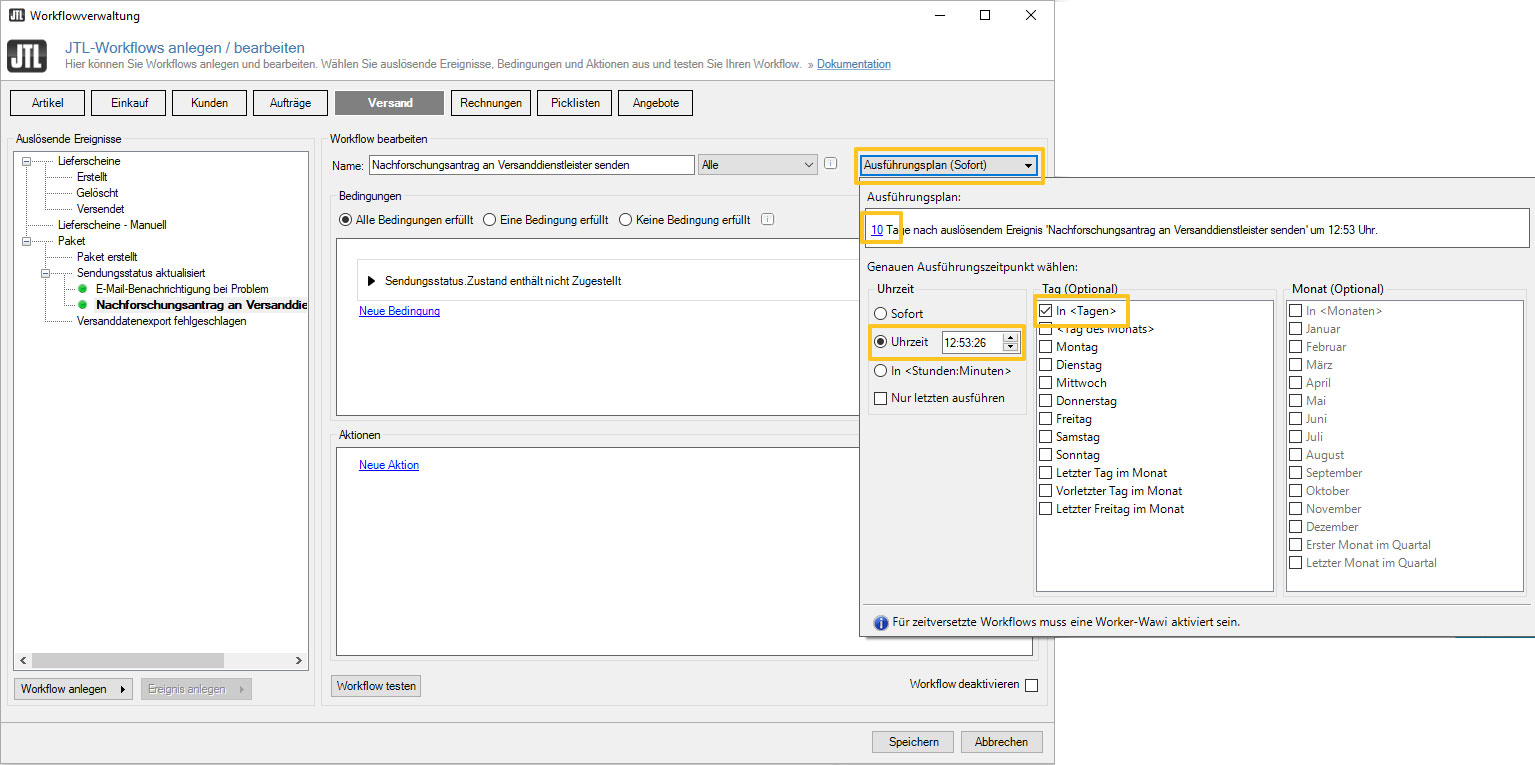
After finishing the template, switch to the workflow management. Under Shipping, you create a new workflow, for example with the name Research request to shipping service provider. As acondition, select Parcel > Shipment status > Status → does not contain → delivered. Then enter Time = In 10 days as the start time for the check under Execution plan.
Finally, you define the action to be carried out, i.e. the sending of the research request by email. To do this, select the following as the output object Parcel > Delivery note with the output mode Mail and the template set Request for investigation. As an alternative recipient, you must enter the email address of your shipping service provider and select Bcc you can send yourself a copy of the message.
FAQ for JTL-Track&Trace
We have currently integrated the interfaces for DHL, DPD and GLS (update: June 2022). The integration of other shipping service providers is planned, but will take some time. It would also be conceivable to develop a plugin that would allow customers in your JTL-Shop to view the shipping route of their order.
In the JTL-IssueTracker, JTL-Shipping section, you can leave your wishes for future integrations and vote for functions:
JTL-Track&Trace will be license- and fee-based. All functions are already included in the current release candidate of JTL-Wawi 1.4 and are currently being tested by selected participants of the pilot customer program. After the official release of our ERP system, the product is expected to be available to all interested parties in an open beta in spring.
After the open beta, you will probably be able to choose between six tariff levels, starting with a starter tariff JTL-Track&Trace 100 for a monthly price of 0 euros for the first 100 shipments, with each additional shipment costing 3 cents in this tariff. The largest package is available for 20,000 shipments per month and will probably cost 149.99 euros per month. Each additional item is charged at 0.8 cents in this tariff.
JTL-Track&Trace was implemented as a service by our developers. This technology allows changes to the APIs to be made more quickly and errors to be rectified directly for all customers.
Therefore, there is usually no need to wait for an update of JTL-Wawi after version 1.4. The costs for maintenance and reliability of the server landscape make up a large part of the JTL Trace&Trace tariffs.
You can or must activate shipment tracking for individual shipping methods. Currently, however, JTL-Track&Trace can only be activated for shipping methods that already use JTL-Shipping shipping label printing.
You can find the dialogue box in the Shipping menu > Shipping methods > Select shipping method > Configure DHL Shipping. In the illustration, we activate the function for an example shipping method “DHL parcel (10kg)”.
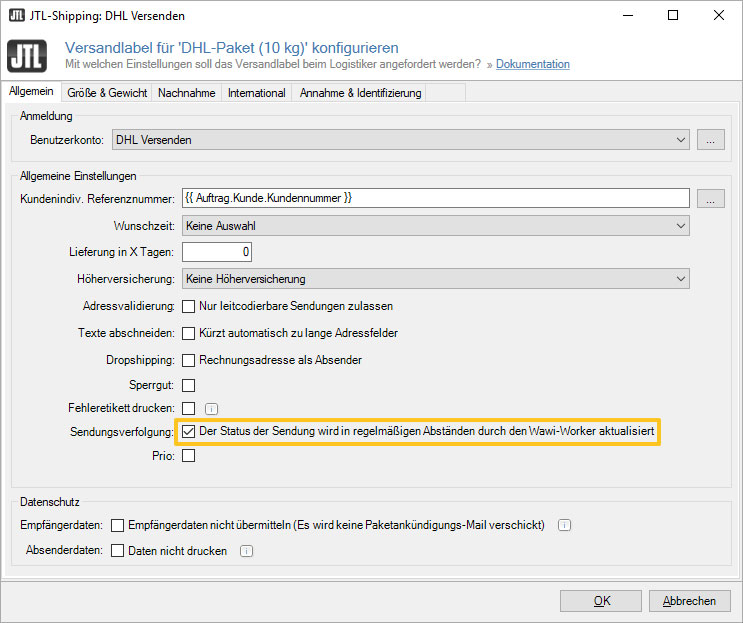
To use JTL-Track&Trace, the background service JTL-Worker must be running. The worker regularly asks our service whether there are any status changes regarding your packages.
As long as the shipments are still waiting to be picked up from you or before the first scan by the logistics provider, we ask for new data every six hours. As soon as the parcels are on their way, JTL updates the shipment status every 15 minutes. In theory, customers could be informed of a change a few minutes before your customer service staff.
Our developers are keeping a close eye on both cycles and will adjust them if necessary.
Last but not least: JTL-Shipping becomes JTL-ShippingLabels
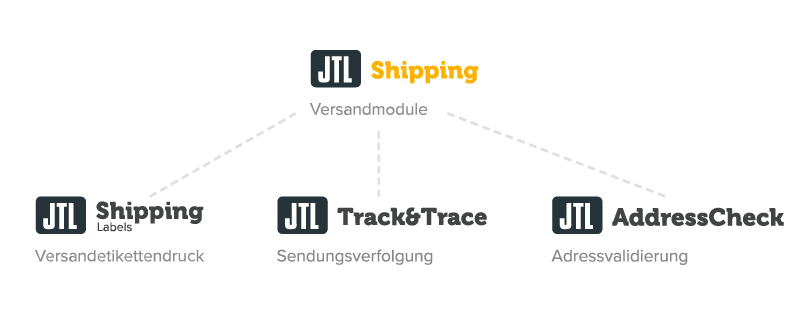
With JTL-Track&Trace we have created a new shipping module. As further solutions in the area of logistics are to follow, we will restructure the names:
Shipping label printing, previously known as JTL-Shipping, will be marketed as JTL-ShippingLabels in the future and will remain free of charge as usual. However, we will use the name JTL-Shipping as an umbrella term for all JTL solutions in the logistics area. We are also developing a module for address validation, the JTL-AddressCheck, which we will of course report on when it is ready.
The renaming will be implemented gradually over the next few months – so don’t be surprised if you still find the old names in different places in JTL-Wawi or on our website for a while.
Want to stay up to date with all the latest news?
Then subscribe to our newsletter channel “Release-Info & Quarterly Newsletter”: Here we announce major releases and you will receive a quarterly newsletter once a season with interesting promotions & helpful solutions from the JTL community.