
Our first Tech Preview has been available since last week – for JTL-Shop 5. This early version of the next major shop release shines the spotlight on the OnPage Composer. However, we would like to explain what a Tech Preview is, how you can use it and what it offers.
The purpose of the Tech Preview
In the next major store release, a few things are set to change for us. So fundamental, in fact, that we are dropping version number 4 and counting up to 5. One of the reasons for this is the new functionality that makes it even easier to maintain content in your own store: the OnPage Composer. While we usually like to highlight these possibilities in developer diaries and the like, we are deliberately taking a different approach this time. Because the purpose and benefits of the OnPage Composer are hardly any clearer than when you use it yourself.
A demo version of this was already in the works for JTL Connect. However, we quickly asked ourselves: If we can show the demo, why not give it to you afterwards? Accordingly, we created the Tech Preview. You can use it to test some new features in a shop test environment before they are launched in 2019 with many other new features in JTL-Shop 5. The advantage, for you and for us, is that you can provide early feedback on how you experience the usability. As we have also intervened in the menu structure of the store back end, this is particularly relevant for us.
Important: The JTL-Shop 5 Tech Preview is not intended for productive use. If you want to use it, you should do so in a test environment. You can find out more about this below.

What do we offer you in the Tech Preview of JTL-Shop 5?
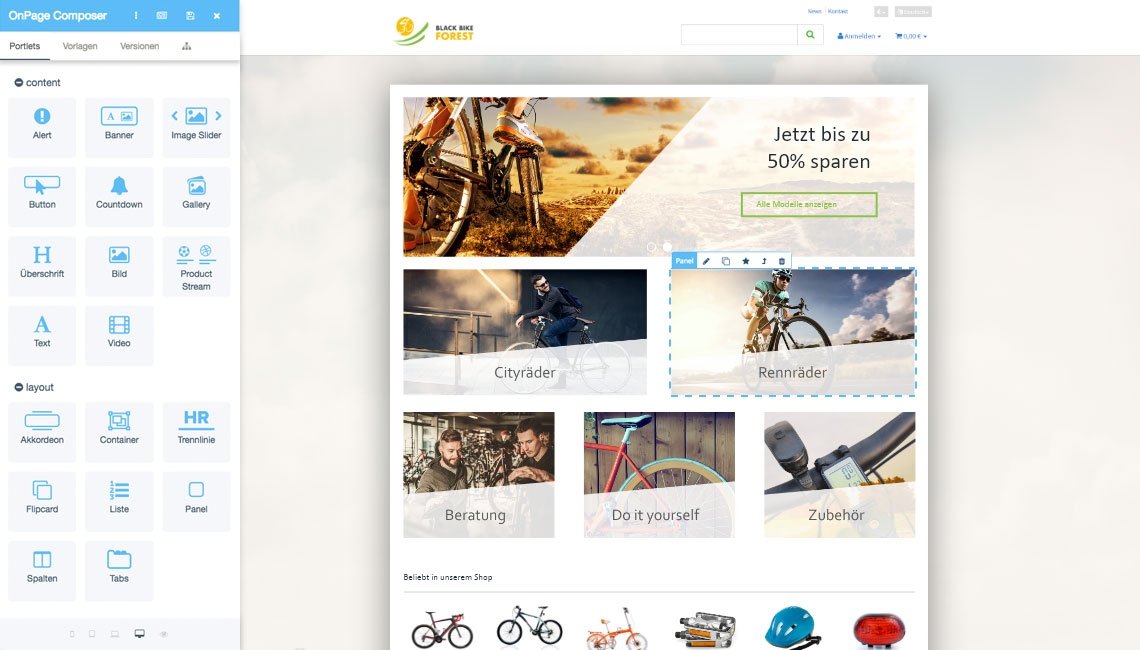
We have already mentioned the OnPage Composer. It is the star of our Tech Preview. With this very easy way to maintain the content of your store via drag & drop, we provide you with a powerful efficiency tool. Individual content such as images, text, videos etc., called portlets, can be assembled on your store interface using the modular principle. Many of the portlets are already integrated in OnPage Composer. We would also like to make additional portlets available to you in the JTL-Store in the future.
The Tech Preview also shows the first changes in the back end. We have moved the navigation in the admin area from the top of the page. The result: a better overview. We have further supported this by adding icons to individual menu items so that they immediately catch the eye. With the demo, we are also addressing the interventions in the familiar way of working with the store administration. You can provide feedback on these changes at an early stage and have time to get used to them.
How can I test the JTL-Shop 5 Tech Preview?
Customers who have already tested JTL-Shop versions for us only need to update their test environment. If you don’t have a test environment yet, you can find more information on how to set one up and what you need to consider in the JTL forum:
To the instructions in the JTL forum
Provide feedback
Of course, we are curious to know how you use the new functions. We look forward to receiving input from you on how you work with the OnPage Composer, which portlets could be relevant for you or how you feel about the new menu structure. Good feedback is best left in the JTL forum. If difficulties or even errors occur, you can report them to our development team there. For this purpose, the forum now has a sub-forum dedicated to the Tech Preview.
We hope you enjoy the Tech Preview of JTL-Shop 5 and look forward to your feedback!