The release at a glance
More overview for your details
Experience the new item management in JTL-Wawi: tidy, intuitive and with plenty of space for your own touches. Mail order made easy.
Optimized delivery processes
Greatly simplified dispatch administration with the help of the packing table. So that your goods are quickly where they need to be: With your customer.
The work takes care of itself
Simply let JTL-Wawi 1.0 take care of daily, recurring tasks fully automatically and benefit from the enormous time savings.
A firework display of new options
Experience the fantastic possibilities of the new eBay marketplace: Easier. More immediate. International.
News that is worthwhile
Add new items to the Amazon product catalogue directly from JTL-Wawi and create your own Amazon listings in no time at all.
Item management 1.0
Your items are at the heart of a good ERP system. The more individually you can maintain and manage your items, the better the conditions for their unique presentation. On all channels and exactly as you need it:
Shipping Management & JTL-Packing Bench+ 1.0

Efficient shipping administration should not take up much time. Regardless of whether you use drop shipping, fulfillment or your own warehouses for your shipping.
In JTL-Wawi, you define all relevant shipping settings in advance. This means your ERP knows what to do even before you want to deliver. Automated processes and clear user guidance ensure fast processing.
The new JTL-Packing Bench+ also allows you to transfer all order preparation tasks to your warehouse staff at the click of a mouse.
So-called pick lists ensure routine workflows and secure, automated allocation of all delivery items. It could hardly be simpler and you have time to devote to other things.
The workflows in JTL-Workflows 1.0

Your ERP system performs a large number of identical tasks every day
… which you have to initiate, track and control manually. The time required to process these individual business processes and the risk of errors or omissions during the process chain are high.
With the new workflows, JTL-Workflows 1.0 provides you with a tool
… with which you can have numerous work processes carried out automatically and reliably. You can decide for yourself where, in what form and to what extent you would like to be supported by workflows.
Set up workflows
The procedure for setting up a workflow is always the same:
Triggering event and conditions
There are practically no limits to the individual design of your workflows. Triggering events can be almost all processes within your ERP, including events in your item and purchasing management as well as in your sales order and shipping management and JTL-WMS. You can also freely define and set the respective conditions by querying all relevant data fields.
Actions in JTL-WawiAt the end of your workflow is the action. Decide which operation is executed at the end of the process chain within your JTL-Wawi. Actions already suggested by JTL-Workflows make it easier for you to set up efficient workflows. For example, set up a targeted information system by e-mail for your customers, suppliers or employees to ensure timely and seamless communication.
Actions in third-party applicationsJTL-Wawi 1.0’s workflow management also provides you with all the options for executing external actions. At the end of your defined process chain, any files and Applications can be called up to trigger the customized actions you require. With the workflows of your JTL-Wawi 1.0, all paths are open to you to organize your work in a time-saving and efficient manner.
The eBay marketplace in JTL-Wawi 1.0

We have combined and visually enhanced the marketplaces that you can operate with JTL-Wawi 1.0. Now you can manage all your eBay and Amazon listings centrally and clearly in a uniform window.
The simple integration and smooth communication between JTL-Wawi and eBay have been among the outstanding properties of our ERP for years. We have now further perfected this interaction and expanded the playing field:
With JTL-Wawi 1.0 you can now reach all eBay marketplaces – worldwide!
Use templates
The starting point for a successful placement of your eBay listings are your templates. A whole bunch of new features in JTL-Wawi 1.0 support you in creating, assigning and maintaining these templates so that you can process your eBay business more efficiently and achieve your goals faster.
Global templatesDefine details and conditions in the new Global Templates that you can quickly and easily assign as the basis for your future eBay listings. Create as many global templates as you like to use them for specific item groups or different eBay marketplaces.
Design templatesYou can now manage your design templates directly from JTL-Wawi 1.0 and have access to your current eBay listings, which you can now easily customize at any time. To create and manage your design templates, you can access simple DotLiquid variables within JTL-Wawi 1.0. This means that there are no limits to the content and maintenance of your design templates. Good interaction with HTML/CSS means that JTL-Wawi 1.0 now offers you the best conditions for presenting your eBay listings convincingly and staging them effectively.
Vehicle application list
By providing the eBay vehicle usage list (FVL) within JTL-Wawi 1.0, you can create automatic links between matching vehicles and your listings. Your linked items will be listed preferentially by eBay and the visibility of your listings will be significantly increased. Benefit from these higher sales opportunities on eBay Motors with JTL-Wawi 1.0.
Further advantages
With a simple mouse click in JTL-Wawi 1.0, you can assign your national and international eBay shipping cost tables stored globally on eBay to your respective listings. It is now also possible to directly set up and manage up to 12 XXL images for your eBay listing with your ERP. Look forward to numerous other innovations that JTL-Wawi 1.0 now offers you with the revised eBay marketplace.
The new Amazon Lister in JTL-Wawi 1.0
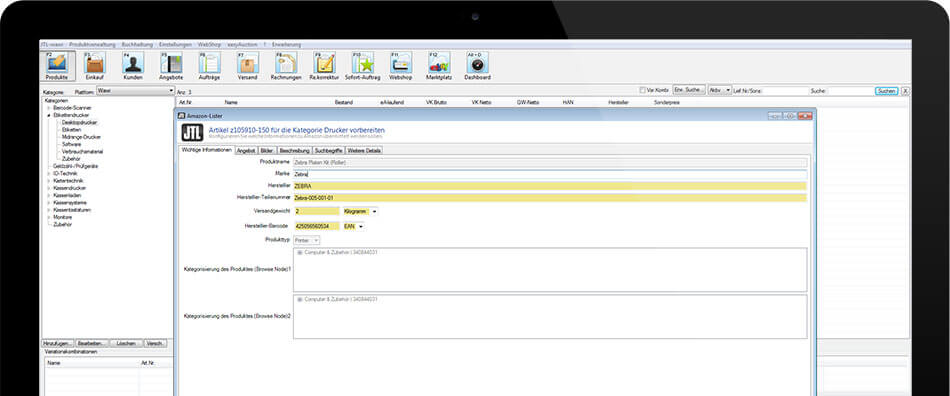
Do you already regularly list your own new products in the Amazon product catalogue or are you planning to do so?
And are you familiar with the time-consuming maintenance via Amazon Seller Central or the time-consuming provision of your item data via flat file? Then we have great news for you that will make your work much easier!
Convenient creation of listings
With the new Amazon Lister, JTL-Wawi 1.0 enables you to conveniently and easily create listings for your new items. You can provide all the necessary data directly from JTL-Wawi and use the Amazon Lister to serve all Amazon categories on all Amazon marketplaces.
The structure and query fields of the JTL Amazon Lister are similar to the input masks of Amazon Seller Central. A regular comparison of the defined input fields between Amazon and JTL-Wawi ensures that your data is provided correctly and accurately.
Use database from JTL-WawiWhen using the Amazon Lister, much of your item data previously entered in JTL-Wawi, e.g. your respective images, texts or prices, are already preselected for the new Amazon listing. Conveniently assign your item variations to the Amazon variations and permanently link the other input fields in the Amazon Lister to the corresponding item fields from JTL-Wawi 1.0. All data fields of your item in JTL-Wawi 1.0 are available for this assignment.
Individual data fieldsIf a desired data field does not yet exist, you can use the custom fields to store the required item properties. Use the integrated editor to link the fields accordingly and exploit all the possibilities of the perfect interaction between JTL-Wawi 1.0 and Amazon. With the new Amazon Lister in JTL-Wawi, there are no limits to how effectively and quickly you can present your new items on Amazon.